
SEOs: Detect Cannibalization vs Duplication in 10 Minutes Using GSC
SERPView Team
SEO Analytics
Cannibalization happens when two or more of your own pages compete for the same query in Google’s index. Duplication happens when identical or near-identical content sits at multiple URLs, forcing a search engine to pick a winner. The distinction matters because the fixes are opposite: duplication gets solved with technical controls like canonicals and redirects, while cannibalization usually needs a content decision, like merging two pages into one.
TL;DR:
- Keyword cannibalization involves multiple pages targeting the same query, causing ranking instability and click splits, while duplication involves identical content at different URLs, wasting crawl resources.
- Cannibalization shows signs like fluctuating rankings between pages, whereas duplication results in Google’s index ignoring or filtering out near-identical URLs.
- Detect cannibalization using Google Search Console by observing impressions and clicks trends over time, especially if multiple URLs share the same query, and verify duplication with content hashes.
- Resolve duplication with canonical tags or noindex, and fix cannibalization by consolidating content through merging or redirects, avoiding chaining redirects and contradictory tags.
- Prevent recurrence by establishing keyword-to-URL mappings, setting canonical rules in templates, and auditing regularly, with KPIs tracking impression consolidation and ranking stability.
Table of Contents
- Cannibalization vs Duplication: What Separates Them
- How Do Cannibalization and Duplication Hurt Rankings?
- How Do You Detect Cannibalization and Duplication?
- Should You Redirect, Merge, Canonicalize, or Noindex?
- How Do You Prevent This From Happening Again?
- What KPIs Confirm the Fix Actually Worked?
- Why Cross-Property Analytics Speed Up Diagnosis
- An SEO Practitioner’s Take on Triage
- Diagnose Cannibalization Faster With SERPView
- Sources
- FAQ
Cannibalization vs Duplication: What Separates Them
Keyword cannibalization is an internal competition problem. It happens when several pages on your own site target overlapping search intent for the same query, and Google has to decide which one deserves the ranking. Nothing about the content has to be identical. Two blog posts written months apart, with completely different wording, can still cannibalize each other if they both try to rank for “best running shoes for flat feet.”
Content duplication is a text-identity problem. It occurs when the actual content, sometimes word for word, appears at more than one URL. Think of a product page that exists at both /shoes/red-sneaker and /shoes/red-sneaker?color=red, or a blog post syndicated to a partner site without a canonical tag pointing back to the original. Search Engine Land’s guide to fixing cannibalization frames the deciding factor clearly: intent overlap signals cannibalization, textual sameness signals duplication.
Here’s where the confusion usually starts. A retailer with ten near-identical city landing pages (“Plumbers in Austin,” “Plumbers in Round Rock,” “Plumbers in Pflugerville”) might have both problems stacked on top of each other. The pages could be similar enough in wording to trigger duplicate-content filtering, while also targeting overlapping local intent that splits ranking signals. Treating that as a single issue with a single fix is exactly how remediation projects stall out.
A few signals help you sort one from the other quickly:
- Multiple URLs, same query, different content: points to cannibalization, not duplication.
- Identical or near-identical body text across URLs: points to duplication.
- Rankings that swap between two of your own pages week to week: classic cannibalization signature.
- Google indexing only one of several similar URLs and ignoring the rest: classic duplication signature.
- Faceted navigation or parameterized URLs generating dozens of near-copies: almost always duplication, driven by templates rather than editorial choices.
Once you can label the pattern correctly, the rest of the audit gets a lot faster — this detailed SEO Competitor Analysis Guide for Digital Marketers helps with detection and evaluation steps.
How Do Cannibalization and Duplication Hurt Rankings?
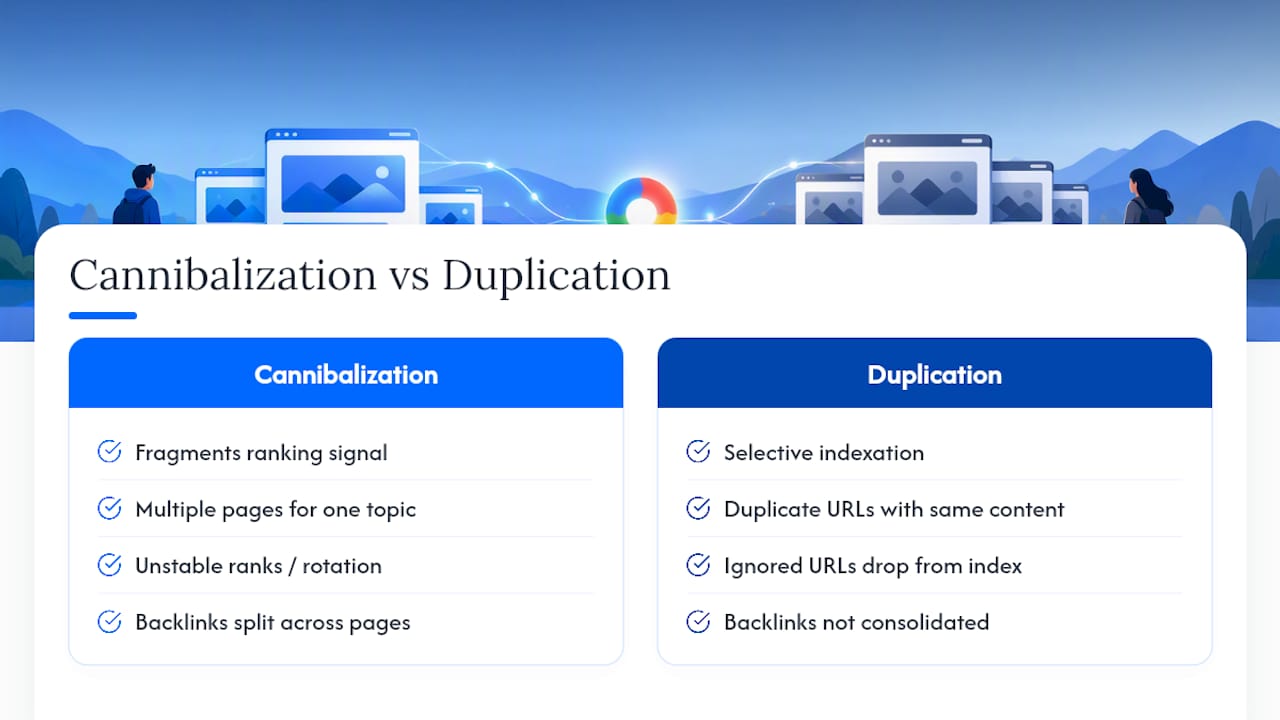
Cannibalization fragments your ranking signal. Instead of one strong page collecting all the backlinks, internal links, and click data for a topic, two or three pages split that authority. Google often responds by ranking none of them particularly well, or by rotating which one shows up, which is why cannibalized queries tend to show unstable positions in rank trackers.
Duplication creates a different kind of damage: selective indexation and wasted crawl budget. When a search engine finds multiple URLs carrying the same content, it typically picks one as canonical and either ignores or drops the rest from the index. Any backlinks pointing at the ignored URLs stop contributing much, since the link equity never consolidates onto the version Google actually shows.
Neither problem triggers a manual penalty. That distinction gets lost in a lot of SEO discussion, but it’s worth stating plainly: Bing’s webmaster team has confirmed that duplicate content is a performance issue, not a punitive action. Crawlers spend resources fetching and comparing pages that ultimately get filtered out, which slows discovery of your genuinely new content. Cannibalization works the same way: it’s an efficiency problem for the algorithm, not a violation that gets you flagged.
The performance cost, in plain terms: duplication wastes crawl resources and delays indexing of new pages, while cannibalization dilutes the ranking signal a topic would otherwise concentrate on one URL. Both outcomes show up as flat or falling clicks, not as a warning in Search Console.
There’s a newer wrinkle worth flagging for anyone thinking beyond classic search. Consolidated, canonical content also helps AI systems and retrieval-augmented generation tools find a single authoritative source instead of guessing among several near-identical pages, a point the Upward Impact team makes well in their comparison of the two problems.
How Do You Detect Cannibalization and Duplication?
The most reliable first pass uses Google Search Console, and it takes about ten minutes once you know the pattern to look for.
- Open the Performance report and filter by the specific query you suspect is cannibalized.
- Switch the dimension to Pages. If more than one URL shows meaningful impressions for that single query, you’ve confirmed internal competition.
- Check the trend over 90 to 180 days. A cannibalized query often shows the “winning” URL alternating between two pages, which is a stronger signal than a one-time snapshot.
- Run a duplicate-content crawl with a standard crawling tool, checking title tags, meta descriptions, and body content hashes across your site for near-exact matches.
- Audit parameterized and faceted URLs separately, since sort orders, filters, and tracking parameters generate duplication at a scale manual review will miss.
- Cross-reference index coverage. Pages Google has excluded as “duplicate, submitted URL not selected as canonical” confirm duplication; pages that are indexed but underperforming confirm cannibalization is more likely the driver.
If a query shows one URL with rising impressions but falling clicks, and a second URL with the reverse pattern, that’s cannibalization actively splitting the click-through rate a single page would otherwise capture.
Pro Tip: Don’t stop at exact-match duplicate checks. A lot of cannibalization involves pages that share zero identical sentences but target the same head term with different long-tail modifiers. Cross-check the query first, then look at the content, not the other way around.
Escalate to a deeper content-similarity analysis when the GSC cross-check shows three or more URLs sharing impressions for a commercially important query. At that point, a manual page-by-page comparison is worth the time, because the fix will likely involve consolidating scope decisions across several pieces of content, not just one redirect.
Should You Redirect, Merge, Canonicalize, or Noindex?
The decision comes down to one question: is the problem textual sameness or intent overlap? Shopify’s guide to duplicate content lays out the technical toolkit clearly, and it maps cleanly onto that question.
Use a 301 redirect when two URLs serve the identical purpose and one is genuinely obsolete, such as an old product URL structure or a merged category page. A 301 passes most of the ranking equity from the old URL to the new one, and it removes the duplicate from consideration permanently.
Use a canonical tag when duplicate or near-duplicate URLs need to stay live for users, like a print-friendly version, a UTM-tagged URL for a paid campaign, or a color-variant product page that shoppers land on directly. Canonical tags are hints, not directives. Google can and does override them, so canonicalization works best on straightforward technical duplication, not on cases where the two URLs have meaningfully different content.
Use noindex when a page needs to exist for site functionality or user experience but has no business appearing in search results at all, such as internal search results pages or thin filtered category views.
Merge or rewrite when cannibalization is the actual diagnosis. If two blog posts both rank inconsistently for the same commercial query, combining them into one authoritative page and redirecting the weaker URL usually recovers ranking stability within a few weeks.
A few implementation mistakes cause more damage than the original problem:
- Chaining redirects (A to B to C) instead of pointing every old URL directly at the final destination.
- Setting a canonical tag that points to a URL which itself redirects elsewhere, creating a signal loop crawlers can’t resolve cleanly.
- Combining canonical and noindex on the same page, which sends Google contradictory instructions about whether the page should be indexed at all.
- Merging two pages without auditing which internal links point to the URL being retired.
After any fix, run through a short checklist: update every internal link that pointed at the retired URL, refresh the XML sitemap to drop the old address, request reindexing for the surviving URL in Search Console, and set a calendar reminder to check rankings again in three to four weeks.
| Situation | Recommended Fix | Why |
|---|---|---|
| Two URLs, identical content, one is outdated | 301 redirect | Consolidates equity permanently |
| Same content needs to stay live for users (print view, tracked URL) | Canonical tag | Preserves accessibility without splitting signal |
| Page has no search value but must exist | Noindex | Removes it from the index without breaking the page |
| Two different pages compete for the same query and intent | Merge or rewrite | Fixes the root cause: overlapping topical scope |
| Faceted or parameterized URLs multiplying near-duplicates | Canonical plus parameter handling | Prevents crawl waste at scale |
On the content side, cannibalization fixes often go beyond a single merge. Grouping related articles into a clear topic cluster, sharpening the internal linking so each page points to the one piece meant to rank, and giving every page a distinct call to action all reduce the odds that two pages quietly start competing again six months later.
How Do You Prevent This From Happening Again?
Cleanup without governance is a temporary fix. The sites that stay clear of recurring cannibalization and duplication treat prevention as an editorial process, not a one-time audit.
Start with a keyword mapping document that assigns one primary query, and a defined set of secondary queries, to exactly one URL. Every writer or content manager checks that map before publishing anything new, and any overlap gets flagged before the page goes live rather than six months later during an audit.
Template controls matter just as much for the duplication side. Product pages, location pages, and category pages generated from the same template are the most common source of large-scale duplication, since a small templating mistake replicates across hundreds or thousands of URLs at once. Set a canonical standard at the template level, not the page level, so every new page launches compliant by default.
A few governance habits keep both problems from creeping back in:
- Maintain a single keyword-to-URL map, reviewed before any new page is approved for publication.
- Set canonical rules once at the template level for faceted navigation, localization variants, and tracked URLs.
- Run a cannibalization and duplication audit on a fixed quarterly cadence, not just when rankings drop.
- Assign one owner per content pillar so overlapping pages get caught during planning, not after publication.
- Build pillar and cluster architecture so each page has a defined semantic territory instead of an implied one.
Our own breakdown of hybrid keyword clustering covers how to structure that pillar architecture in more depth, including how clustering catches overlap before content gets written.
What KPIs Confirm the Fix Actually Worked?
The clearest sign of a successful fix is consolidation, not just stability. Watch impressions by query crossed with page in Search Console; a resolved cannibalization issue shows impressions concentrating on one URL instead of splitting across two or three.
Track these metrics on a monthly cadence, with a lighter weekly check during the first month after any change:
- Impressions and clicks for the target query, watching for consolidation onto the surviving URL rather than a net increase right away.
- Average position stability. A page that used to swing between position 8 and position 14 should settle into a narrower band.
- Click-through rate, which typically improves once one clear result stops competing with a near-duplicate for the same click.
- Index coverage status, confirming redirected or canonicalized URLs move out of “duplicate” categories within a few weeks.
- Crawl stats, checking that crawl requests drop for retired URLs and shift toward pages you actually want indexed.
Expect gradual gains rather than an overnight jump. Shopify’s technical guidance notes that consolidated impressions, reduced volatility, and improved CTR are the standard pattern after a redirect or merge takes effect, typically visible within three to six weeks once Google recrawls and reprocesses the affected URLs.
Why Cross-Property Analytics Speed Up Diagnosis
Most cannibalization and duplication problems don’t stay confined to one property. Agencies managing multiple client sites, or brands running several regional domains, need to compare query and page data across properties at once, and Google Search Console’s native export caps make that painful at scale.
A few practical advantages come from working with consolidated, longer-horizon data:
- Cross-property exports let you spot a query cannibalizing across two separate domains, something a single-property GSC view can’t reveal on its own.
- A longer historical window shows whether a ranking swing is a one-time blip or a recurring cannibalization pattern that’s been building for months.
- Pre-built cannibalization reports cut the audit-to-fix loop from a manual export-and-pivot exercise down to a few clicks.
- A shared glossary reference, like our duplicate content entry, keeps terminology consistent across a team running audits at scale.
Utsav Chopra’s work on SERPView’s cannibalization tooling reflects this same audit-first philosophy: diagnose with data before you touch a single redirect.
An SEO Practitioner’s Take on Triage
Most teams try to fix everything at once, which is why cleanup projects drag on for months. Triage by business value first: fix the cannibalization sitting on your highest-impression commercial queries before you touch a low-traffic duplication issue on a legacy blog category. Template-driven duplication can wait a sprint. A cannibalized product page competing against your own category page cannot.
Whatever you fix, log it. A simple spreadsheet noting the date, the change, and the query affected turns your next audit into a five-minute comparison instead of a guessing game.
— Utsav Chopra
Diagnose Cannibalization Faster With SERPView
Running the query-by-page cross-check manually across a handful of properties is manageable. Running it across ten client accounts with the standard Search Console export cap is not, since that 1,000-row ceiling forces you to pull data in fragments and reassemble it by hand. SERPView removes that ceiling, giving you up to 50,000 rows per export alongside pre-built cannibalization reports that surface competing URLs without a manual pivot table.

For an agency running audits across multiple client domains, that means one dashboard instead of a dozen browser tabs, plus up to five years of historical data to tell a real pattern apart from a seasonal blip. Start with a cross-property query and page export, generate your merge or redirect plan from what it surfaces, then track the outcome inside the same dashboard. The Real Pro plan is available as a monthly subscription, or you can choose Life Time Access for a single one-time payment, offering flexible purchasing options. Check the feature set and pick the plan that matches how many properties you’re auditing.
Sources
- How To Fix Duplicate Content Issues on Your Website (2026) - Shopify
- Does Duplicate Content Hurt SEO and AI Search Visibility — Bing Webmaster
- Fix Keyword Cannibalization: Identify & Resolve SEO Issues - Search Engine Land
- Content cannibalization vs duplication: Key differences & fixes | Upward Impact
FAQ
What Exactly Is Keyword Cannibalization?
Keyword cannibalization is when two or more pages on the same website compete for the same search query, splitting clicks, impressions, and ranking authority instead of concentrating them on one page. It’s diagnosed by checking whether multiple URLs share impressions for a single query in Search Console. SERPView’s cannibalization checker automates that cross-check across every property you manage.
Can You Give an Example of Cannibalization in Business?
A common example is an online retailer with a general “winter jackets” category page and a separate blog post titled “Best Winter Jackets,” both optimized for the same core query. Google has to choose between them, and the resulting page often ranks lower than either would alone. Retail, SaaS, and local service sites all see this pattern most often on their highest-value commercial terms.
What Is Another Word for Cannibalization in Business Terms?
Outside SEO, this concept is often called “internal competition” or “self-competition,” referring to one product, page, or offering undercutting another from the same company. In search marketing specifically, “keyword cannibalization” remains the standard term, and it’s the phrase you’ll see used across Search Engine Land’s guide and most technical SEO documentation.
What Does Cannibalization Mean in SEO Specifically?
In SEO, cannibalization means multiple pages on one site are targeting overlapping search intent for the same keyword, which fragments ranking signals like backlinks and click data instead of letting them concentrate on a single strong page. It’s distinct from duplicate content, which involves identical text rather than overlapping intent. Fixing it typically means merging the competing pages or clearly re-scoping each one’s topic.
How Do I Know Whether to Merge or Redirect a Page?
Merge when both pages have unique value worth keeping and combining them creates one stronger asset; redirect when one page is simply outdated or redundant with no content worth preserving. Check internal links and historical traffic on both URLs before deciding, since a page with strong backlinks may be worth keeping as the redirect target even if its content is thinner.
Recommended
Ready to unlock your full GSC potential?
SERPView helps you access all your Google Search Console data without limitations. Start your free trial today.
Get Started Free