
Search Console API Limits: Quotas, Row Caps, and Fixes
SERPView Team
SEO Analytics
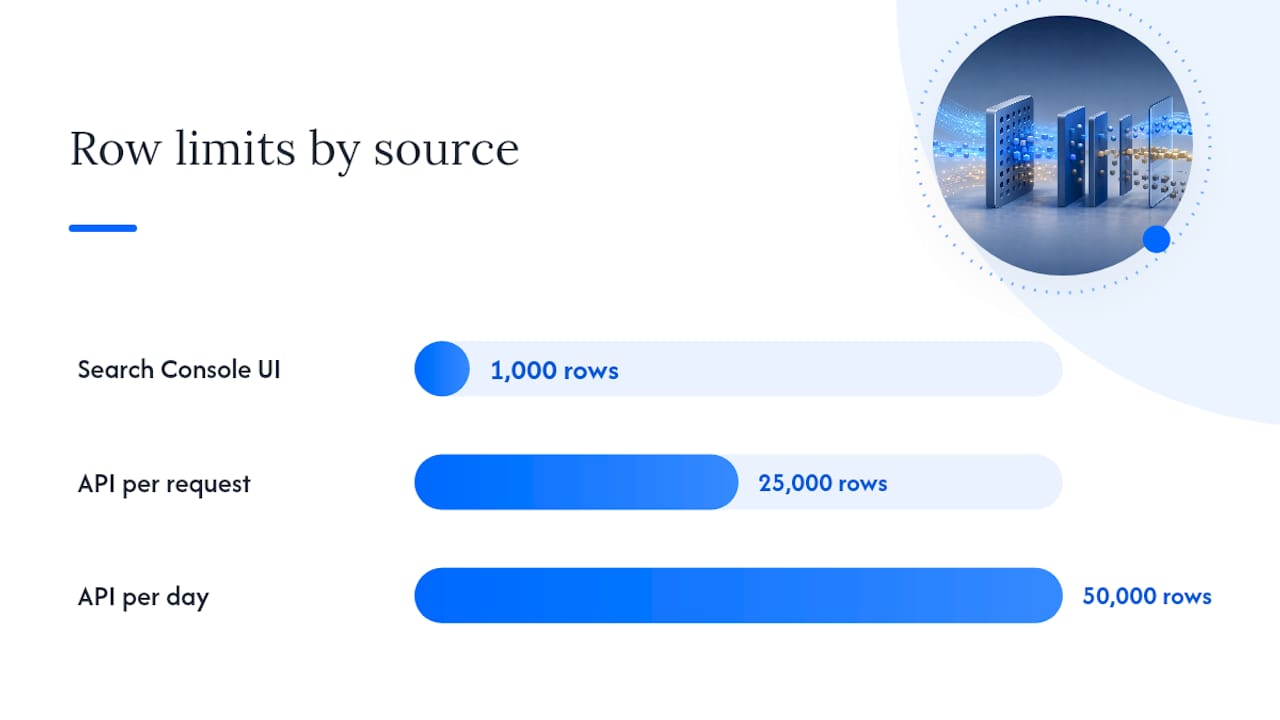
The Search Console API caps you at around 1,200 queries per minute (QPM) per site for Search Analytics, supports exporting up to 50,000 rows per day per search type, and enforces stricter per-site URL Inspection quotas. Compare that to the UI’s own 1,000-row cap and it becomes clear why serious reporting requires moving beyond the dashboard.
A quotaExceeded or 429 error doesn’t always mean the same thing. Google tracks usage across separate load windows, a short-term one measured in 10-minute bursts and a long-term one measured across a full day, and either can throttle you independently of your raw request count.
Three moves fix most quota headaches before they start:
- Query one search type per day (web, image, video) instead of bundling them into a single call.
- Paginate with
rowLimitandstartRow, splitting large pulls into weekly date ranges. - Add exponential backoff with jitter, and log which parameters triggered the failure.
Key Takeaways
The Search Console API limits include roughly 1,200 QPM per site for Search Analytics and up to 50,000 exportable rows per day per search type, exceeding the UI’s 1,000-row cap but necessitating pagination and date-splitting for extensive reporting.
| Point | Details |
|---|---|
| Know your quota scope | Search Analytics, URL Inspection, and other resources each carry separate per-site, per-user, and per-project ceilings. |
| Watch both load windows | A 10-minute short-term window and a 1-day long-term window can throttle you independently of raw request count. |
| Paginate and split by date | Use rowLimit and startRow together with 7-day windows to stay under the 50,000-row daily cap per search type. |
| Expect totals to differ from rows | Privacy filtering omits rare queries from exported rows while aggregate totals still include them. |
| Consolidate multi-property pulls | Serpview reduces repeated API pressure across properties and exports up to 50,000 rows with extended historical storage. |
Table of Contents
- Search Console API Limits: A Quick Reference
- What Do Load Windows Actually Limit?
- Row Caps and Sampling: Why Your Export Never Matches the Dashboard
- Why Am I Getting 429 or quotaExceeded Errors?
- How to Pull Large Datasets Without Getting Throttled
- Where Do I Monitor My Quota Usage?
- How Serpview Handles the Limits This Guide Just Explained
- What Actually Matters When You Hit These Limits
- Get More Than 1,000 Rows Without Fighting the API Yourself
- Sources
- FAQ
Search Console API Limits: A Quick Reference
Here’s the numeric baseline worth bookmarking before you write another line of pull script.
Statistic Callout: Search Analytics has per-site and per-user QPM quotas near 1,200, while project-level ceilings are significantly higher, providing more capacity when calls are distributed across service accounts.
The three resource groups behave differently, and mixing them up is the fastest way to misdiagnose a throttling error:
- Search Analytics: per-site and per-user QPM near 1,200, with substantially higher per-project QPM and QPD limits for multi-property accounts.
- URL Inspection: per-site caps near 600 QPM and 2,000 daily requests, with elevated project-level limits for agencies.
- All other resources: per-user QPS/QPM limits alongside distinct per-project QPD ceilings.
These numbers come straight from Google’s usage limits documentation, and the URL Inspection quota specifics sit in a separate developer guide worth keeping open in a tab.
What Do Load Windows Actually Limit?
Load isn’t the same thing as request count, and that distinction trips up more pipelines than raw rate limits do. A single Search Analytics query with five dimensions and a wide date range can cost far more “load” than ten simple queries with one dimension each, even though both count as one API call apiece.

Google enforces two separate load windows. The short-term window covers roughly 10 minutes and catches sudden spikes, like a script firing 200 heavy queries in a burst after a cron job wakes up. The long-term window spans a full day and catches sustained high-volume usage that never spikes but never lets up either, the kind of pattern you get from a poorly throttled scheduled job running continuously.
Here’s where rowLimit and dimensions interact in ways that surprise people:
- Requesting
page,query, anddevicetogether on a high-traffic property can return hundreds of thousands of potential row combinations, even if you caprowLimitat 25,000. - The API has to compute the full dimensional breakdown before truncating, so the compute cost (the “load”) reflects the uncapped result, not your requested limit.
- Splitting one 90-day query into thirteen 7-day queries usually reduces load per call even though it increases the total number of calls.
Pro Tip: Before you paginate by row count, paginate by date first. A narrower date range shrinks the dimensional combinations the API has to compute, which often resolves a load-window 429 that persists even after you’ve lowered rowLimit.
This is also why two developers pulling identical row totals can see wildly different quota behavior. The one filtering by a single high-traffic page and one date at a time will almost always outperform the one requesting three dimensions across a full quarter in one call.
Row Caps and Sampling: Why Your Export Never Matches the Dashboard
The Search Console UI truncates every table to 1,000 rows, full stop. The API doesn’t share that ceiling. It supports up to 50,000 rows per day per search type, reachable through pagination since a single request maxes out at a 25,000-row rowLimit.
That gap explains a recurring source of confusion: your dashboard total and your downloaded CSV rarely match. The Performance report applies privacy filtering that omits rare or personally identifiable queries from the rows you can see, even though the aggregate totals at the top of the report still include that hidden traffic. Google’s own export documentation confirms that totals can reflect anonymized queries the row-level export never surfaces.
Practical fallout looks like this:
- A property showing a total number of clicks in the summary chart may provide fewer clicks in the identifiable query rows returned.
- Index coverage and sitemap reports tend to be more complete than Performance data, since they aren’t subject to the same query-level anonymization.
- Pulling by page instead of by query sometimes recovers rows that anonymized query filtering would otherwise hide.
The workaround isn’t a workaround so much as an expectation reset: treat exported rows as a near-complete but not exhaustive dataset, and lean on aggregate totals when you need directional accuracy rather than a row-by-row audit.
Why Am I Getting 429 or quotaExceeded Errors?
A 429 or quotaExceeded response almost always traces back to one of three triggers: you’ve exceeded a QPS/QPM ceiling in a short burst, you’ve sustained too much QPD volume over the day, or you’ve tripped a load-window limit unrelated to raw call count. Community-tracked rate-limit profiles confirm these three failure modes show up consistently across implementations, alongside occasional serviceUnavailable responses during Google-side maintenance windows.
Handle them in this order:
- Log the exact request that failed, including dimensions, date range, and search type, before you retry anything.
- Apply exponential backoff with jitter, starting around 1 second and doubling with each retry, capped at a reasonable ceiling like 60 seconds.
- Throttle per-site or per-user, not globally, if you manage multiple properties. A single noisy property shouldn’t stall pulls for every other client account.
Pro Tip: Tag your logs with the search type and dimension set on every retry attempt. Six months in, that log is the only way to prove whether a recurring 429 is a load-window issue or a genuine QPD ceiling, and support will ask for exactly that detail.
How to Pull Large Datasets Without Getting Throttled
Getting past the 1,000-row UI habit means rebuilding your pull logic around three patterns that work together, not in isolation.
- Paginate with
rowLimitandstartRow. Request 25,000 rows at a time, incrementstartRowby 25,000 each call, and stop once a response returns fewer rows than requested, that’s your signal the dataset is exhausted. - Split by date range. Seven-day windows are a reliable default for high-traffic properties; wider windows increase load and risk tripping the long-term window even when your total row count stays modest.
- Split by search type. Web, image, and video traffic each carry their own 50,000-row daily ceiling, so querying them separately effectively triples your available daily headroom.
Once your pull volume outgrows ad hoc scripting, the developer guide on retrieving all your data recommends scheduled incremental pulls rather than repeated full-history requests. Export to BigQuery if you need exhaustive long-term storage, since Google’s own API guide steers larger implementations toward BigQuery rather than repeated API polling against the same historical range.
Pro Tip: If you’re validating ranking data alongside Search Console pulls, pairing it with a rank-checking API workflow gives you a second data point without adding load to your Search Console quota.
Where Do I Monitor My Quota Usage?
The Google Cloud Console has a quota tab specific to the Search Console API, showing your current QPS, QPM, and QPD consumption against your allotted ceiling in near real time. Check it before you scale up a pull job, not after it fails.
Beyond the dashboard, build your own instrumentation:
- Log endpoint, dimensions, and timestamp on every request, successful or not.
- Set alerts on sustained 429 spikes, not just single occurrences, since isolated errors are normal and expected.
- Request a quota increase only after you can show Google support a consistent usage pattern that legitimately needs it. Support typically wants request logs and a description of the use case before approving an increase.
How Serpview Handles the Limits This Guide Just Explained
Every pattern above, pagination, date-splitting, backoff, gets harder to maintain once you’re managing quota across ten or fifty client properties instead of one. That’s the operational reality Serpview was built around.
Serpview consolidates Search Console data across multiple properties into a single dashboard, which cuts down on the repeated per-project API pressure that comes from querying each site separately through your own scripts. It surfaces up to 50,000 rows per export rather than the UI’s 1,000-row ceiling, and it stores extended historical data so you’re not re-pulling the same date ranges every reporting cycle.
Consolidating properties into one scheduled pull, instead of ten separate scripts hitting the API independently, is the difference between staying comfortably under your project’s QPD ceiling and tripping it every Monday morning.
Features that directly reduce quota friction:
- Scheduled incremental pulls instead of manual, repeated full-history requests
- Customizable filters for isolating page, query, or device-level performance without re-querying the raw API
- Visual benchmarking against industry standards, built from data already consolidated in one place
- Client-ready exports for agencies managing white-labeled reports across accounts
Pro Tip: Combine the date-splitting pattern from earlier in this guide with a platform that schedules pulls automatically. You get the quota-safe request pattern without maintaining the backoff logic yourself.
What Actually Matters When You Hit These Limits
Most advice on Search Console API limits treats quotas like a wall to memorize rather than a variable to manage. That framing gets people stuck. The QPM and QPD numbers matter less than understanding load, the compute cost behind a request, because two developers can send an identical number of calls and get completely different throttling outcomes depending on how many dimensions they stacked into each one.
The conventional advice to “just paginate” undersells the real fix. Pagination without date-splitting still risks tripping the long-term load window on wide date ranges, even at a conservative rowLimit. The teams that stop fighting quotas are the ones who split by date first and treat row count as the second lever, not the first.
If there’s one priority for readers building pipelines today, it’s this: stop querying per property and start querying per search type, per date window, on a schedule. That single habit change resolves more 429 errors than any backoff algorithm, because it addresses load at the source instead of retrying around it. Tools that automate this pattern, rather than scripts that reinvent it property by property, are where the real time savings live.
— Utsav Chopra
Get More Than 1,000 Rows Without Fighting the API Yourself
Serpview is the practical alternative to building and maintaining your own pagination, backoff, and date-splitting scripts for every client property you manage. Instead of writing quota-handling logic from scratch, you get a dashboard that already pulls up to 50,000 rows per property, stores extended history, and schedules incremental updates automatically.

It suits agencies juggling multiple client accounts as much as in-house SEO teams tired of babysitting cron jobs. You get customizable filters for keyword and page-level analysis, device and country segmentation, and client-ready exports without touching a single startRow parameter. If you’ve just spent this guide learning how to work around the Google Search Console row ceiling, the faster path is letting a platform built for that exact problem handle it. Start exploring the free SEO tools or check the shared dashboard feature to see how a consolidated view replaces the manual pull logic covered above.
Sources
- Usage Limits | Search Console API | Google for Developers
- About Search Console data - Search Console Help
- Apis
FAQ
What Is the Search Console API’s Row Limit?
The API allows up to 50,000 rows per day per search type through pagination, compared to the UI’s 1,000-row cap on Performance report tables.
Why Do I Get a 429 Error From the Search Console API?
A 429 typically means you’ve hit a QPS/QPM/QPD ceiling or tripped a short-term or long-term load window; check your request logs against the specific quota category before retrying.
How Do I Get More Than 1,000 Rows of Search Console Data?
Use the API with pagination, rowLimit, and startRow, split by date range and search type, or use a consolidated platform like Serpview that exports up to 50,000 rows automatically.
Does the API Have the Same Data as the UI?
Not exactly. Both apply privacy filtering that omits rare queries, but the API supports far larger exports than the UI’s 1,000-row table limit.
What’s the Difference Between Short-Term and Long-Term Load Windows?
The short-term window covers roughly 10 minutes and catches request bursts, while the long-term window spans a full day and catches sustained high-volume usage, per Google’s usage limits documentation.
Recommended
Ready to unlock your full GSC potential?
SERPView helps you access all your Google Search Console data without limitations. Start your free trial today.
Get Started Free