
Search Data Export Limitations: What Agencies Need to Know
SERPView Team
SEO Analytics

TL;DR:
- Google Search Console limits exports to 1,000 rows in the UI and about 50,000 via the API using pagination. Agencies managing multiple sites should use API batching or a consolidation platform for automated, extended data retrieval beyond the 16-month retention window. These constraints are designed for performance and privacy, making external archiving essential for long-term, comprehensive analysis.
A search data export limitation is the row/record cap Google Search Console places on performance data you can retrieve in a single export. The UI table is capped at 1,000 rows, while the API raises that ceiling significantly through pagination. For agencies managing multiple properties, the practical fix is API batching with rowLimit and startRow parameters, or a consolidation platform like Serpview that lifts exports to the daily maximum supported by the API per property.
Three constraints define the problem:
- UI exports: truncated to 1,000 rows; chart totals still reflect full site data
- API exports: default 1,000 rows, paginated up to 50,000 rows per day per property per search type
- Data retention: Google Search Console stores performance data for about 16 months; anything older requires your own archive
Table of Contents
- What does a search data export limitation actually cap?
- Why does Google enforce these row limits?
- How do these limits affect agency reporting?
- What are your options for getting more rows?
- How to reliably export more rows, step by step
- How to archive GSC exports for multi-client agencies
- How to design reports that are accurate and defensible
- Quick checklist: which export approach fits your client?
- Key Takeaways
- The real cost of ignoring export limits
- Serpview gives agencies the export capacity GSC alone can’t
- Useful sources
- FAQ
What does a search data export limitation actually cap?
Google Search Console enforces limits differently depending on the report type and the dimensions you request. Understanding exactly where the cap applies helps you design exports that avoid truncation.
UI and standard exports cap the table at 1,000 rows. Crucially, the totals shown in the UI still reflect the full dataset, not just the visible rows. So your aggregate clicks and impressions are accurate; it’s the row-level breakdown that gets cut.
Query and URL dimensions are where limits bite hardest. The API default returns 1,000 rows, but you can raise rowLimit to 25,000 and paginate with startRow to retrieve larger result sets, reaching the daily API limit per property per search type.
Dimension-only requests behave differently. For requests that don’t involve query or URL dimensions, Search Console exports all available data. Country, device, and Search Appearance breakdowns are generally complete. This matters for your export strategy: if you only need a device split, skip the query dimension entirely.
Retention is the other hard constraint. Google Search Console holds roughly 16 months of performance data natively. Multi-year, year-over-year analysis requires an external archive. Serpview’s extended storage feature addresses this gap directly for agencies that need historical context beyond that window.
Most Search Console reports cover a representative sample of URLs rather than a comprehensive listing. Page Indexing and Video pages are documented exceptions.
Why does Google enforce these row limits?
Google’s limits are a deliberate design trade-off, not a technical oversight.
“Due to limitations related to serving latency, storage, processing resources, and others, Search Console has a limit on the amount of data that can be displayed or exported. These limits won’t affect the majority of properties in Search Console. A few very large websites can be affected by this, but even for those we believe the remaining data will be large enough to create a representative sample of data.” — Google Search Central Blog
Beyond infrastructure, privacy filtering removes low-volume queries from row-level exports. Those suppressed queries still contribute to aggregate totals, which is why your exported row sums sometimes don’t reconcile with the chart totals. The Performance report omits some low-volume queries to protect user privacy, and data can lag by a few days.
For most single-property sites, sampling is invisible. For large enterprise sites or agencies aggregating dozens of properties, the missing long-tail rows add up fast.
How do these limits affect agency reporting?
The impact scales with client complexity. Here are the scenarios where data export constraints become a real reporting problem:
- Long-tail keyword gaps: — A site with thousands of low-volume queries hits the 1,000-row UI cap immediately. Monthly reports built from UI exports miss the majority of the query set.
Watch for these signals that your export is being limited: the exported table stops at the UI export row cap while the chart shows higher totals, or cells display ~ or - in the UI, which become zeros in the downloaded file. Both indicate truncation or suppression.
What are your options for getting more rows?
Four approaches address search data export restrictions, each with different trade-offs.
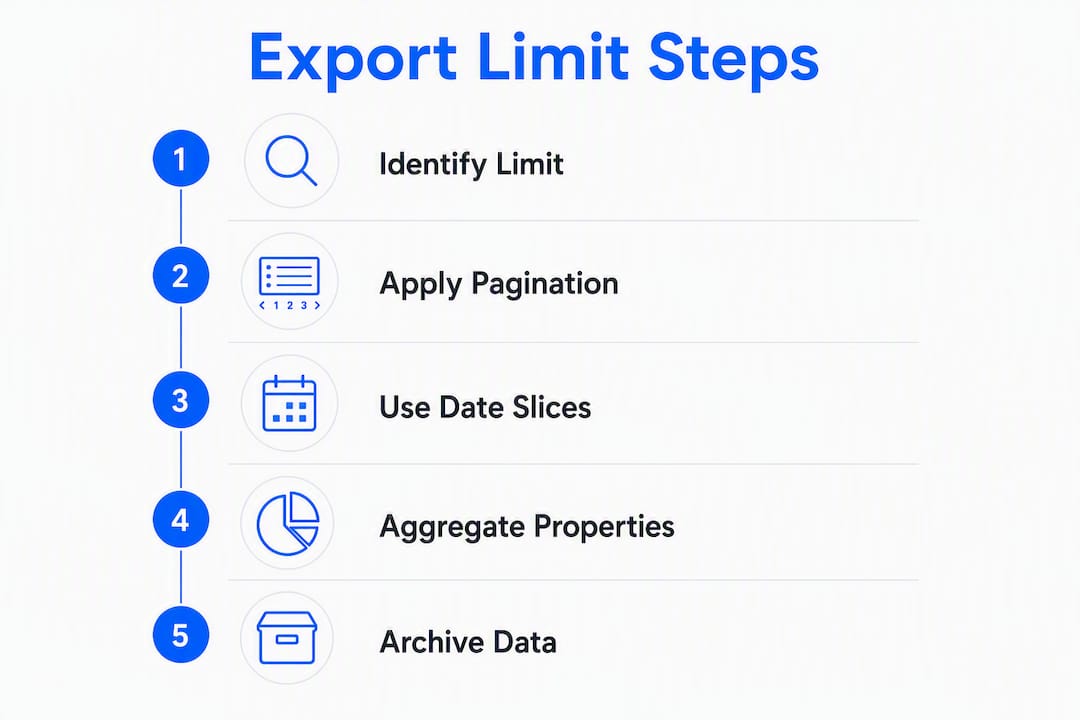
API pagination is the most direct fix. Set rowLimit to 25,000, run the request, then set startRow to 25,000 and run again to retrieve additional rows, paginating up to the daily API ceiling per property per search type (commonly 50,000 rows). This works well for single-property technical teams. The downside: it requires developer time, and you still hit the daily ceiling.
Date-range slicing reduces suppression. Splitting a 90-day request into weekly slices returns more rows per period because fewer queries fall below the privacy threshold in any given week. More granular requests yield more complete data.

Property aggregation before exporting reduces per-property sampling noise for multi-site clients. Combining data at the analysis layer rather than exporting each property independently gives you a more complete picture.
Consolidation platforms like Serpview ingest multiple properties, automate scheduled exports, and surface up to 50,000 rows without requiring custom API code. The trade-off is subscription cost and setup time, but for agencies managing five or more properties, the time savings are substantial.
Pro Tip: Use API batching when you have a developer available and a single large property to manage. Switch to a consolidation platform when you’re managing multiple clients or need automated scheduling without ongoing maintenance.
For a deeper look at how analytics workflows support content measurement alongside GSC exports, that framing applies directly to multi-property agency reporting.
How to reliably export more rows, step by step
This pattern works for API batching and maps to how Serpview automates the same process.
- Authenticate using OAuth 2.0 with the Search Console API. Confirm the service account has access to the target property.
- Set your parameters: choose
searchType(web, image, news, video), select dimensions (query,page, or both), and define your date range. - First request: set
rowLimit: 25000,startRow: 0. Log the response row count. - Paginate: if the response returns 25,000 rows, set
startRow: 25000and repeat. Stop when the response returns fewer rows thanrowLimit. - Slice by date: for ranges longer than 30 days, split into weekly or daily requests to reduce suppression and improve row completeness.
- Verify: compare the sum of exported clicks against the chart total in GSC. A gap indicates suppressed rows; document it.
- Log everything: record the extraction timestamp, request parameters, and row count for every pull.
Serpview’s consolidation layer handles steps 3–7 automatically across all connected properties, scheduling recurring exports and storing results in a consistent schema without manual intervention.
Pro Tip: Add a lightweight retry wrapper to your API script that logs partial page responses. When Google reprocesses historical data, row counts for the same date range can shift. Logged parameters let you explain those shifts in client reports.
How to archive GSC exports for multi-client agencies
A consistent archive schema is what makes historical data actually usable. Without it, exports from six months ago won’t join cleanly to today’s data.
Recommended canonical columns: date, property, query, page, device, country, clicks, impressions, ctr, position. Add extracted_at (timestamp) and request_params (JSON string) to every row.
Recommended formats: newline-delimited JSON for pipeline ingestion; CSV for analyst-facing storage. BigQuery works well for large agencies needing SQL-based cross-property analysis.
| Client tier | Export frequency | Retention period | Format |
|---|---|---|---|
| Active / high-traffic | Daily | Indefinite | NDJSON + CSV |
| Mid-size / moderate traffic | Weekly | 3+ years | CSV |
| Low-change / small sites | Monthly | 2 years | CSV |
Schema versioning matters when you add or remove dimensions over time. Version your schema and document changes with dates so historical joins don’t break silently. When Google reprocesses data, re-run the affected date slices and flag the re-extraction timestamp in your archive. Serpview’s extended storage handles schema consistency and re-ingestion automatically, which removes a significant maintenance burden for agencies with large client rosters.
How to design reports that are accurate and defensible
Clients notice when numbers shift between reports. The fix is transparency, not perfection.
- Include the extraction timestamp and request parameters in every client report appendix.
- Compare exported row sums to GSC chart totals and document any gap as suppressed low-volume queries.
- Use Pacific Time consistently for daily date boundaries, since GSC uses PT for daily views. Inconsistent time zones create apparent data discrepancies in YOY comparisons.
- Apply consistent date slicing for year-over-year comparisons: same weekday alignment, same date range length.
- Flag
~and-values explicitly in client-facing exports rather than letting them silently become zeros.
Pro Tip: Add a one-paragraph audit appendix to every client report listing the extraction date, row count, chart total, and any reconciliation gap. Clients rarely read it, but it protects you when numbers are questioned.
Understanding how search data informs client strategy over time is easier when your archive is clean and your reports carry full extraction metadata.
Quick checklist: which export approach fits your client?
Use this to scope the right solution during client onboarding.
- Small site, single property, developer available: scheduled API exports with pagination; daily or weekly cadence
- Small site, no developer: manual UI export for top queries; accept the 1,000-row limit for low-traffic sites where it doesn’t matter
- Mid-size site, multi-property: API batching with date slicing, or a consolidation platform if manual maintenance is unsustainable
- Enterprise / high-traffic, multi-property: consolidation platform with automated scheduling, extended storage, and cross-property aggregation
- Any client needing multi-year history: external archive is non-negotiable; start scheduled exports immediately regardless of other choices
- Budget-constrained: free API covers the technical need; the cost is developer time and ongoing maintenance
The pattern is straightforward: the more properties and the longer the history required, the stronger the case for a platform that handles aggregation and scheduling automatically.
Key Takeaways
Google Search Console’s 1,000-row UI cap and 16-month retention window make API pagination and external archiving non-negotiable for agencies managing multi-property or long-term client reporting.
| Point | Details |
|---|---|
| UI cap is 1,000 rows | Chart totals remain accurate; only row-level breakdowns are truncated in UI exports. |
| API ceiling is generally 50,000 rows per day | Use rowLimit and startRow to paginate up to the daily API limit per property per search type, with a maximum of 25,000 rows per response. |
| 16-month retention limit | Any analysis beyond 16 months requires an external archive; start scheduled exports immediately. |
| Suppressed queries create gaps | Low-volume queries are omitted for privacy; exported row sums will not always match chart totals. |
| Serpview lifts practical limits | Serpview consolidates multiple properties and automates exports up to 50,000 rows with extended historical storage. |
The real cost of ignoring export limits
Most agencies discover these constraints mid-project, not during scoping. A client asks for a two-year trend and the data simply isn’t there. A long-tail keyword analysis comes back with 1,000 rows when the site has tens of thousands of queries. The numbers in the report don’t reconcile with what the client sees in their own GSC dashboard.
The honest reality is that Google’s limits are reasonable for the majority of sites. The problem is that agency work is almost never about the majority of sites in isolation. It’s about aggregating, comparing, and archiving across dozens of properties over years. That’s a fundamentally different use case than what native GSC was designed for.
What I find underappreciated is the schema problem. Most teams focus on getting more rows and overlook the fact that rows from six months ago, pulled with different parameters, won’t join cleanly to today’s data. The extraction timestamp and canonical schema are what make historical data actually usable, not just stored. Serpview’s approach of normalizing schema at ingestion and automating re-extraction when Google reprocesses data addresses the part of this problem that most agencies don’t think about until it’s already broken.
Serpview gives agencies the export capacity GSC alone can’t
If you’re managing more than a handful of properties, the native GSC export workflow becomes a bottleneck fast. Serpview consolidates all your Search Console properties into a single dashboard and surfaces up to 50,000 rows per export, with automated scheduling so you’re never manually pulling data before a client call.

Key capabilities relevant to the limits covered in this article:
- White-label shared dashboards for client-ready reporting
Data governance is built in: every export carries extraction metadata, and schema versioning is handled automatically. Explore the full Google Search Console integration on Serpview, or start a trial to see consolidated exports in action.
Useful sources
- A deep dive into Search Console performance data filtering and limits | Google Search Central Blog — Primary Google source on row limit rationale, API pagination parameters, and sampling behavior.
- Export data directly from a Search Console report | Search Console Help — Official documentation on UI export behavior, truncation, and how
~values appear in downloads. - Performance report troubleshooting: data discrepancies | Search Console Help — Explains privacy filtering, low-volume query suppression, and the 2–3 day data lag.
- Export Search Console data using the Search Console API | Search Console Help — Official API documentation confirming the 50,000-row daily ceiling per property per search type.
- About Search Console data | Search Console Help — Clarifies which reports use representative sampling and which are exhaustive.
- GSC Data Limitations: What You’re Missing & How to Fix It | Serpview — Practical agency-focused guide on the 16-month retention issue and scheduled export workflows.
- Extended Storage for Search Console Data | Serpview — Product feature page on automated ingestion and long-term historical storage.
FAQ
What is the row limit for Google Search Console exports?
The UI table caps at 1,000 rows. The API allows up to the daily row limit per property per search type using rowLimit and startRow pagination.
Why don’t my exported row totals match the GSC chart totals?
Low-volume queries are suppressed for privacy and excluded from row-level exports but still counted in aggregate totals. The gap between your exported sum and the chart total represents those suppressed queries.
How far back does Google Search Console data go?
Google Search Console retains performance data for 16 months. For analysis beyond that window, you need an external archive built from scheduled exports.
Can Serpview export more than 1,000 rows?
Yes. Serpview consolidates multiple Search Console properties and supports exports up to the full daily API ceiling, with automated scheduling and extended historical storage beyond the 16-month native retention window.
Which GSC report types are exempt from row limits?
Requests that don’t include query or URL dimensions, such as country, device, or Search Appearance breakdowns, export all available data without truncation.
Recommended
Ready to unlock your full GSC potential?
SERPView helps you access all your Google Search Console data without limitations. Start your free trial today.
Get Started Free