
Track Local Search Performance Step by Step: A Repeatable System
SERPView Team
SEO Analytics
You track local search performance step by step by building a GEO baseline, wiring five tools together, and running a weekly-to-monthly cadence that ties visibility directly to calls and revenue. That’s the whole system. The rest of this guide shows you how to build it.
Here’s what to do this week:
- Connect Google Business Profile (GBP), Google Search Console (GSC), and GA4 so data flows into one place.
- Add UTM parameters to every GBP link so mobile clicks stop showing up as “Direct” in GA4.
- Set up a small geo-grid around your business location for neighborhood-level rank tracking.
- Turn on call tracking without changing the public number in your listings.
- Run a baseline GEO audit so you have a starting point from which to measure.
If you do this correctly, you should see measurable movement within 30 to 90 days: better map pack visibility, more direction requests, faster review velocity, and a clearer line from search activity to booked jobs.
Key Takeaways
Tracking local search performance step by step requires a GEO baseline, five connected tools, and a weekly-to-monthly cadence that ties every metric back to real leads.
| Point | Details |
|---|---|
| Start with a baseline | Run a GEO baseline audit before making changes so you have a true starting point for AI visibility and accuracy. |
| Connect the five-tool stack | Wire together GBP, GSC, GA4, a geo-grid rank tracker, and call tracking before pulling any KPI. |
| Fix attribution first | Add UTM tags to GBP links and link GSC to GA4 so mobile clicks stop showing as “Direct.” |
| Run a real cadence | Check weekly, report monthly, and rerun the full GEO audit every quarter. |
| Consolidate reporting with Serpview | Serpview pulls GSC, geo-grid, and GBP-linked data into one dashboard with up to 50,000 rows for faster client reporting. |
Table of Contents
- Why Local Search Tracking Works Differently Than General SEO
- What Local SEO Metrics Should You Track First?
- Which Tools Do You Need to Track Local SEO Properly?
- How Do You Run a Monthly Local SEO Tracking Workflow?
- How Do You Turn Local SEO Data Into Action?
- What Common Mistakes Ruin Local SEO Measurement?
- How Do You Audit Your Local AI Visibility?
- What Belongs in a Local SEO Reporting Template?
- Get One Dashboard Instead of Five Tabs
- Sources
- FAQ
Why Local Search Tracking Works Differently Than General SEO
General SEO tracking chases traffic and rankings. Local tracking has to chase something more concrete: foot traffic, phone calls, and booked jobs tied to a specific radius around your business. A national e-commerce brand can tolerate some noise in its analytics. A dentist watching one ZIP code cannot.
The measurement model that works best treats local performance as three connected layers. Visibility (are you showing up in the map pack and geo-grid) feeds engagement (are people clicking, calling, or requesting directions), which feeds outcomes (are those actions turning into booked revenue). Skip a layer and your reporting breaks down into guesswork.
Local SEO professionals who report on this properly track KPIs like:
- Phone calls attributed to GBP versus organic website traffic
- Direction requests from Google Maps
- Qualified leads (not just form fills, but leads that match your service area and budget)
- Booked jobs or completed appointments tied back to a search source
One practical framework breaks this into exactly those three layers: visibility, engagement, and outcomes, paired with a five-tool stack you can start using today. That framework is the backbone of everything in this guide.
What Local SEO Metrics Should You Track First?
Three categories matter, and they build on each other in order.
Visibility metrics tell you whether you exist in the results that matter. That means geo-grid rank (your position across a grid of points around your service area), map pack share (how often you appear in the top three local results), and impressions for your local landing pages. You pull geo-grid data from a rank tracker, map pack share from tools like Nightwatch or GBP insights, and impressions straight from GSC.
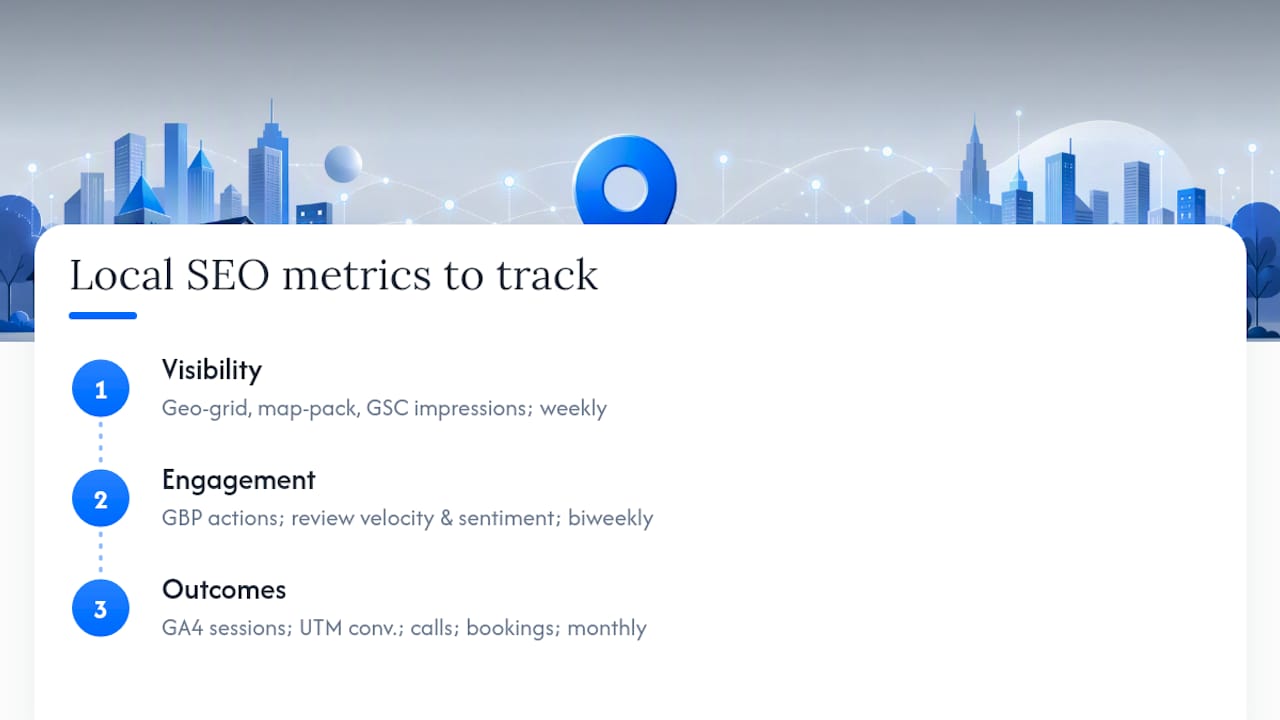
Engagement metrics show whether visibility is converting into interest. GBP profile actions (calls, website clicks, direction requests) live inside your GBP insights dashboard. Review velocity, meaning how fast new reviews accumulate, and review sentiment round out this layer. A business earning three reviews a month with a 4.8-star average is in a very different position than one stuck at one review every quarter.
Outcome metrics are the ones that actually justify the work: GA4 local sessions, UTM-tagged GBP conversions, tracked phone calls, and completed bookings. These require the most setup but deliver the most defensible numbers when you’re reporting to a stakeholder or a business owner who wants to know if any of this mattered.
A useful reporting model treats the whole funnel as visibility → trust → engagement → conversion → revenue, and every report should end with a clear list of next actions tied to what the data actually showed. This structure forces accountability instead of vanity metrics.
Set targets for each layer. Report visibility weekly, engagement biweekly, and outcomes monthly, since revenue data takes longer to stabilize.
Which Tools Do You Need to Track Local SEO Properly?
You need five tools at minimum, and skipping any one of them creates a blind spot.
- Google Business Profile for visibility and engagement data straight from Google.
- Google Search Console for organic query, click, and impression data on your local pages.
- Google Analytics 4 (GA4) for tracking what happens after someone clicks through.
- A geo-grid rank tracker like Nightwatch for neighborhood-level position tracking.
- A call tracking system to attribute phone leads to their actual source.
Once you have those five, SERPView becomes the layer that consolidates them, since Google Search Console’s own interface caps most reports at 1,000 rows and stitching GBP, GSC, and GA4 together manually eats hours every month.
Setup follows a specific order:
- Verify ownership of your GBP listing and confirm the address, phone number, and category are correct.
- Verify your website property in GSC and confirm it covers both the www and non-www versions if applicable.
- Link GSC to GA4 so search data flows into your conversion reports automatically.
- Add UTM parameters to your GBP website URL. Mobile browsers often strip referrer data, and untagged GBP clicks routinely get miscategorized as “Direct” traffic in GA4.
- Configure your geo-grid tracker with a 3×3 grid centered on your location for most service radii under 20 miles.
Assign roles carefully. Give team members “Manager” access in GBP rather than full ownership transfers, since ownership changes have caused more than one agency to lose control of a client’s listing entirely.
How Do You Run a Monthly Local SEO Tracking Workflow?
A repeatable cadence beats a brilliant one-time audit every time. Here’s the workflow that holds up across a full year of reporting.
Step 0. Build a NAP master record (name, address, phone, exactly as it should appear everywhere) and a naming convention for your tracking spreadsheets before you touch a single tool. This sounds tedious. Skip it and you’ll spend your third month reconciling three different address formats across five citation sources.
- Baseline week: Run your GEO baseline audit (more on that below), record starting visibility, citation accuracy, and current geo-grid coverage.
- Weekly checks: Scan new reviews and respond to them, check rank shifts across your five to ten core keywords, and sanity-check call volume against last week’s numbers.
- Monthly deliverable: Compile the geo-grid trend line, pull your GSC and GA4 KPI slice, tally review velocity, and write a short next-actions list.
- Quarterly deep-dive: Rerun the full GEO baseline audit, prioritize any structural fixes that surfaced, and check competitor share-of-voice in your geo-grid.
Weekly checks catch problems before they compound; monthly cycles are where trend analysis and client-facing reporting actually happen.
| Cadence | What you check | Deliverable |
|---|---|---|
| Weekly | New reviews, rank shifts on core keywords, call volume | Quick health check, no formal report |
| Monthly | Geo-grid trend, GSC/GA4 KPIs, review velocity | Client-ready summary with next actions |
| Quarterly | Full GEO baseline audit, competitor share-of-voice | Structural fix priority list |
One scheduling detail trips people up constantly: run your rank checks during actual business hours. Google increasingly favors listings that show as “open now” for certain queries, so a rank check run at 2 AM can show artificially depressed positions that have nothing to do with your actual SEO health.
How Do You Turn Local SEO Data Into Action?
Data without triage just becomes a longer spreadsheet nobody reads. Sort every finding into a simple impact-versus-effort grid before you decide what to fix first.
- High impact, low effort: NAP inconsistencies across directories, missing structured data on service pages, broken UTM links.
- High impact, higher effort: Local content gaps, systematic review generation campaigns, service-area page builds.
- Lower priority: Cosmetic GBP photo updates, minor category tweaks.
Run small tests instead of guessing. Swap your GBP website URL to test two different UTM-tagged landing pages against each other. Add structured data for LocalBusiness or Service schema and watch impressions over the following month. Run an A/B test on your review request timing, sending it immediately after service versus 24 hours later.
Assign an owner to every fix and set expectations for signal lag. Structured data changes can take two to four weeks to show up in GSC. Review campaigns usually show movement within two to three weeks. NAP fixes across citations can take a month or more to fully propagate.

Pro Tip: Log every change you make with a date stamp, even small ones like a new photo upload. When a ranking jumps three weeks later, you’ll actually know why.
What Common Mistakes Ruin Local SEO Measurement?
Bad attribution wrecks more local SEO reports than bad strategy does. If your UTM tags are missing or broken, or if you’re running two different phone numbers across your listings without reconciling them, your numbers lie to you every single month.
Watch for these specific failures:
- Running rank checks from a single IP address without location spoofing, which introduces personalization noise that skews results.
- Comparing this month’s GA4 numbers against a differently-dated GSC window, making trend comparisons meaningless.
- Treating raw impressions as a win when they didn’t translate into clicks, calls, or bookings.
- Forgetting to document your canonical phone number when you deploy a tracking number, which creates NAP conflicts across citations.
Each of these is fixable in under an hour. None of them get fixed if nobody’s specifically checking for them.
How Do You Audit Your Local AI Visibility?
Search behavior has expanded past the ten blue links, and a growing share of local discovery now happens inside ChatGPT, Perplexity, Gemini, and Google’s AI Overviews. A GEO baseline audit tells you exactly where you stand across those platforms, the same way a traditional SEO audit tells you where you stand in classic search.
- Build four prompt categories: discovery (“best plumber near [neighborhood]”), comparison (“X vs Y for [service]”), trust (“is [business] legitimate/reliable”), and logistics (“hours for [business]” or “does [business] offer [service]”).
- Run each prompt across your target platforms from a logged-out session and a logged-in session, and record the date of every run.
- Capture five data points per prompt: whether you’re mentioned, where you rank in the response, the sentiment or framing used, factual accuracy, and which sources got cited.
- Calculate your visibility percentage (mentions divided by total prompts) and accuracy percentage (accurate mentions divided by total mentions).
Sort your results into three buckets: invisible (not mentioned at all), inaccurate (mentioned with wrong information), or misframed (mentioned but positioned poorly against competitors). The correct fix order is eligibility first, trust second, relevance last, since a blocked crawler or inconsistent NAP record undermines everything else you build on top of it.
Pro Tip: Run this audit quarterly and check the SERPView AI Overview Checker between full audits to catch sudden citation drops early.
What Belongs in a Local SEO Reporting Template?
A report that doesn’t drive a decision is just a document. Build yours around a KPI snapshot and a short set of dashboard widgets, then close every report with prioritized next actions.
Your monthly KPI snapshot should include:
- Visibility score (geo-grid coverage and map pack share)
- GBP actions (calls, website clicks, direction requests)
- Qualified leads and revenue where available
- Review velocity and average sentiment
| Dashboard widget | What it shows | Where the data comes from |
|---|---|---|
| Geo-grid trend line | Rank movement across your service area over time | Rank tracker export |
| Map pack share | How often you appear in the top three local results | Rank tracker or GBP insights |
| GSC impressions, clicks, CTR | Organic visibility for local landing pages | Google Search Console |
| GA4 UTM conversions | Which GBP-sourced sessions actually converted | GA4 linked to UTM-tagged GBP links |
| Calls by source | Which channel drove each phone lead | Call tracking platform |
Trend lines built from consistent tracking data turn incremental weekly progress into something a business owner can actually see and trust, especially once six to eight weeks of data accumulates.
Close every report the same way: a two or three sentence executive summary stating what moved and why, followed by a short, numbered list of next actions. That structure is what separates a report that gets read from one that gets filed.
What Practitioners Learn Running This Workflow
The first GEO baseline audit almost always turns up something ugly. It’s usually a blocked crawler setting, or three different phone numbers spread across old citation listings nobody remembered creating. Finding that early saves months of confused reporting later.
Split ownership clearly: one person monitors GBP and reviews weekly, another owns the geo-grid and rank data, and a third compiles the monthly report. Expect real visibility movement in 60 to 90 days, not two weeks.
Get One Dashboard Instead of Five Tabs
Serpview is the tool that replaces the spreadsheet-stitching most local SEO professionals resign themselves to. Instead of exporting from GSC, capping out at 1,000 rows, and manually merging that with geo-grid history and GBP screenshots for every client report, Serpview consolidates all of it into one dashboard with up to 50,000 exportable rows.

That matters most during the monthly reporting step described above. Rather than rebuilding a geo-grid trend chart and a GSC KPI slice from scratch every cycle, you pull historical performance data, filter by location or device, and generate a client-ready report in a fraction of the time. Features like custom annotations let you mark exactly when a fix went live, so the next ranking jump has a clear cause attached to it, and the shared dashboard feature lets clients check live data without you exporting anything at all.
If you’re managing more than one location or more than one client, start a Serpview trial and connect your first Search Console property today. It takes less time than building this month’s report by hand.
Sources
- Local GEO baseline audit
- How to Track Local SEO Performance
- Local SEO Reporting: How To Track Visibility, Calls, Leads, And Revenue
- How To Track Local SEO Performance for Your Small Business
- Local ranking considers business open hours
FAQ
How Do You Track SEO Performance for a Local Business?
Connect Google Business Profile, Google Search Console, and GA4, add UTM tags to your GBP links, and run a geo-grid rank tracker alongside call tracking to see visibility, engagement, and outcomes in one place.
What Is the 80/20 Rule in SEO?
How Do You Optimize for Local Search?
Start with an accurate, fully verified GBP listing, keep your NAP consistent across every citation, earn reviews consistently, and track your geo-grid rank so you know which neighborhoods still need work.
Is 75 a Good SEO Score?
A score in isolation tells you little without context; what matters more is whether your visibility, engagement, and outcome metrics are trending upward month over month against your own baseline.
How Often Should You Run a Local SEO Audit?
Run a full GEO baseline audit quarterly, but check weekly for new reviews, rank shifts on your core keywords, and call volume so nothing slips between audits.
Recommended
Ready to unlock your full GSC potential?
SERPView helps you access all your Google Search Console data without limitations. Start your free trial today.
Get Started Free