
Free Web Page Search for Agencies: Multi-Property Workflows
SERPView Team
SEO Analytics

TL;DR:
- Google Search Console’s free tools include the UI for quick spot checks, the API for scheduled programmatic pulls, and BigQuery exports for full datasets with long-term storage. Excessive manual management and quota limits make DIY solutions difficult for large agencies managing many properties, prompting the use of purpose-built platforms like Serpview for consolidated reporting.
The fastest free ways to run page- and keyword-level searches across multiple properties are the Google Search Console UI (quick spot checks, up to 1,000 rows), the Search Console API with startRow pagination (programmatic pulls up to 50,000 rows per property per day), and bulk export to BigQuery (full queryable datasets with no row cap per export). Pick the right one based on your job, not your familiarity.
TL;DR by use case:
- Ad-hoc URL checks — Search Console UI, filter by page, export to CSV or Google Sheets
- Scheduled cross-property pulls — Search Console API with pagination and a merge script
- Full historical analysis — BigQuery bulk export for queryable, long-retention tables
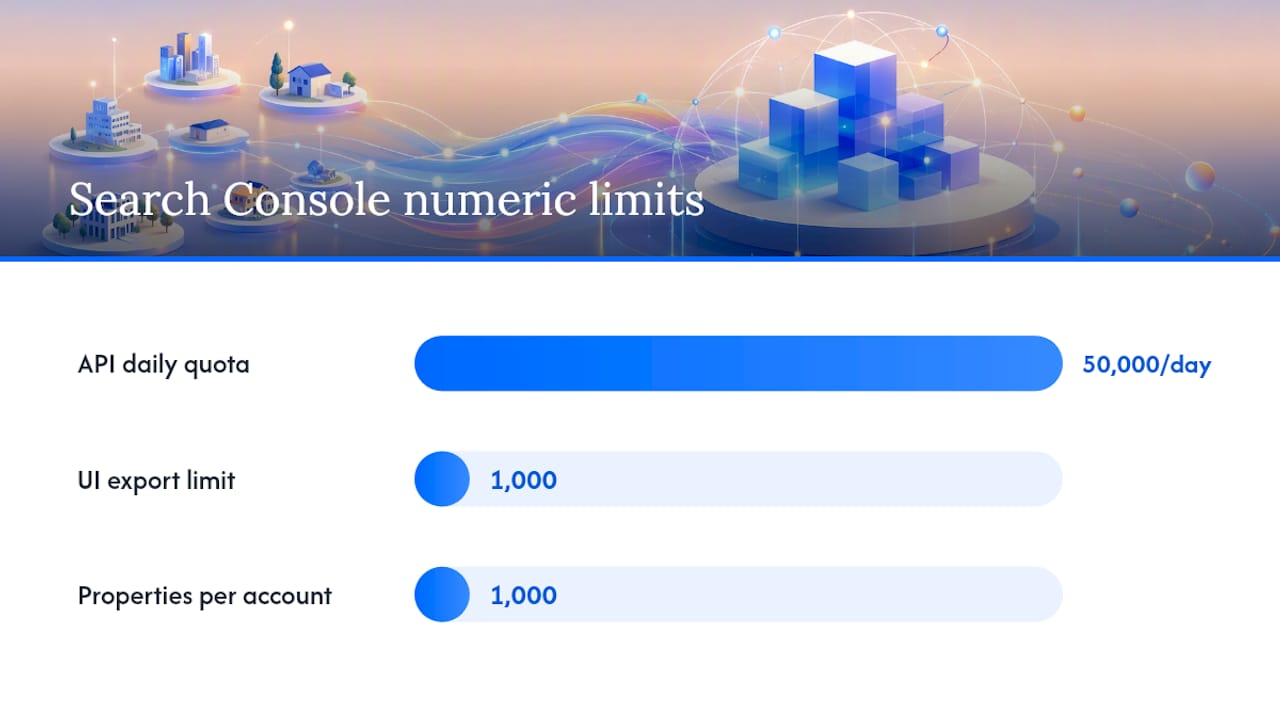
Row-limit reality: The UI truncates exports at 1,000 rows. The API delivers up to 50,000 rows per property per day. BigQuery export bypasses both limits for daily, partitioned tables.
Table of Contents
- Which free approach fits your workflow?
- How do you use the Search Console API for page-level queries?
- How do you set up BigQuery bulk export from Search Console?
- How should agencies manage properties at scale?
- Three practical recipes you can run right now
- When does Serpview make more sense than DIY free tools?
- Key Takeaways
- The operational reality most agencies underestimate
- Serpview removes the manual work from multi-property GSC analysis
- Useful sources and links
- FAQ
Which free approach fits your workflow?
Choosing the wrong method wastes time. The table below maps each free option to the dimensions that matter most for agency work.
| Dimension | Search Console UI | Search Console API | BigQuery Export |
|---|---|---|---|
| Row limit / data depth | 1,000 rows per export | 50,000 rows/day per property | No per-export row cap |
| Cross-property consolidation | Manual, one property at a time | Scriptable across N properties | Queryable across exported datasets |
| Automation / scheduled exports | None | Full (cron, Cloud Functions, etc.) | Daily automatic cadence |
| Setup complexity and cost | Zero setup, free | Google Cloud project + OAuth | Cloud project + storage/query costs |
| Historical retention | — | — | Indefinite (you control storage) |
Search Console UI works well for fast, one-off checks on a handful of URLs. The 1,000-row ceiling and manual property switching make it impractical for agencies running weekly reports across dozens of clients.
The API is the right choice when you need scheduled pulls, custom filters, or cross-property merges. You write the script once, and it runs on your schedule. The 50,000-row daily quota per property is generous for most sites but can bind you on large e-commerce or news properties.
BigQuery export is the gold standard for full datasets. Once configured, it lands daily partitioned tables in your Cloud project. You query with SQL, join across properties, and retain data as long as you pay for storage.
How do you use the Search Console API for page-level queries?
The searchAnalytics.query endpoint is the core of any programmatic free web page search. You send a POST request specifying the property, date range, dimensions (typically page and query), and optional filters. The API returns clicks, impressions, CTR, and average position for each row.
Authentication and setup
You need a Google Cloud project with the Search Console API enabled, then either OAuth 2.0 (for user-delegated access) or a service account (for server-to-server automation). The official API documentation covers both flows. Service accounts are preferable for agency pipelines because they don’t expire with a user’s session.
Pagination with startRow
The API returns a maximum of 25,000 rows per request by default. To retrieve more, increment startRow by your row count on each subsequent call until the response returns fewer rows than requested.
POST https://searchconsole.googleapis.com/webmasters/v3/sites/{siteUrl}/searchAnalytics/query

{
  "startDate": "2026-01-01",
  "endDate": "2026-01-31",
  "dimensions": ["page", "query"],
  "rowLimit": 25000,
  "startRow": 0   // increment to 25000, 50000 on next calls
}
Stop when the response row count is less than rowLimit. That signals you’ve retrieved everything available up to the 50,000-row daily quota.
Key insight: The 50,000-row limit is per property per day, not per request. Splitting one large property into URL-prefix sub-properties multiplies your available quota, though each sub-property needs its own verification and access management.
Pro Tip: Pull aggregate data first (page dimension only), then fan out to page+query calls only for URLs that meet a threshold — say, pages with more than 100 impressions. This approach, combined with caching responses for unchanged date ranges, keeps you well inside quota limits even across large sites.
How do you set up BigQuery bulk export from Search Console?
Bulk export is the way to bypass API row limits entirely and build a queryable, long-term archive of your GSC data. The setup process takes under 30 minutes, but a few configuration decisions have lasting consequences.
How should agencies manage properties at scale?
Google limits each Search Console account to 1,000 properties. For large agencies, that ceiling arrives faster than expected, especially when you add subfolder properties to multiply API quotas.
Three practical recipes you can run right now
Recipe 1: Ad-hoc URL-to-keywords check (Search Console UI)
Objective: Find which queries drive traffic to a specific page.
- Open Search Console, go to the Performance report.
- Add a “Page” filter with the exact URL.
- Switch to the “Queries” tab to see keywords for that page.
- Export to CSV or Google Sheets for further analysis.
Expected output: Up to 1,000 query rows with clicks, impressions, CTR, and position for the filtered URL.
Recipe 2: Daily scripted API pull across multiple properties
Objective: Automate keyword and page data collection across all client properties.
- Maintain a list of verified property URLs.
- For each property, call
searchAnalytics.querywithdimensions: ["page", "query"]and paginate withstartRowuntil the response is exhausted. - Write results to a central database or Google Sheet, tagging each row with the property URL and pull date.
- Schedule with a cron job or Cloud Scheduler. For keyword opportunity reporting, add a filter for position 5–20 to surface quick-win candidates.
Expected output: A merged, daily-updated table of page+query performance across all properties.
Recipe 3: BigQuery historical trend report
Objective: Analyze 12-month page-to-keyword trends for a client.
- Confirm BigQuery export is active and partitions are loading daily.
- Run a SQL query joining the
searchdata_site_impressiontable ondata_dateandurl. - Aggregate clicks and impressions by week, filter by page URL pattern.
- Export results to Google Sheets or a BI tool for client presentation.
Expected output: A time-series table showing weekly performance per page, queryable across the full retention window.
When does Serpview make more sense than DIY free tools?
The free methods above work. They also require a Google Cloud project, scripting knowledge, ongoing maintenance, and careful quota management. For agencies managing more than a handful of clients, that operational debt compounds quickly.
Serpview is the right call when you need consolidated cross-property queries without writing and maintaining scripts, client-ready reports without manual exports, and a single place to track keyword cannibalization and content decay across all your properties.
What Serpview handles for you:
- Consolidates multiple GSC properties into one dashboard without double-counting
- Delivers up to 50,000 rows of exportable data per property
- Retains historical performance data beyond the standard UI window
- Provides pre-built reports: cannibalization, CTR benchmarking, content decay heatmaps
- Supports white-label sharing and team invitations for client-facing work
Where Serpview fits: If you’re spending more than two hours a week on manual GSC exports or debugging API scripts, a consolidated platform pays for itself in recovered analyst time alone.
Pro Tip: Use Serpview’s shared dashboard feature to give clients a live view of their data without granting them direct GSC access — a clean separation that protects your workflow and your client relationship.
Key Takeaways
Google Search Console’s three free access methods serve different scales: use the UI for spot checks, the API for programmatic pulls, and BigQuery export for full queryable datasets with indefinite retention.
| Point | Details |
|---|---|
| UI row limit | Search Console UI exports truncate at 1,000 rows — sufficient for spot checks, not for agency reporting. |
| API daily quota | The Search Console API delivers up to 50,000 rows per property per day; use startRow pagination to retrieve all available data. |
| BigQuery for full data | BigQuery bulk export bypasses row limits and supports SQL queries across indefinite historical partitions. |
| Property account limit | Google caps each account at 1,000 properties; use dedicated accounts and quarterly audits to stay under the limit. |
| Serpview for scale | Serpview consolidates multiple GSC properties into one dashboard, removing the need for manual scripts and API quota management. |
The operational reality most agencies underestimate
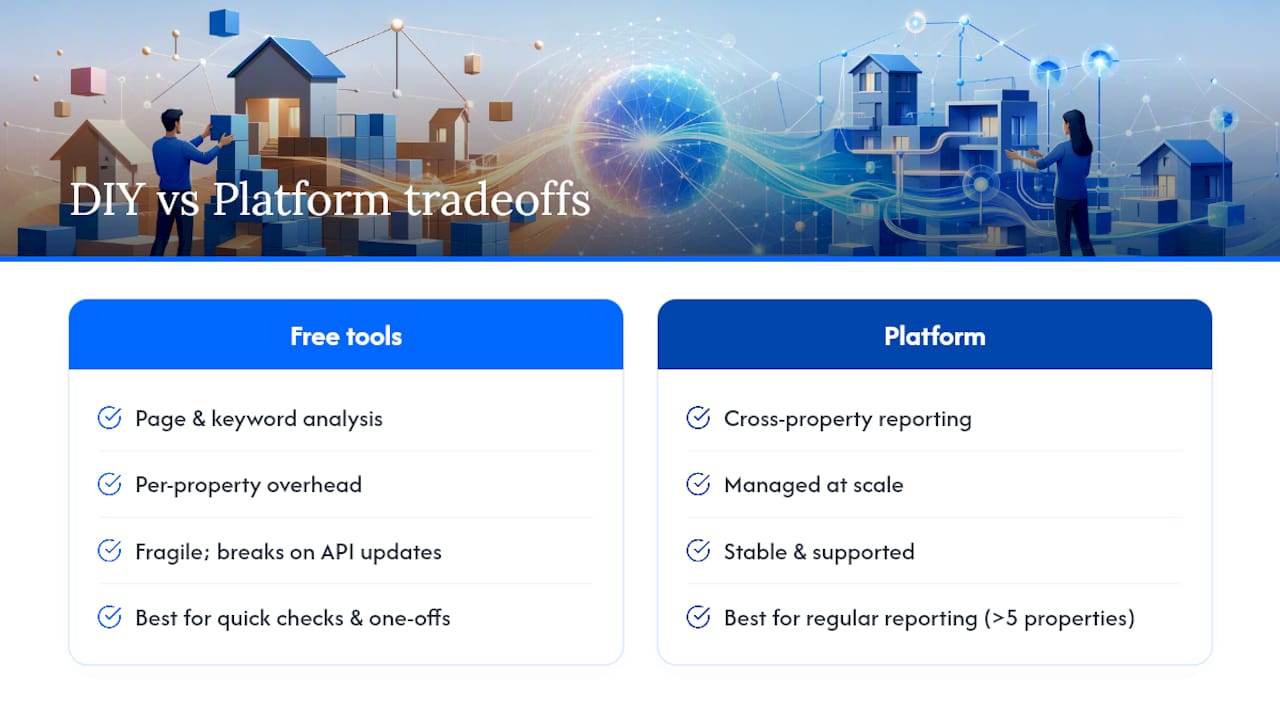
The free tools are genuinely capable. The Search Console API, used well, gives you everything you need for page- and keyword-level analysis across dozens of properties. BigQuery export is as close to a complete free dataset as you’ll find anywhere.
The problem isn’t the tools. It’s the operational surface area they create. Every new client property means another verification, another dataset, another script to maintain, and another quota to watch. That overhead is invisible in the first month and painful by month six.
Agencies that treat the API as a long-term solution often find themselves maintaining a fragile stack of scripts that breaks whenever Google updates an endpoint or a service account expires. The smarter move is to use the free methods for what they’re genuinely good at — quick checks, one-off analyses, and early-stage clients — and to move consolidated reporting onto a platform built for it before the operational debt becomes a retention risk.
The decision rule is simple: if you’re managing more than five properties and producing regular client reports, the time cost of DIY tooling exceeds the cost of a purpose-built platform. That’s not a criticism of the free methods. It’s just arithmetic.
Serpview removes the manual work from multi-property GSC analysis
Agencies running page- and keyword-level searches across multiple properties spend real time on setup, maintenance, and manual exports. Serpview consolidates that work into a single dashboard that connects directly to your GSC properties, surfaces up to 50,000 rows of data per property, and generates client-ready reports without a line of code.

You get pre-built cannibalization checks, CTR benchmarking, content decay heatmaps, and algorithm update overlays — all in one place. White-label sharing lets you send clients a live dashboard without exposing your workflow or your GSC credentials. For SEO automation tools that complement a consolidated reporting setup, the ecosystem around Serpview covers the full agency stack.
Connect your first property in minutes at serpview.com and see your cross-property data in a single view.
Useful sources and links
| Resource | What you’ll find there |
|---|---|
| Search Console API — Google Developers | Official API reference: endpoint structure, authentication, pagination with startRow, and the 50,000-row daily quota. |
| About Search Console API data and limits | Explains filtering, aggregation, and per-property quota enforcement for the searchAnalytics.query endpoint. |
| Bulk data export to BigQuery — Google Search Central | Step-by-step setup guide covering project ID entry, dataset naming, location selection, and partition expiration rules. |
| Download Search Console report data | Documents the 1,000-row UI export limit and available formats (Google Sheets, Excel, CSV). |
| Search Console account and property limits | Covers the 1,000-property-per-account cap and guidance on account management strategies. |
| How to Make Search Console Work Harder | Practitioner tactics for multiplying per-property API quotas using subfolder properties. |
| GSC API Limits & Fixes — Similar AI | Third-party analysis of the 50K quota, BigQuery as the gold-standard export, and quota-management strategies. |
FAQ
What is the row limit for free Google Search Console exports?
The UI export caps at 1,000 rows. The Search Console API allows up to 50,000 rows per property per day using startRow pagination.
How do you paginate past the default API row limit?
Set startRow to the number of rows already retrieved and repeat the request. Continue until the response returns fewer rows than your rowLimit value.
Is BigQuery export from Search Console really free?
The export itself is free, but Google Cloud charges for storage and for bytes scanned in queries. Keep costs low by using date-partitioned queries and setting appropriate partition expiration.
How many properties can one Search Console account hold?
Google’s limit is 1,000 properties per account. Agencies managing large portfolios should use dedicated accounts per client tier and audit properties quarterly.
When should you use Serpview instead of the free API?
Serpview is the better choice when you need consolidated cross-property reporting, client-ready dashboards, and pre-built reports like cannibalization checks — without maintaining custom scripts or managing API quotas manually.
Recommended
Ready to unlock your full GSC potential?
SERPView helps you access all your Google Search Console data without limitations. Start your free trial today.
Get Started Free