
Agencies: Build Scheduled SEO Reports That Export Up to 50,000 Rows
SERPView Team
SEO Analytics
Scheduled SEO reports automate the recurring delivery of chosen KPIs, pulled from Google Search Console, GA4, rank trackers, and crawl tools, to whoever needs to see them, on a set calendar. The value is consistency: no missed month, no manual export at 11 p.m. before a client call. Your first move is simple. Pick a cadence, connect your core data sources, and let the system carry the repetitive work while you handle the interpretation.
TL;DR:
- Automated reports scale efficiently, enabling agencies and teams to manage dozens of clients without increasing manual effort or risking errors.
- The main KPIs should focus on visibility, traffic, conversions, and key ranking changes, limited to a few pages or metrics to avoid information overload.
- Monthly reports are suitable for most cases, but weekly or quarterly cadences are better for active experiments or high-level strategic reviews, respectively.
- To ensure data accuracy, always verify the setup before sending, confirm date ranges, and regularly update connection credentials and report templates.
- Using platforms like SERPView overcomes data export caps from Google Search Console, allowing larger exports and easier management of multiple client accounts or long-tail keywords.
Table of Contents
- What Are Scheduled SEO Reports and Why Automate Them?
- Which KPIs and Visuals Belong in a Scheduled Report?
- How Often Should You Send Scheduled SEO Reports?
- How to Set Up Scheduled SEO Reports Step by Step
- Common Mistakes That Undermine Automated Reports
- Building a Workflow That Keeps Automation Reliable
- Why SERPView Fits the Scheduled Reporting Workflow
- Keeping Client Data Secure When Reports Run on Autopilot
- A Practitioner’s Checklist for Month-End Reporting
- Get Scheduled SEO Reporting Running This Week
- Sources
- FAQ
What Are Scheduled SEO Reports and Why Automate Them?
A scheduled SEO report is a recurring document or live dashboard that pulls the same set of metrics, from the same sources, on the same calendar, without someone rebuilding it from scratch each cycle. The report itself isn’t new. What changes with automation is who does the assembling: a connector and a template, not an analyst copying numbers into a spreadsheet at midnight.
The typical use cases fall into three buckets. Client updates for agencies managing retainers. Executive summaries for in-house teams that need to justify SEO spend to leadership. And internal monitoring for SEO teams tracking their own experiments week over week. Each has a different audience, but the underlying mechanics of collecting and formatting data stay the same, which is exactly why automation works so well here.
The benefits compound as your account list grows:
- Scalability: One template serves ten client accounts instead of ten separate manual builds.
- Accuracy: Automated pulls remove the copy-paste errors that creep into manual spreadsheet work.
- Consistent delivery: Reports land on the same day every cycle, which builds trust with stakeholders who plan around them.
- Faster anomaly detection: A ranking drop or traffic dip shows up in the next scheduled cycle instead of surfacing weeks later when someone finally checks.
Automation should handle the recurring data collection. The added value agencies deliver still comes from human commentary layered on top. That distinction matters for how you structure your workflow. A tool can tell you organic sessions dropped 12% last month. It cannot tell your client why that drop happened, whether it was seasonal, algorithmic, or a technical regression, or what to do about it. Automation handles the “what.” Analysis handles the “why” and the “so what.” Skip the human layer and you’re just mailing spreadsheets on a timer.
Which KPIs and Visuals Belong in a Scheduled Report?
Reports that try to show everything end up showing nothing clearly. An effective SEO report centers on a handful of KPIs, tied to visibility, traffic, conversions, and revenue, rather than every metric a dashboard can generate.
Here’s the prioritized list worth including in most scheduled reports:
- Visibility and impressions: How often your pages appear in search results, pulled from GSC.
- Organic sessions: Actual visits driven by organic search, from GA4.
- Conversions and revenue: The business outcome tied to that traffic, whether that’s leads, signups, or sales.
- Top pages: Which URLs are driving the most traffic and where they’re trending.
- Ranking movers: Keywords that gained or lost significant position since the last cycle.
- Technical health score: A rollup of crawl errors, index coverage issues, and site speed flags.
- Backlink highlights: New links earned or lost, especially from high-authority domains.
Focused monthly reports run two to four pages plus an appendix for detailed tables, and that length constraint forces you to prioritize. A trend line works best for showing momentum over time. A ranked table works best for showing which pages or queries deserve attention this cycle. Annotated spikes, a small marker noting “algorithm update” or “site migration” next to a sudden jump or drop, save you from fielding the same question three different ways in a client call.
Every KPI on the report should connect to a next action. A ranking drop on a money page points to a content refresh. A conversion dip on high-traffic pages points to a landing page review. Listing the metric without the recommended response turns your report into a data dump instead of a decision-making tool, which defeats the purpose of scheduling it in the first place.
How Often Should You Send Scheduled SEO Reports?
Cadence depends on what the report is for, not on what feels thorough. Three patterns cover most situations:
- Monthly works for the majority of client retainers and internal stakeholder updates. SEO moves slowly enough that weekly monthly change often reflects noise rather than signal, and monthly cadence gives you enough data to spot real trends.
- Weekly makes sense for active experiments, a site migration, a major content push, a technical fix rollout, where you need to catch problems before they compound over a full month.
- Quarterly suits strategic reviews aimed at leadership, where the audience cares about the trajectory of the SEO program, not the weekly fluctuations underneath it.
Timing matters as much as frequency. Search Console data carries a typical lag, so scheduling your monthly export the day after month-end often means pulling an incomplete data set. Push your automated send to three or four days after the month closes, and you’ll capture a fuller, more stable picture.
Versioning keeps your comparisons honest over time. Label each report clearly with its date range, and document any changes to tracking setup, a new GA4 property, an updated conversion goal, a rank tracker keyword list revision, right in the report itself. Annotate anomalies as they happen rather than trying to reconstruct the explanation three months later when someone asks why April looks strange. A reporting cadence built around these guardrails holds up under scrutiny in a way that a rushed, unlabeled export never does.
How to Set Up Scheduled SEO Reports Step by Step
Start with the template decision, because it shapes everything downstream. A live dashboard link suits stakeholders who want to check in whenever they like. A PDF suits clients who prefer a fixed monthly document they can forward internally. A slide deck suits executive audiences who want the narrative pre-built, not raw tables to interpret themselves.
Setup follows a predictable sequence:
- Authorize your reporting tool to access Google Search Console for the properties you’re tracking.
- Link the corresponding GA4 property, matching date ranges and goal definitions to what GSC reports.
- Import rank tracking and crawl data, either through native connectors or scheduled CSV exports if your tool doesn’t integrate directly.
- Set the delivery schedule, choosing the send date, format, and recipient list.
- Run a test cycle before going live with client-facing delivery.
Before the first real send goes out, run through a short verification pass: check that the date range matches what you intended, confirm every link in the report resolves correctly, and compare a sample of numbers against the source platform directly. Automated dashboard setups that centralize GSC and GA4 in one place cut a meaningful chunk of this manual checking down, since you’re verifying one connected system instead of reconciling multiple exports by hand.
Pro Tip: Keep a shared changelog of every template edit and connector change. When a client asks why a number looks different from last quarter, you’ll have the answer in seconds instead of digging through old files.
Common Mistakes That Undermine Automated Reports
Automation removes manual labor, but it introduces its own failure points if you’re not watching for them.
The most common mistakes include:
- Wrong date ranges: A misconfigured template pulling last month’s data instead of this month’s, often unnoticed until a client flags it.
- Missing annotations: A traffic spike or drop with no explanation attached, leaving stakeholders to guess or assume the worst.
- Connector breakage: An expired GSC token or a revoked GA4 permission that silently stops data from flowing, producing a report with gaps nobody catches until it’s too late.
- Over-reporting noisy metrics: Filling the report with volatile day-to-day numbers that don’t inform any decision, which buries the KPIs that actually matter.
Troubleshooting these issues is mostly a matter of habit rather than technical skill. Confirm the date range on every scheduled send before it goes out, not after a client asks. Run periodic test exports against the source platform to catch drift early. Re-authenticate connectors on a set schedule rather than waiting for a broken report to reveal the problem. And sanity-check total volumes against your own memory of the account. If organic sessions suddenly triple with no known cause, that’s more likely a tracking error than a genuine win.
The guardrail worth adopting across the board: keep the main report focused on the KPIs that drive decisions, and move granular detail into an appendix. A report trying to explain everything ends up explaining nothing well, and readers start skimming past the parts that actually matter.
— Utsav Chopra
Building a Workflow That Keeps Automation Reliable
A one-time setup isn’t enough. Scheduled reporting holds up over time only when it follows a repeatable process, and that process looks the same whether you’re running it for one client or fifty.
- Build the template once, defining the KPIs, visuals, and layout that match your audience.
- Test run it against a live account before scheduling it for real delivery, checking that every number and link resolves correctly.
- Schedule the recurring send, choosing a cadence and timing that accounts for data lag.
- Verify each cycle before it reaches the recipient, confirming date ranges and spot-checking figures against source platforms.
- Add human commentary, translating the numbers into what changed, why, and what happens next.
Someone needs to own each stage. Typically, whoever built the template signs off on the first automated send, confirming the setup works end to end before it touches a client inbox. Ongoing annotation duties usually fall to whoever manages the account day to day, since they have the context to explain a ranking shift or a traffic dip in plain language.
Templates and KPIs aren’t static either. Revisit them every quarter or two. A KPI that mattered when a client was focused on link building might matter less once the priority shifts to technical health or content expansion. Structuring client reports around the metrics that currently prove revenue impact, rather than the ones that mattered a year ago, keeps the whole system worth the recipient’s time.
Why SERPView Fits the Scheduled Reporting Workflow
Every step described above, connecting sources, prioritizing KPIs, exporting at scale, runs into the same wall eventually: native tools cap what you can pull. Google Search Console’s own interface stops at 1,000 rows, which is workable for a small site and unworkable for an agency tracking a client with ten thousand ranking keywords across mobile and desktop.
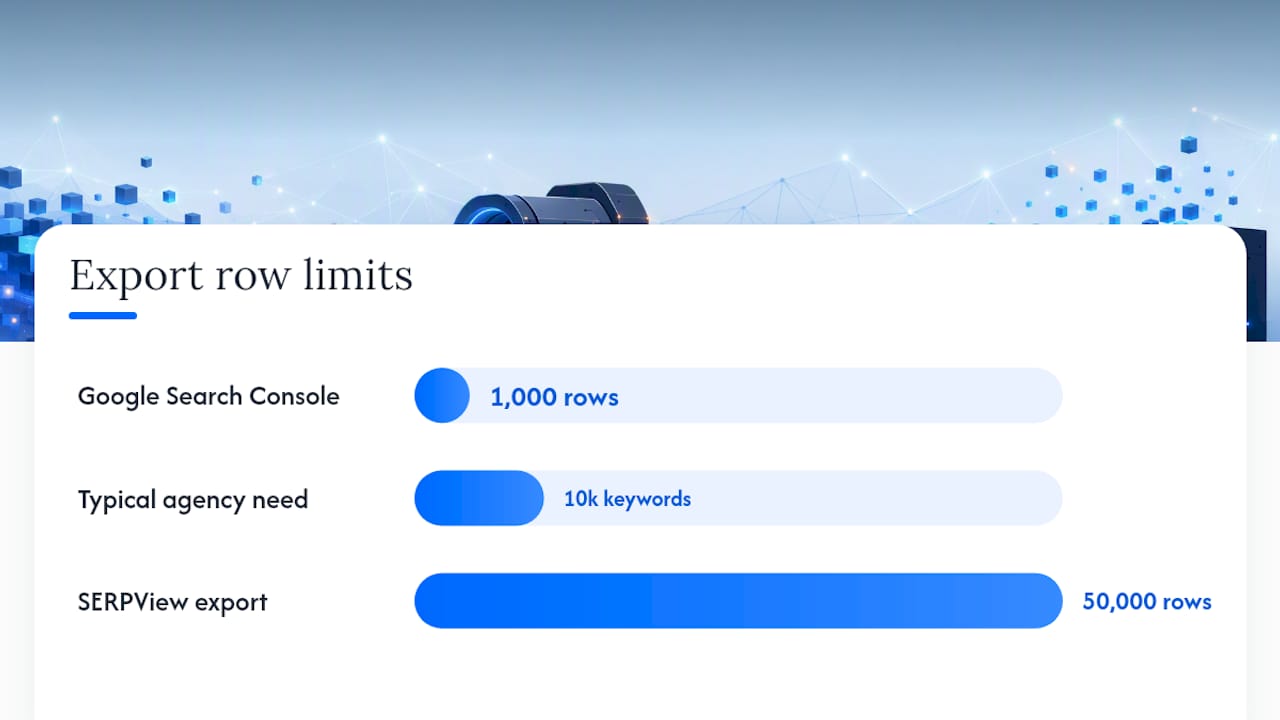
SERPView addresses that limitation directly. The platform consolidates analytics across multiple properties into one dashboard and supports exports up to 50,000 rows, which changes what “scheduled report” can actually contain. Instead of a capped snapshot, you get a fuller data set to build trend analysis and keyword-level detail on.
That capacity matters most in a few specific situations:
- Agencies managing many properties benefit from viewing multiple client accounts without switching between separate GSC dashboards for each one.
- Enterprise exports for large sites need the deeper row count to capture long-tail keyword performance that a 1,000-row cap would simply cut off.
- White-label client sends work well with shared dashboards that give clients a live, branded view instead of a static PDF that goes stale the day it’s sent.
SERPView’s own reporting on enterprise workflows points to shared dashboards and larger exports as the mechanism that lets agencies scale client reporting without rebuilding the process for every new account. For a team already following the build, test, schedule, verify workflow outlined above, that removes one of the biggest bottlenecks: the row limit that forces a choice between depth and speed.
Keeping Client Data Secure When Reports Run on Autopilot
Automating delivery means data moves through more hands and more systems than a manual report ever would, and that raises the stakes on how you handle it.
Start with access control. Every connector, GSC, GA4, rank tracker, crawl tool, needs an authentication token or API key, and each one is a potential entry point if left unmanaged. Limit access to the accounts and properties each team member actually needs, and revoke credentials promptly when someone leaves a project or the agency.

Email delivery deserves its own scrutiny. A scheduled report sent to the wrong recipient list, especially one containing client revenue figures or conversion data, is a real risk, not a hypothetical one. Double-check recipient lists whenever a report template changes, and consider shared dashboard links over email attachments for sensitive figures. A link can be revoked or permission-restricted; a PDF already sitting in someone’s inbox cannot.
Data retention matters too. If your reporting tool stores historical exports, know how long that data persists and whether it’s encrypted at rest. Clients increasingly ask these questions directly, particularly agencies working with regulated industries like finance or healthcare, so having a clear answer ready protects the relationship as much as the data itself.
A Practitioner’s Checklist for Month-End Reporting
Month-end reporting gets messy fast if you’re managing more than a couple of accounts, so a short checklist beats trying to remember every step from memory. Before any report goes out, confirm the date range matches the intended cycle, spot-check three or four numbers against the source platform, and make sure every ranking movement has a one-line explanation attached.
Client communication benefits from predictability more than polish. Sending the report on the same day every month, even a rough one, builds more trust than an occasional beautifully designed report that arrives whenever it’s convenient. Consistency is the actual deliverable half the time.
This section will incorporate the author’s professional background and relevant case study examples in a future update.
Scheduled reporting isn’t about eliminating judgment from the process. It’s about freeing up judgment for the parts that actually need it.
Get Scheduled SEO Reporting Running This Week
SERPView gives you the row capacity and shared dashboard structure to run the workflow this article just walked through, without hitting Search Console’s export ceiling every time an account grows. Instead of stitching together capped exports and manual spreadsheet updates, you get one dashboard covering every connected property, with room to actually see keyword-level detail across a full account.

The first two actions worth taking are straightforward. Sign up and connect your Google Search Console and GA4 properties, then set up your first shared dashboard so you can see whether the automated numbers match what you’re pulling manually today. From there, layer in custom annotations to mark algorithm updates, migrations, or campaign launches directly on the timeline, so your next scheduled report already has the context built in instead of requiring you to reconstruct it later. Start with the Google Search Console connection and build outward from there.
Sources
Four data sources form the backbone of any credible scheduled SEO report, and each one answers a different question.
Google Search Console shows what queries are triggering impressions and clicks, and where your average position sits for each. It’s the closest thing to raw visibility data you’ll get from Google directly, though its native interface caps exports at 1,000 rows, which becomes a real constraint once you’re tracking a site with thousands of ranking keywords.
GA4 picks up where GSC leaves off: sessions, engagement, and conversions once a visitor lands on the site. This is where organic traffic turns into a business outcome, which is the number executives actually care about.
Rank tracking tools provide daily or weekly position snapshots for a defined keyword set, useful for catching movement that GSC’s rolling averages can smooth over.
Crawl data flags the technical issues, broken links, orphaned pages, index coverage gaps, that quietly erode the other three metrics if left unchecked.
A few connector realities are worth planning around:
- How to create an SEO report + benefits, best practices, and examples | HubSpot
- SEO Reporting Software & Report Generator | AnalyzeData
Before trusting any automated export, spot-check it against the source platform directly. Pull the same date range manually in GSC or GA4 and compare totals. Tools like automated audit platforms that run continuous monitoring can help catch connector breakage between report cycles, rather than after a client asks why last month’s numbers look wrong.
Pro Tip: Run your first three scheduled reports in parallel with manual pulls. Once the numbers match consistently, you can trust the automation and drop the manual check.
FAQ
What Is an SEO Report?
An SEO report is a structured summary of how a website performs in organic search, typically covering visibility, traffic, conversions, and revenue pulled from sources like Google Search Console and GA4. Its purpose is to show how organic search contributes to business growth, not just to list raw numbers. A scheduled SEO report automates that summary so it arrives on a set calendar instead of getting rebuilt manually each time.
Is SEO Still Relevant?
Yes. Organic search remains one of the primary ways people discover websites, products, and services, and that hasn’t changed with the rise of AI-powered search tools. If anything, the shift toward AI-generated answers makes structured, well-organized content and technical health more important, since both traditional rankings and AI citations tend to favor clearly organized, authoritative pages.
Can ChatGPT Do an SEO Audit?
ChatGPT and similar tools can help interpret data, draft commentary, or flag obvious issues you describe to it, but it cannot connect directly to your Search Console or GA4 accounts to pull live data on its own. A proper technical audit still requires a crawl tool and access to real performance data, with AI serving as an assistant for analysis and writing rather than a replacement for the data pull itself.
What Is the 80/20 Rule in SEO?
In SEO, a small share of your pages, keywords, or fixes tends to drive the majority of your organic results. In reporting terms, this supports keeping scheduled reports focused on the KPIs and pages that actually move the needle, rather than listing every metric a dashboard can generate.
How Often Should Scheduled SEO Reports Be Sent?
Monthly cadence works for most client retainers and internal updates, since SEO trends usually need a full month to separate signal from noise. Weekly cadence suits active experiments or migrations, and quarterly suits strategic reviews aimed at leadership. Schedule monthly sends a few days after month-end to account for Search Console’s typical data lag.
Recommended
Ready to unlock your full GSC potential?
SERPView helps you access all your Google Search Console data without limitations. Start your free trial today.
Get Started Free