
Agencies: Stop Sending Unread SEO Reports With Serpview 50,000 Rows
SERPView Team
SEO Analytics
The fastest way to share SEO reports is a short-written summary paired with either a live shareable dashboard link or a branded PDF snapshot, with a scheduled email handling recurring delivery. Use the dashboard link for clients who want ongoing access, the PDF for board-level reviews and archives, and automated scheduling for anything recurring. Automation and consistent branding do more than save you time. They also build the kind of client trust that keeps retainers renewed.
TL;DR:
- Shareable dashboard links suit clients who check data regularly and prefer live updates, but require strict permissions and access control.
- PDF snapshots are ideal for official records and board presentations, but should be paired with current exports for accuracy.
- Automating data extraction from Search Console, GA4, and CRM systems saves time and maintains consistency across multiple client reports.
- Using a small set of key metrics focused on rankings, traffic, and conversions enhances client understanding and prevents information overload.
- A fixed reporting schedule with consistent format and clear ownership of action items encourages trust and accountability in ongoing SEO work.
Table of Contents
- What Belongs in a Client-Facing SEO Report
- Which Sharing Method Fits Which Audience?
- How Do You Automate SEO Report Generation and Delivery?
- How Often Should You Send SEO Reports?
- Should You Use a Live Template or a Final PDF?
- How Do You Keep Shared Reports Secure?
- How Serpview Handles Large-Scale Client Reporting
- The 80/20 Case for Simpler SEO Reports
- Turn Large Search Console Exports Into Reports Clients Actually Open
- Templates and Guides Worth Bookmarking
- Sources
- FAQ
What Belongs in a Client-Facing SEO Report
A report that gets read has a structure the client can predict. If they have to hunt for the number that matters, you’ve already lost their attention. The strongest client-facing SEO reports open with a short executive summary and then move into supporting detail, not the other way around.
The executive summary should answer three questions in one paragraph: what happened, why it happened, and what you’re doing about it. State the verdict first, in plain language, before any chart or table. Something like: “Organic traffic grew 14% this month, driven by three new page-one rankings in the plumbing repair cluster. We’re now shifting budget toward the water heater cluster, which is showing early momentum.”
Below that summary, the core metrics section should cover ground clients actually care about, not every number your tools can produce. A practical client-ready template typically includes ten components: executive summary, organic traffic breakdown, keyword rankings, technical health, backlink profile, content performance, conversions, a competitor snapshot, AI search visibility, and prioritized action items.
At minimum, build your KPI section around these:
- Rankings, clustered by topic rather than dumped as a flat keyword list, so a client can see “local plumbing” performance instead of scanning fifty individual terms.
- Organic traffic from GA4, segmented by landing page group when possible.
- Conversions or goal completions, tied to the specific pages or keyword clusters that drove them.
- Branded versus non-branded traffic, which tells a client whether growth is coming from new searchers or from people who already know the business.
- Technical health, summarized as a short list of issues rather than a raw crawl export.
- Backlink activity, framed as quality and relevance rather than raw count.
- Content performance, showing which pieces are gaining or losing visibility over time.
None of these numbers mean anything without context. Always show a comparison, whether month over month or against the same period last year, and benchmark against a realistic target rather than an arbitrary one.
The last, and most skipped, ingredient is ownership. Every prioritized issue in the report needs a named owner and a next step. “Fix duplicate title tags” is a task nobody claims. “Content team to update 12 duplicate titles by the 15th” is a task somebody can be held to. Reports that assign action items get acted on. Reports that just list problems get filed away.
Which Sharing Method Fits Which Audience?
Every SEO reporting workflow eventually runs into the same question: link, PDF, or email? The honest answer is that the right method depends on who’s receiving it and what they plan to do with the information.
-
Shareable dashboard link. This is the best option for clients who check in regularly or who like to explore data themselves. A live link stays current without you re-sending anything, and shareable links are often the fastest way to distribute SEO reports precisely because they skip the file-attachment problem entirely. The tradeoff is permissions. Set links to read-only, isolate each client’s data from every other client’s, and revoke access the moment a contract ends.
-
Branded PDF snapshot. PDFs win for monthly strategic reviews, board presentations, and anything that needs to exist as a permanent record. A PDF can’t be edited, won’t change after you send it, and looks professional printed or projected in a meeting. The downside is staleness. A PDF from March tells you nothing about April, so pair it with a fresh export each cycle rather than reusing an old file with a new cover page.
-
Email summary with attached link or PDF. The summary is the delivery mechanism, not the report itself. Keep it to three or four sentences: what moved, why it moved, and what you’re doing next. This pattern, pairing a short written summary with the full link or attachment, directs attention to what matters before the client even opens the full document.
-
Spreadsheets or CSV exports. These belong with technical teams and developers who want to filter, pivot, or cross-reference raw data rather than read a narrative. Reserve raw exports for people who’ve asked for them specifically. Sending a spreadsheet to a marketing director who wanted a summary just creates more work for both of you.
A hybrid approach usually wins. Send the email summary every cycle, link the live dashboard for anyone who wants to dig deeper, and generate the PDF only when a formal record is required. Overcomplicating delivery, scattering data across five attachments and three formats, creates the exact admin friction that makes reports harder to open, understand, and act on.
How Do You Automate SEO Report Generation and Delivery?
Manual reporting doesn’t scale past two or three clients. Once you’re managing five, ten, or fifty properties, the collection process itself becomes the bottleneck, not the analysis.
Start by automating the extracts, not the narrative. Rankings, GA4 traffic, and conversion data should flow into your report template on a schedule, without anyone manually exporting a CSV and pasting it into a slide deck. Automating report exports can save teams substantial time, but the time savings only materialize if the connection is set up correctly the first time.
Your connector priorities should follow this order:
- Google Search Console, for rankings, impressions, and click-through data.
- GA4, for traffic, engagement, and conversion events.
- Any CRM or ads platform where you need to tie organic performance to revenue or paid-search overlap.
A free option worth knowing about here is Looker Studio, which connects natively to both Search Console and GA4 and supports both PDF export and read-only link sharing, making it a reasonable starting point before you invest in a dedicated platform.
Template versioning matters more than most agencies realize. If every client report is a one-off document, you’re rebuilding structure every month instead of just swapping data. Build one master template with parameterized fields (client name, date range, branding colors) so updating twenty client reports means changing twenty variables, not rewriting twenty documents. A guide to automating SEO dashboards over a structured setup period walks through this kind of build for teams managing multiple GSC and GA4 properties at once.
Pro Tip: Before you trust any scheduled export, run it manually once and compare the output against a fresh pull straight from the source. API quotas, data sampling, and Search Console’s row limits can quietly distort numbers, and you want to catch that during a test run, not during a client call.
The most overlooked automation pitfall is treating the export as the finished product. Automate the data pull, but keep a human in the loop to translate what the numbers mean for that specific client’s business, because a spreadsheet full of correct numbers still needs someone to explain why they matter.
How Often Should You Send SEO Reports?
Cadence is a promise. Once you set a rhythm, clients start expecting it, and breaking that rhythm damages trust faster than a bad month of rankings does.
Three cadences cover almost every stakeholder relationship:
- Monthly strategic report. This is the full narrative version, complete with prioritized action items, sent to executives, account owners, and anyone making budget decisions. It should read like a briefing, not a data dump.
- Weekly tactical snapshot. A short, KPI-only update for marketing teams who want to track momentum between the big monthly conversations. Five metrics, no narrative required.
- Ad-hoc alerts. Reserved for genuinely urgent issues, sudden indexing drops, a Core Web Vitals failure, a major ranking collapse. These go out immediately to the account owner, not batched into the next scheduled report.
Whichever cadence you choose, send the report on the same day each cycle and keep the metric order consistent every time. A client who knows the traffic chart always appears second and the conversions table always appears fourth will read your reports faster and trust them more. Consistency is a small thing that compounds.
Should You Use a Live Template or a Final PDF?
The format question comes down to whether the report needs to keep moving after you send it, or whether it needs to freeze in place.
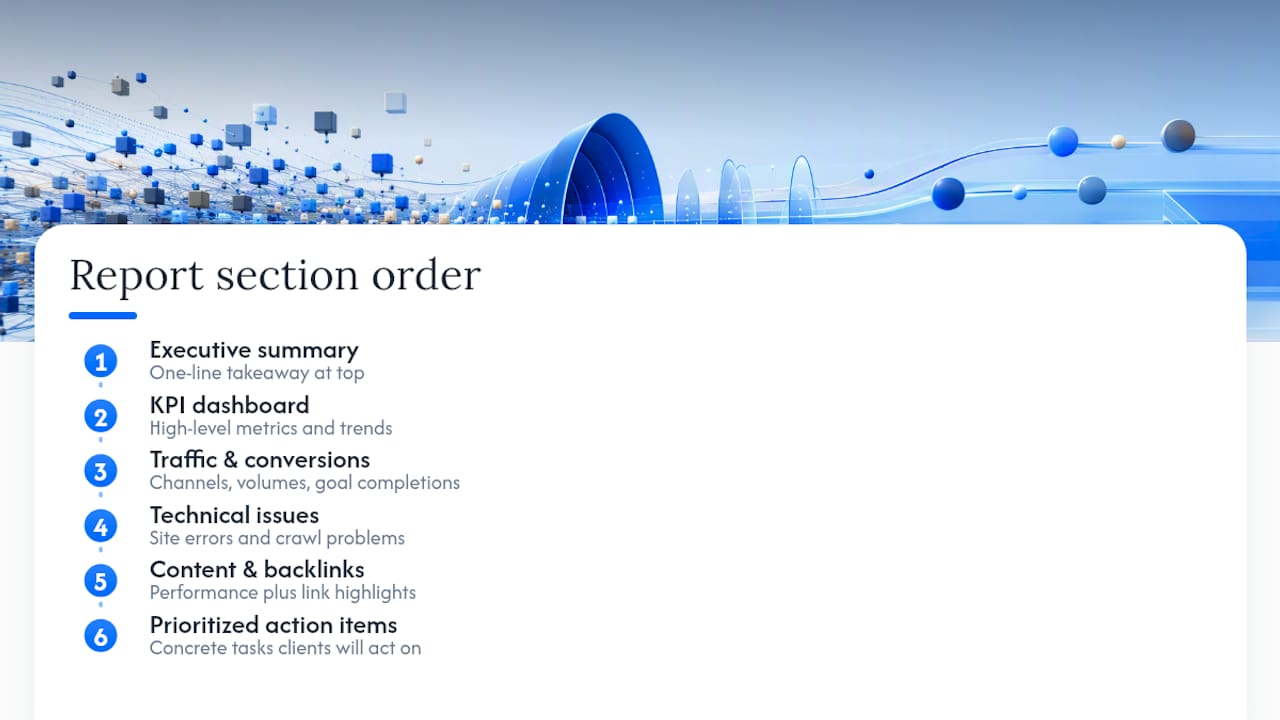
A reusable template, whether built in Google Sheets, Looker Studio, or a dedicated reporting platform, should carry the same section order every time: executive summary, KPI dashboard, traffic and conversions, technical issues, content performance, backlinks, and prioritized action items last. That final section is the one clients actually act on, so don’t bury it under six pages of charts.
Use a live sheet or dashboard when the client wants to explore data themselves between meetings. Use a PDF when the report needs to be archived, printed, or presented to a board that won’t touch the underlying data at all. CSV exports stay reserved for technical stakeholders who want to manipulate the numbers directly.
Branding takes five minutes and changes how seriously a report gets treated. Add the client’s or your agency’s colors, a simple cover page with the date range and property name, and a one-line summary sentence at the very top of the first page. That single sentence, something like “Organic traffic up 9%, driven by content refreshes on the blog,” often gets read even by executives who skip everything else.
How Do You Keep Shared Reports Secure?
Every live link you send is a potential data leak if you’re not deliberate about permissions. Default to read-only access for anything you share externally. Editable dashboards belong internally, not in a client’s inbox.
Per-client isolation is non-negotiable for agencies managing multiple accounts. One client should never be able to see another client’s data through a misconfigured shared folder or a dashboard that pulls from a shared workspace without proper filtering. Platforms built for agency use, including white-label dashboards that keep client data separate while still allowing branded exports, handle this by design rather than leaving it to manual folder management.
Set expiration dates on links you share for one-time purposes, like a sales demo or a prospective client pitch, so access doesn’t quietly persist for months after the conversation ends. Keep a simple log of who has access to what. Before sending any live link, run through a short checklist: is this read-only, is it scoped to the right client’s data only, does it expire when it should, and would you be comfortable if this link ended up forwarded to someone outside the intended audience?
How Serpview Handles Large-Scale Client Reporting
Agencies managing a dozen client properties run into the same wall eventually: Google Search Console’s native export caps out at 1,000 rows, which hides most of the long-tail keyword data that actually explains traffic shifts.
Some SEO reporting platforms address that gap by ingesting data from multiple GSC properties, consolidating it into one view, and exporting up to 50,000 rows instead of the standard 1,000, which matters when a client’s keyword footprint runs into the thousands. From there, agencies can build a shared dashboard for ongoing client access or generate a PDF for the monthly review.
A few specifics worth knowing:
- Historical performance tracking often extends further back than most native tools allow, useful for showing trend lines instead of isolated monthly snapshots.
- Customizable filters let users slice data by device, country, or topic cluster without rebuilding the report from scratch.
- White-label sharing means the dashboard and exports can carry an agency’s branding, not a third-party logo.
For agencies juggling multiple accounts, consolidating exports this way tends to cut the manual data-pulling time that used to eat into billable hours, freeing that time for the analysis clients are actually paying for.
The 80/20 Case for Simpler SEO Reports
Most reporting failures aren’t caused by missing data. They’re caused by too much of it. Give a client forty metrics and they’ll remember none of them. Give them five that map directly to business outcomes, and they’ll remember all five and quote them back to you in the next renewal conversation.
The 80/20 principle applies cleanly here: a small handful of metrics, rankings movement, traffic trend, conversions, usually drives the vast majority of client decisions. Everything else is supporting detail that belongs in an annex, pulled out only when a client specifically asks or during onboarding when you’re establishing baselines.
I’d go further than most reporting guides do on this point. Clients don’t need more data. They need a translator. Attach a one-page explainer the first time you send a report, something that defines what “organic traffic” and “branded search” actually mean in plain terms. It costs you twenty minutes once and saves you a dozen confused emails over the life of the account. Clarity, not completeness, is what keeps a report from ending up unread in a folder.
— Utsav Chopra
Turn Large Search Console Exports Into Reports Clients Actually Open
Serpview gives agencies the row capacity that Google Search Console’s native export doesn’t: up to 50,000 rows across consolidated properties, instead of the 1,000-row ceiling that hides most long-tail keyword movement. That’s the practical advantage over piecing together manual exports property by property. Once the data’s consolidated, you can build a shared dashboard for clients who want live access, or generate a white-label PDF for the monthly strategic review.

Filters for device, country, and topic cluster let you customize each client’s view without starting from scratch every cycle, and historical tracking gives you the trend lines that make a one-line executive summary credible instead of anecdotal. If your team is spending more time exporting data than explaining it, that’s a workflow problem worth fixing before your next renewal cycle. Start by connecting a property and building your first shared dashboard to see how the consolidated export compares to your current process.
Templates and Guides Worth Bookmarking
A few resources are worth keeping on hand alongside your own reporting workflow:
- The free SEO client report template from CrawlRaven covers all ten sections discussed above and exports cleanly to PDF or Sheets.
- Reporting Ninja’s guide to client SEO reports has practical examples of cadence and structure.
- RankCoworker’s export guide walks through tool-specific export steps and common API pitfalls.
- Serpview’s own post on proving revenue through monthly client reporting covers cadence strategy in more depth.
- For teams weighing white-label reporting partners, BabyLoveGrowth’s white-label offering is worth a look for agencies scaling client volume.
Sources
- SEO Report Sharing: The Easiest Ways to Send Reports to Clients
- How to create SEO reports for your clients in 2026 (+ Examples)
- How to Easily Export SEO Reports: Methods for Different Tools (2026)
FAQ
What Is an SEO Report?
An SEO report summarizes a website’s organic search performance over a set period, typically covering rankings, traffic, conversions, and technical health, framed around what changed and what to do next.
Can ChatGPT Do an SEO Audit?
ChatGPT can help draft summaries, spot patterns in exported data, or explain technical issues in plain language, but it can’t crawl a live site or pull real-time Search Console and GA4 data on its own, so it works best as a writing aid alongside dedicated crawling and analytics tools.
What Is the 80/20 Rule in SEO Reporting?
It means prioritizing the small set of metrics, usually rankings movement, traffic trend, and conversions, that drive most client decisions, and pushing everything else into an optional annex rather than the main report.
Can You Give an Example of an SEO Report?
A typical client-ready report opens with a one-paragraph executive summary, then covers keyword rankings by cluster, organic traffic from GA4, conversions, technical health, backlinks, and content performance, closing with prioritized action items and owners; the CrawlRaven template is a solid free starting structure.
How Do I Share SEO Reports With Clients Who Aren’t Technical?
Lead with a short email summary in plain language, then attach either a branded PDF or a read-only dashboard link so the client can see the detail without needing to interpret raw data themselves.
Recommended
Ready to unlock your full GSC potential?
SERPView helps you access all your Google Search Console data without limitations. Start your free trial today.
Get Started Free