
Stop Stitching CSVs: Agency Operations for Team Access SEO Tools
SERPView Team
SEO Analytics
Team access SEO tools are analytics platforms built for multiple users, not a single login. They combine role-based access control, cross-property Google Search Console aggregation, and client-ready reporting so agencies and multi-site teams can work from one shared source of truth. If you’re evaluating one, your next move is simple: score every candidate against a must-have feature checklist before you sign a contract, not after.
TL;DR:
- Role-based access control is essential for managing permissions and avoiding security risks in team workspaces.
- Platforms should support API-based data aggregation from multiple search and analytics tools, not manual CSV exports.
- Export limits must support at least 50,000 rows to accommodate long-tail queries and detailed audits.
- Regular quarterly access reviews and audit logs prevent permission drift and maintain security integrity over time.
- Combining ongoing dashboards with scheduled PDF reports provides comprehensive, trustworthy insights for clients.
Table of Contents
- Why Agencies and Multi-Site Teams Need Team Access SEO Tools
- What to Require From a Team-Access SEO Platform
- How to Onboard a Team and Connect Properties Correctly
- Access Governance and Security Controls That Actually Hold Up
- Combining Dashboards and Scheduled Reports Without Losing Anyone’s Trust
- The Mistakes That Break Team Reporting (And How to Fix Them Fast)
- Why an Operations-First Model Beats Ad-Hoc Processes
- Where SERPView Fits Into a Team-Access Rollout
- Sources
- FAQ
Why Agencies and Multi-Site Teams Need Team Access SEO Tools
Google Search Console works fine for one person watching one property. It falls apart the moment three analysts, an account manager, and a client all need to see the same numbers without emailing spreadsheets back and forth. Treating multi-site SEO as an operations problem, rather than a reporting chore, is what separates agencies that scale from ones that drown in manual exports every month, according to a multi-site management playbook from AI SEO Agents.
Centralized, team-based SEO tools solve a handful of recurring headaches:
- Shared visibility cuts duplicated work when two team members pull the same GSC data by hand.
- Automated alerts catch traffic drops or indexing issues across dozens of properties without anyone babysitting a dashboard.
- Always-on dashboards keep clients informed between formal reports, which reduces the “what’s happening with my site?” emails.
- Higher export ceilings support deeper appendices and audits than a 1,000-row CSV ever could.
What to Require From a Team-Access SEO Platform
Not every platform that calls itself “collaborative” actually supports team-based SEO strategies. Some just let you share a password. Here’s the priority order for evaluating real contenders:
- Granular role-based access control (RBAC). You need distinct viewer, analyst, and admin tiers, plus a clean team-invitation flow, not a shared login everyone remembers by sticky note.
- Cross-property aggregation via API. The platform should pull directly from Google Search Console, Bing, and GA4 rather than forcing manual CSV stitching every week.
- High row and export capacity. GSC caps native exports at 1,000 rows. Look for platforms supporting up to 50,000 rows so long-tail queries and low-traffic pages don’t disappear from your analysis.
- Service accounts, audit logs, and access registers. These make every pull traceable to a specific account instead of a shared credential nobody can identify later.
- White-label reporting and client portals. Scheduled PDFs, custom branding, and staged report templates turn raw data into something a client actually wants to open.
Pro Tip: Before you commit to a platform, ask for a sandbox account and try inviting a teammate with “viewer” permissions only. If they can accidentally edit a filter or export raw client data, the RBAC isn’t granular enough for agency work.
Agencies weighing best team SEO tools for the first time often underestimate how much time gets lost to permission chaos, not data analysis. Fix the access model first, and the reporting problems tend to shrink on their own.
How to Onboard a Team and Connect Properties Correctly
Rolling out a new platform across a client roster is where most teams get sloppy. A methodical rollout avoids the rework later.
- Inventory every client’s canonical domain, including www versus non-www and HTTP versus HTTPS, before connecting anything.
- Create dedicated service accounts for API connections. Never authenticate with a personal Google login, since onboarding best practices from BriefIQ consistently flag shared credentials as a security and continuity risk.
- Map each property to its own client workspace and assign least-privilege roles from day one.
- Build report templates and stage them internally before any client sees a live dashboard.
- Pilot the full workflow with one account, audit the output for accuracy, then scale to the rest of the roster.
- Set monitoring thresholds and route alerts to a named owner, not a shared inbox nobody checks on Fridays.
A few habits make this stick:
- Log the canonical domain decision in your onboarding doc so nobody re-litigates it during a data discrepancy.
- Assign one internal owner per client account, even if multiple analysts touch the data.
- Revisit the pilot results after two full reporting cycles before declaring the process “done.”
Access Governance and Security Controls That Actually Hold Up
Permissions rot. Someone leaves the agency, a client swaps contacts, a freelancer’s temporary access never gets revoked, and six months later nobody can say who has access to what. An access register listing every account, its role, and the date of last review is the simplest fix, and it’s the same principle Microsoft’s guidance on entitlement management recommends for enterprise identity systems generally.
Run access reviews on a quarterly cadence. It sounds tedious, but stale permissions are how “the intern who left in March” ends up with admin rights on a client’s production dashboard in August.
A few non-negotiables for teams handling client data at scale:
- Require service accounts for every automated pull, never personal logins.
- Demand immutable audit logs so you can trace a data change back to a specific user and timestamp.
- Treat SOC 2 Type II and ISO 27001 as baseline signals of enterprise-grade data handling, not marketing badges.
- Document your change history so a reporting discrepancy can be traced to its source in minutes, not days.
A platform with immutable audit logs and clear data lineage isn’t a luxury feature. It’s the difference between explaining a discrepancy to a client in five minutes and spending an afternoon reconstructing what happened.
Combining Dashboards and Scheduled Reports Without Losing Anyone’s Trust
The strongest reporting workflows pair two formats instead of picking one. Always-on dashboards handle day-to-day monitoring; scheduled PDFs handle the formal, dated record a client can file away, a combination Reportr’s agency reporting guide points to as the standard that reduces client friction.
A dependable monthly PDF template usually includes:
- An executive summary written in plain language, not metric dumps.
- A KPI snapshot benchmarked against the prior period.
- An insights-and-actions section tying numbers to specific next steps.
- A full appendix with query-level exports, which is where a 50,000-row export ceiling actually earns its keep during a client audit.
Stage every template internally first, and add anomaly alerts plus data-source health checks so a broken API pull never reaches a client before someone notices.
The Mistakes That Break Team Reporting (And How to Fix Them Fast)
Most reporting failures aren’t analytical. They’re operational.
- Authentication drift silently breaks pulls when a personal login expires or loses permissions. Service accounts plus active monitoring for failed pulls catch this before a client does, and automating reports without losing trust depends on exactly this kind of validation control.
- Incorrect property mapping happens when staging domains get connected instead of production, or www and non-www versions split the data in two. Validate canonical domains at onboarding, every time.
- Stale access accumulates quietly. Quarterly reviews are the fix, not a one-time cleanup.
- Broken exports and formula errors slip through when templates go live without a dry run. Stage and validate before delivery, not after a client flags the mistake.
Pro Tip: Set up a monthly “data health” check five days before reports go out. It catches authentication drift and mapping errors while there’s still time to fix them quietly.
Why an Operations-First Model Beats Ad-Hoc Processes
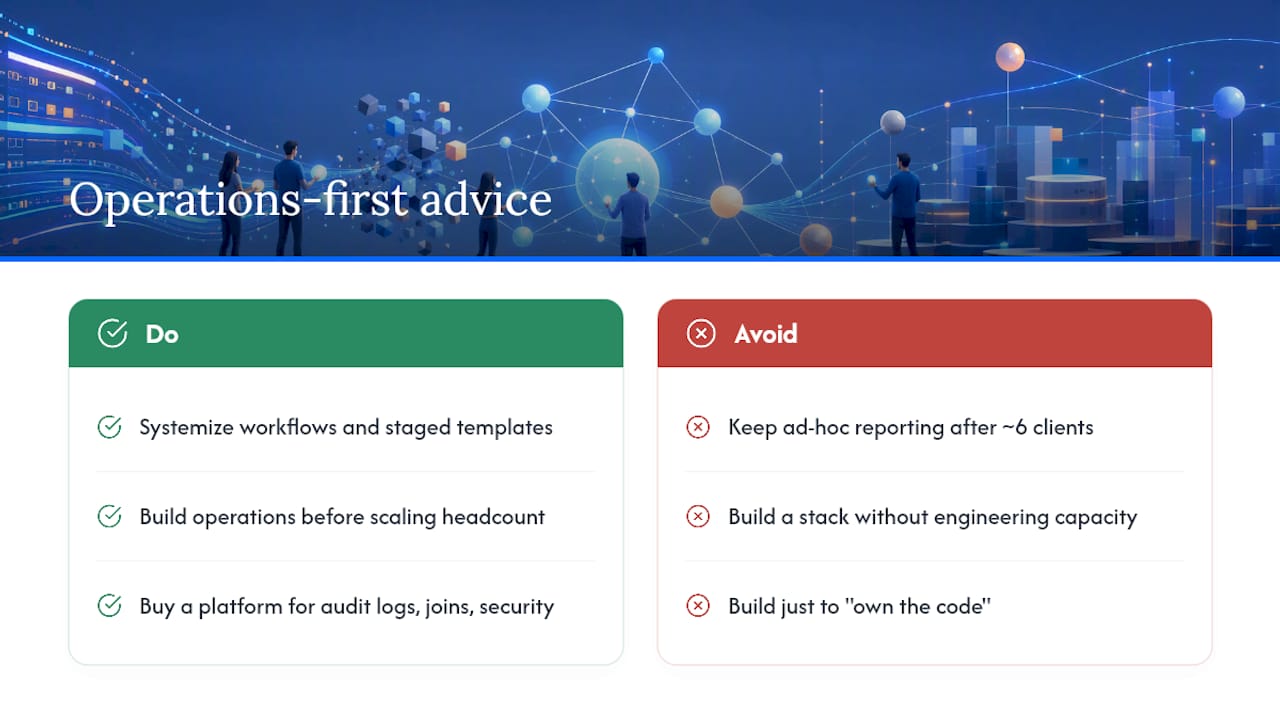
Ad-hoc reporting works until client number six. After that, every new account adds friction instead of shrinking it, because nothing is templated and nothing is reusable. Systemized workflows and staged report templates cut the marginal onboarding time for each new client, which is the entire point of building operations before you scale headcount.
Buy a dedicated platform when you need audit logs, cross-property joins, and security controls faster than your engineering team can build them. Build your own stack only if you have real engineering capacity and a genuine long-term data warehouse need, not just a preference for owning the code.
— Utsav Chopra
Where SERPView Fits Into a Team-Access Rollout
SERPView is built around the exact operational gaps this playbook covers: cross-property Google Search Console aggregation, exports up to 50,000 rows instead of the native 1,000-row cap, shared dashboards, and team invitations with role-based permissions.

Agencies managing a dozen or more client properties typically feel the difference first in reporting time, since white-label templates and scheduled PDFs replace the manual export-and-format routine most teams still run by hand. If your current setup means someone spends a Friday afternoon stitching CSVs together, that’s the specific problem SERPView’s shared dashboard and team invitation features were built to remove. Agencies offering branded client portals can also pair this with white-label reporting workflows for a fully client-facing setup. Start by connecting one client property and inviting a teammate as a viewer to see how the permission model holds up before rolling it out across your full roster.
Sources
For deeper detail on the standards and workflows referenced throughout this guide:
- Access reviews and entitlement management | Microsoft Learn
- SEO client onboarding: practical checklist | BriefIQ
- How to automate SEO reporting for multiple clients | Black & Gold SEO
FAQ
What Makes a Tool a “Team Access” SEO Platform?
It provides multi-user accounts with role-based permissions, pulls data across multiple properties through APIs rather than manual exports, and generates client-ready reports without sharing a single shared login.
How Many Rows Can Google Search Console Export Natively?
Google Search Console caps native exports at 1,000 rows per query, which is why platforms supporting up to 50,000 rows, like SERPView, matter for deep keyword and page-level analysis.
How Often Should Teams Review User Access?
Quarterly access reviews are the standard cadence for catching stale permissions before they become a security gap, following the entitlement management practices Microsoft recommends.
Should Agencies Share Personal Google Credentials With Clients?
No. Personal credential sharing causes authentication drift and breaks reporting continuity; service accounts and native role-based permissions are the safer standard for onboarding.
What Security Certifications Should Enterprise Clients Look For?
SOC 2 Type II and ISO 27001 are the baseline indicators of proper data lineage and audit-log integrity that enterprise clients typically expect from an analytics vendor.
Recommended
Ready to unlock your full GSC potential?
SERPView helps you access all your Google Search Console data without limitations. Start your free trial today.
Get Started Free