
How to Identify Content Refresh Opportunities in 2026
SERPView Team
SEO Analytics
The fastest way to find content refresh opportunities is to cross-reference three signals: pages losing clicks in Google Search Console, pages ranking in positions 11–20 with high impressions, and pages showing declining engagement or conversions in GA4. These pages already have organic authority. They just need a targeted update to reclaim ground.
Start with these four diagnostic checks:
- Declining clicks or impressions in GSC over the last 90 days compared to the prior period or the same period last year
- Striking-distance rankings (positions 11–20) with meaningful impression volume but few clicks
- High impressions, low CTR — pages Google is showing but searchers are skipping
- Falling engagement time or conversion events in GA4 on pages that previously converted
Pro Tip: Avoid refreshing every page that shows one weak signal. Multiply traffic value by closability (how close the page is to page 1) to rank candidates. A page at position 14 with 5,000 monthly impressions beats a page at position 35 with the same impressions every time.
Key Takeaways
Refreshing existing content with organic authority and measurable decay signals delivers faster ranking recovery than publishing new pages from scratch.
| Point | Details |
|---|---|
| Start with three signals | Cross-reference GSC click drops, striking-distance rankings (positions 11–20), and GA4 engagement losses to find the best candidates. |
| Score before you write | Apply a weighted matrix (traffic value, closability, effort, technical fixability) to rank candidates and avoid wasting time on low-impact pages. |
| Fix intent match first | Update headings, intro, and structure before touching statistics or metadata — format mismatches cause more ranking loss than outdated data. |
| Track every refresh | Use annotations and post-publish monitoring windows of 4–8 weeks to validate whether an edit caused the traffic change. |
| Serpview removes the data ceiling | Serpview exports up to 50,000 rows of GSC data across multiple properties, with pre-built decay heatmaps and prioritization reports that replace manual spreadsheet joins. |
Table of Contents
- How to set up a content discovery audit
- How to use Google Search Console to find content decay
- Which GA4 signals reveal content that needs a refresh
- Crawl and technical checks that surface thin or duplicate content
- Keyword and SERP opportunity checks for striking-distance pages
- Page-level quality checks: what to evaluate before refreshing
- How to build a scoring matrix to rank refresh work
- Tactical refresh checklist: what to change and in what order
- Relaunch checklist and what to track after publishing
- How to promote refreshed content and rebuild internal linking
- Audit cadence and governance: how often to re-audit
- Practical tools and a minimal template to run your first refresh program
- How Serpview speeds up content discovery and prioritization
- How to prioritize refreshes at scale
- Serpview makes content refresh discovery faster
- Sources
- FAQ
How to set up a content discovery audit
A content audit starts with a single spreadsheet that joins data from three sources: Google Search Console, GA4, and a site crawl. The canonical URL is your join key across all three.
Your inventory needs these fields at minimum:
| Column | What to capture |
|---|---|
| URL | Canonical URL (no trailing slash variation) |
| Publish date | Original publication date |
| Last updated | Most recent significant edit date |
| Clicks (90 days) | From GSC Performance report |
| Impressions (90 days) | From GSC Performance report |
| Avg. position | From GSC, filtered by page |
| CTR | From GSC, calculated or exported |
| Conversions | Goal completions or key events from GA4 |
| Engagement rate | From GA4 landing page report |
| Word count | From crawl output (Screaming Frog or equivalent) |
| Content type | Blog post, product page, landing page, etc. |
| Channel | Organic, direct, referral — from GA4 |
To build this inventory, follow these steps:
- Export GSC data. Go to Performance → Pages → export the full table. Set the date range to the last 90 days and compare it to the prior 90-day period or the same period last year.
- Export GA4 landing pages. In GA4, go to Reports → Engagement → Landing page. Filter by medium = organic. Export with sessions, engagement rate, and key events.
- Run a site crawl. Use Screaming Frog (or an equivalent crawler) to pull word count, title, H1, meta description, and indexability status for every URL.
- Join the data. Use VLOOKUP or a pivot in Google Sheets, with the canonical URL as the shared key. Normalize URLs first — remove trailing slashes, lowercase everything, and strip UTM parameters.
- Add a “last updated” column manually or from your CMS export. Pages with no update in over a year are automatic candidates for review.
Exporting GSC performance data and sorting by drops in clicks or by queries where your pages rank 11–20 with high impressions reliably surfaces high-impact refresh candidates. That single export, joined to GA4 engagement data, gives you a ranked list in under an hour.
Pro Tip: If you manage multiple properties, Serpview’s unified dashboard pulls GSC data across all of them into one view, bypassing the 1,000-row export cap that makes multi-property audits painful in native GSC.

How to use Google Search Console to find content decay
The most reliable GSC checks compare a recent 3-month window against the prior period or the same period last year, then filter by the largest drops in clicks or by pages sitting in positions 11–20 with high impressions.
Here is the exact walkthrough:
- Open Search Console → Performance → Search results.
- Set the date range to Last 3 months and enable Compare to the previous period or same period last year.
- Click the Pages tab. Sort by Clicks Difference (ascending) to see the biggest losers first.
- Switch to the Queries tab with a specific page filtered. Look for queries where impressions are high but CTR is low — these are keywords the page ranks for but fails to attract clicks on.
- Filter by Position 11–20 to isolate striking-distance pages. Export this list.
- For CTR analysis, add the CTR column and sort ascending. Pages with impressions above 1,000 and CTR below 2% are strong candidates.
Signals to look for in the export:
- Clicks declining, impressions stable — the page is losing CTR, likely outcompeted on title or meta description
- Impressions declining, clicks declining — classic content decay; the page is losing ranking ground
- Impressions stable, CTR declining — a SERP feature (featured snippet, People Also Ask, or AI Overview) may be displacing clicks
This impressions/CTR/diagnosis matrix helps distinguish classic decay from outcompetition or SERP feature displacement — a useful frame before you decide how deeply to refresh a page.
Pro Tip: GSC caps exports at 1,000 rows. If your site has thousands of pages, you will miss candidates. Serpview exports up to 50,000 rows and surfaces the full query × page table, so you can run this analysis without manually stitching together partial exports.
Which GA4 signals reveal content that needs a refresh
Falling users and sessions, rising exit rates, declining engagement time, and drops in conversion events are the highest-confidence signals that a page has lost relevance or intent match.
Key GA4 filters to run:
- Landing page report (Reports → Engagement → Landing page), filtered by medium = organic
- Compare two date ranges (last 90 days vs. prior 90 days or same period last year)
- Add columns: Engaged sessions, Engagement rate, Average engagement time, Key events (conversions)
- Sort by largest drop in engaged sessions or largest drop in key events
Segment by device when signals diverge. A page with strong desktop engagement but poor mobile engagement may need a UX fix rather than a content rewrite. Similarly, filtering by country can reveal that a page performs well in one market but has lost ground in another — useful if you target multiple regions.
Pro Tip: Before acting on a GA4 drop, cross-check it against GSC impressions for the same period. A drop in sessions with stable impressions points to a CTR or UX problem. A drop in both sessions and impressions points to a ranking loss. Chasing a seasonal dip with a content refresh wastes editorial time.
Crawl and technical checks that surface thin or duplicate content
A site crawl is the fastest way to find technical decay that undermines content quality before you even open a page. Use Screaming Frog (or an equivalent crawler) to flag thin content, duplicate titles and meta descriptions, noindex pages, and broken images or links.
Run these crawl filters on every audit:
- Word count below 300 — likely thin content or a page that has lost body copy over time
- Duplicate H1 or title tags — cannibalization risk that dilutes ranking signals
- Missing or duplicate meta descriptions — a quick CTR fix once content is updated
- Noindex pages receiving internal links — wasted crawl budget and link equity
- Redirect chains (3+ hops) — slow down crawling and dilute PageRank
- Missing structured data — especially on how-to, FAQ, and product pages
- Broken internal links — pages that have moved or been deleted without redirects
To integrate crawl output into your audit spreadsheet:
- Run a full crawl in Screaming Frog. Export the Internal tab as CSV.
- Filter for the columns: Address, Status Code, Indexability, Word Count, Title 1, H1-1, Meta Description 1.
- Join to your inventory spreadsheet on the canonical URL.
- Flag any page with word count below 300, a non-200 status, or a noindex tag that is also receiving organic traffic in GSC.
Pages with technical blockers should be fixed before or alongside content edits. Refreshing copy on a page with a redirect chain or a noindex tag produces no ranking benefit.
Keyword and SERP opportunity checks for striking-distance pages
Pages ranking 11–20 for high-volume, relevant keywords are your closest wins. They already have some authority — they just need a content improvement to cross the page-1 threshold.
To find and evaluate these opportunities:
- Export your GSC striking-distance list (positions 11–20, sorted by impressions descending)
- For each candidate, check the current top-ranked pages: what subtopics do they cover that your page misses? What format do they use (guide, listicle, comparison, video)?
- Run a gap analysis by comparing your page’s H2 structure against the top 3 ranking pages for the target query. Missing subtopics are the fastest content additions to make.
- Check keyword difficulty for the target term. A page at position 14 for a low-difficulty keyword is a much faster win than one at position 18 for a highly competitive term.
A simple opportunity score helps you rank candidates:
Opportunity score = Monthly impressions × Conversion intent (1–3) × Closability factor (1–3)
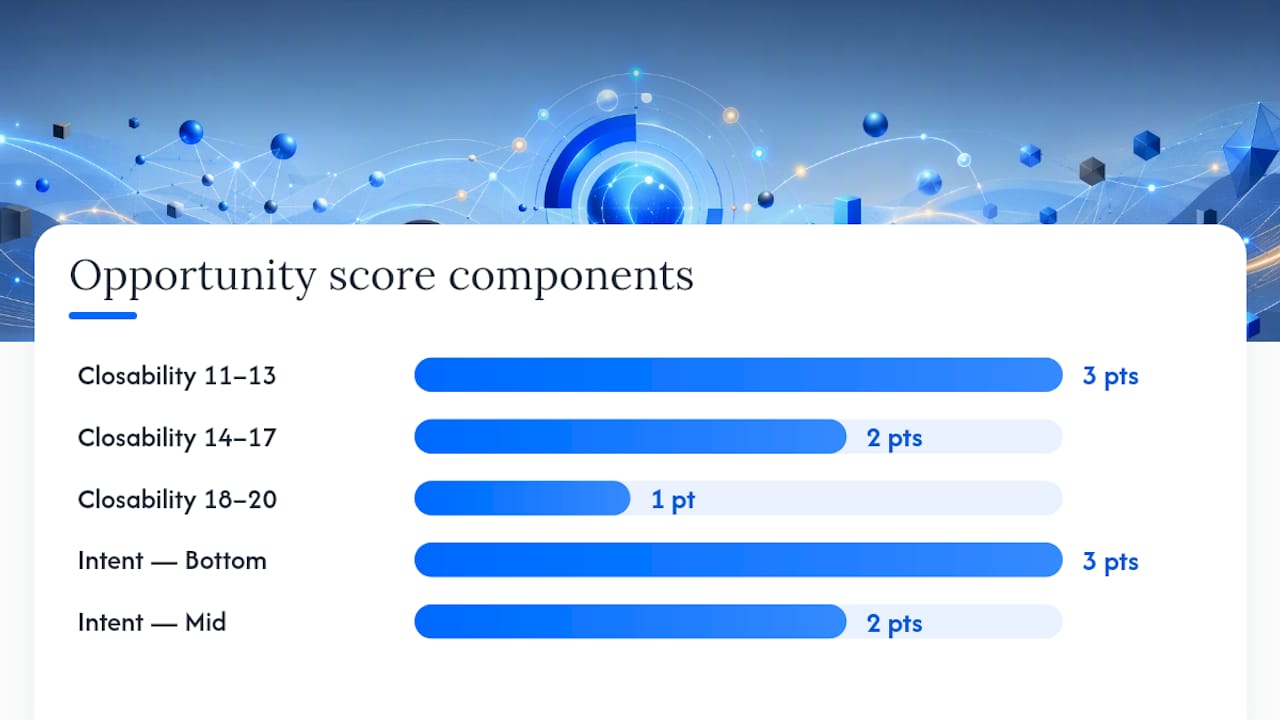
Closability is highest (3) for pages at positions 11–13, medium (2) for positions 14–17, and lowest (1) for positions 18–20. Conversion intent scores 3 for bottom-of-funnel queries, 2 for mid-funnel, and 1 for informational.
Prioritize time-sensitive pages, product-led pages, page-2 ranking low-hanging fruit, and high-impression/low-CTR pages when selecting refresh targets. That order reflects both business value and speed-to-impact.
Pro Tip: Detect intent shifts by comparing the current SERP content types against what your page delivers. If the top 5 results are all comparison pages and your page is a how-to guide, the format mismatch is the primary problem — not the copy itself.
Page-level quality checks: what to evaluate before refreshing
Evaluate intent match, topical coverage against competitors, accuracy of data, multimedia quality, and conversion path before deciding how deeply to refresh a page.
Run this quality checklist on every candidate:
- Intent match — does the page format and angle match what the top-ranked pages deliver?
- Outdated statistics — any stat older than 18 months or referencing a year that has passed
- Missing subtopics — H2 sections that top competitors cover but your page skips
- Thin sections — paragraphs under 100 words that answer a subtopic superficially
- Outdated screenshots or product UI — especially damaging for tool-review or tutorial content
- CTA placement and relevance — is the primary CTA above the fold and aligned with the page’s intent?
- Internal links — are relevant newer pages linked from this one?
Use this decision flow to choose the right action:
| Situation | Action |
|---|---|
| Page has authority, minor gaps | Light refresh: update stats, add subtopics, fix metadata |
| Page has authority, major intent shift | Deep rewrite: restructure, new intro, new H2 architecture |
| Page has no authority, thin content | Prune or merge into a stronger related page |
| Two pages target the same query | Redirect the weaker to the stronger, consolidate content |
Pages with existing conversion events score higher priority. A page that already generates leads but is losing traffic is worth more editorial time than a page that never converted.
How to build a scoring matrix to rank refresh work
A composite score that combines business value, technical fixability, closability, and effort converts a raw list of candidates into an ordered backlog your team can actually execute against.
Sample scoring matrix:
To apply this matrix to your audit output:
- Copy your candidate list into a new spreadsheet tab.
- Score each page on the five criteria above (1 = low, 5 = high). For effort, invert the score — a page requiring 8+ hours scores 1, a page requiring under 2 hours scores 5.
- Multiply each score by its weight and sum the row.
- Sort by total score descending. The top 10 rows are your first sprint.
- Flag pages scoring above 3.5 as quick wins and schedule them within the next two weeks.
Monitoring historical content changes alongside traffic enables teams to identify whether a specific edit coincided with a traffic swing — which is exactly the kind of validated signal that justifies investing more effort in a follow-up refresh.
Pro Tip: Tie the matrix to team SLAs. Quick wins (score above 3.5, effort under 2 hours) should be scheduled within 14 days. Deep refreshes (score above 3.0, effort above 6 hours) go into the next monthly sprint. Without SLAs, the backlog grows faster than the team can clear it.
Tactical refresh checklist: what to change and in what order
Prioritize changes that improve intent match and extractability first — headings, a TL;DR summary, and schema. Then update data and multimedia. Then fix metadata and internal linking last.
Follow this sequence for every refresh:
- Update the title tag and H1. Make the primary keyword more specific and the value proposition clearer. Turn a flat label into a question or a benefit statement.
- Rewrite the introduction. The first 100 words should answer the query directly. Cut any throat-clearing or historical context that delays the answer.
- Add missing subtopics. Insert new H2 sections for topics the top-ranked competitors cover that your page skips.
- Refresh all statistics and examples. Replace any stat that is noticeably outdated. Link to the primary source, not a secondary aggregator.
- Improve CTAs. Move the primary CTA above the fold if it is buried. Align the CTA copy with the page’s intent (informational pages need a soft CTA; transactional pages need a direct one).
- Add FAQ schema. Wrap 3–5 common questions in FAQ structured data. This improves extractability for both traditional search and AI Overviews. Reference structured data best practices when implementing.
- Optimize images. Compress, add descriptive alt text, and replace any outdated screenshots.
- Fix internal links. Add links to newer related pages and update anchor text on older pages that link to this one.
- Update the dateModified field in your schema and add a short visible changelog entry at the bottom of the page.
Before/after examples:
- Title before: “Content Refresh Tips” → After: “How to Refresh Old Content and Recover Lost Rankings”
- H2 before: “Using Google Search Console” → After: “How does Google Search Console show you which pages are decaying?”
- Intro before: “Content refresh is the process of updating existing content to improve its performance…” → After: “If a page that used to rank on page 1 has slipped to page 2, a targeted refresh — not a full rewrite — is usually enough to recover it.”
Adding dateModified schema and a visible changelog improves AI and search extractability, particularly for pages competing for AI Overview citations.
Relaunch checklist and what to track after publishing
After publishing a refresh, request a recrawl, update your sitemap, and monitor CTR, impressions, positions, and engagement for 4–8 weeks before drawing conclusions.
Relaunch checklist:
- Submit the URL in GSC → URL Inspection → Request Indexing.
- Confirm the page appears in your XML sitemap and resubmit the sitemap.
- Add or update internal links from 2–3 high-traffic pages pointing to the refreshed URL.
- Push the page via email newsletter or social if the update is substantial.
- Use Google’s Refresh Outdated Content tool if the old snippet in search results still shows removed or outdated content. Note that approved requests can take several days to process and expire after 180 days.
- Set a custom annotation in Serpview to mark the publish date of the refresh, so you can correlate any traffic changes to the specific edit.
Expected time-to-impact:
| Signal | Typical timeline |
|---|---|
| CTR change (title/meta update) | 3–10 days |
| Ranking shift (content depth improvement) | 4–8 weeks |
| Engagement rate improvement | 1–2 weeks |
| New backlinks from outreach | 4–12 weeks |
| AI Overview citation | 2–6 weeks |
Track these KPIs at the 4-week and 8-week marks: CTR at a stable position, engagement rate, conversion delta versus the pre-refresh baseline, and new referring domains. If impressions are up but CTR is flat, the title needs another iteration. If rankings improved but conversions did not, the CTA or landing page experience is the next lever.
How to promote refreshed content and rebuild internal linking
The fastest way to accelerate reindexing and recover traffic after a refresh is to add internal links from high-traffic pages, push the update via email, and reach out to sites that previously linked to the page.
Promotion tactics in order of impact:
- Internal linking from cornerstone pages. Find your highest-traffic pages in the same topic cluster and add a contextually relevant link to the refreshed page. Use descriptive anchor text that reflects the target keyword, not generic phrases like “click here.”
- Newsletter or email push. A brief mention in your next email sends a direct traffic signal and can generate early engagement that reinforces the refresh.
- Social republishing. Share a key excerpt or updated stat from the page. Frame it as “updated for 2026” to signal freshness.
- Outreach to previous linkers. Find sites that linked to the page before using your backlink tool of choice. A short email noting the update and the new content additions often earns a link refresh or a new mention.
- Update topical hub pages. If you have a pillar page or topic cluster hub, add or update the link to the refreshed page there. This passes authority and helps search engines understand the page’s place in your content architecture.
Pro Tip: When adding internal links, use anchor text that matches the target keyword of the refreshed page, not the topic of the linking page. A link from your “content audit guide” to your “striking-distance keywords” page should say “striking-distance keywords,” not “learn more about keyword research.”
Updating search visibility improvement strategies at the hub level is one of the highest-leverage moves after a refresh — it signals to search engines that the refreshed page is part of an authoritative cluster, not an isolated update.
Audit cadence and governance: how often to re-audit
Set cadence by content type and business value. Blog guides need a review every 6–12 months, product pages every 3–6 months, and high-traffic pages quarterly.
Suggested cadences and triggers:
- Quarterly: Top 20 pages by organic traffic, any page tied to a product launch or pricing change
- Every 6 months: Core blog guides, comparison pages, and any page with a featured snippet
- Annually: Evergreen reference content, glossary pages, and low-traffic informational posts
- Event-triggered: Any page affected by an algorithm update, a major industry change, or a product deprecation
Role matrix for refresh governance:
| Role | Responsibility | SLA |
|---|---|---|
| SEO owner | Audit, scoring, and prioritization | Audit delivered within 5 business days of cadence trigger |
| Content owner | Copy updates, subtopic additions | Light refresh within 3 days; deep refresh within 10 days |
| Editor | Quality review and fact-checking | Review within 2 business days of content submission |
| Developer | Schema, template, or UX changes | Within 5 business days of content sign-off |
Track every refresh in your audit spreadsheet with a “last refreshed” date and a “next review” date. This prevents pages from falling through the cracks between cadence cycles. Content freshness is one of the most consistent levers for sustained ranking improvement, and a governance system is what makes it repeatable rather than reactive.
Practical tools and a minimal template to run your first refresh program
The essential toolkit covers five categories: GSC for performance data, GA4 for engagement signals, a site crawler for technical checks, a keyword research tool for gap analysis, and a spreadsheet for scoring.
| Tool | What to export | Why it matters |
|---|---|---|
| Google Search Console | Pages report (clicks, impressions, CTR, position) | Primary source for decay and striking-distance signals |
| GA4 | Landing page report (sessions, engagement rate, key events) | Engagement and conversion signals by page |
| Screaming Frog | Internal tab (URL, status, word count, title, H1, meta) | Technical decay and thin content flags |
| Ahrefs | Site Explorer → Organic pages (traffic, keywords, backlinks) | Keyword gap analysis and backlink data |
| SEMrush | Position tracking + content audit tool | Rank tracking and content score benchmarking |
| Google Sheets | Joined inventory + scoring matrix | Central audit hub and prioritization output |
Your minimal spreadsheet template needs six tabs: (1) Raw GSC export, (2) Raw GA4 export, (3) Crawl output, (4) Joined inventory, (5) Scoring matrix, and (6) Refresh backlog. The joined inventory tab is where you combine all three sources on the canonical URL. The scoring matrix tab applies the weighted criteria from the prioritization section. The backlog tab is what you hand to the content team.
Serpview’s content decay detector automates the discovery step by flagging pages with declining performance patterns across your properties, reducing the time you spend on manual joins.
How Serpview speeds up content discovery and prioritization
A unified analytics view shortens discovery by surfacing larger exports, longer historical windows, and cross-property comparisons in one place — without the manual joins that slow down multi-property audits.
Serpview maps directly to the audit workflow:
- Large GSC exports (up to 50,000 rows) replace the 1,000-row cap that forces teams to run partial audits or stitch together multiple exports
- Content decay heatmaps surface pages losing ground across traffic, impressions, and CTR in a single visual — no pivot table required
- CTR benchmarking shows how your pages perform against industry averages at each ranking position, so you can distinguish a CTR problem from a ranking problem
- Pre-built prioritization reports output a scored candidate list that maps directly to the scoring matrix in this guide
- Historical performance tracking lets you see how a page performed 12 or 24 months ago, not just the last 90 days — critical for detecting slow decay that short windows miss
- Cross-property comparison lets agencies and multi-site teams run one audit across all properties instead of repeating the process per domain
Pro Tip: Use Serpview’s query counting by ranking tier to see how many queries each page ranks for in positions 1–3, 4–10, and 11–20. A page with many position 11–20 queries and few position 1–10 queries is a high-priority refresh candidate — it has breadth without depth.
How to prioritize refreshes at scale
The teams that run effective refresh programs at scale share one habit: they triage before they write. The instinct to start with the most broken page is wrong. Start with the page that is closest to winning and worth the most when it does.

That means protecting your pillar pages first. A pillar page that slips from position 3 to position 8 costs more traffic than ten blog posts falling off page 1 combined. Set a threshold — any pillar page dropping several positions in a 30-day window triggers an immediate review, regardless of the cadence schedule.
For teams managing large content libraries, batching by content type speeds editorial throughput significantly. Refreshing five comparison pages in one sprint lets writers and editors build a rhythm. Context-switching between a how-to guide, a product page, and a glossary entry in the same week fragments focus and reduces quality.
Pro Tip: When a refresh involves front-end changes — schema additions, template edits, or image replacements — batch those with a developer sprint rather than blocking the content team. Separate the copy work from the technical work, ship the copy first, and schedule the technical layer for the next sprint. A page with updated copy and no schema still outperforms a page with perfect schema and stale copy.
Seasonal pages deserve their own calendar. A page targeting a holiday or annual event needs to be refreshed 6–8 weeks before the target date, not after traffic has already peaked and dropped.
Serpview makes content refresh discovery faster
Finding refresh candidates across dozens of pages and properties is where most content programs stall. The manual work of exporting, joining, and scoring data from GSC, GA4, and crawl tools takes hours — and the 1,000-row GSC cap means you are often working with incomplete data.

Serpview gives you a unified dashboard that consolidates GSC data across all your properties, exports up to 50,000 rows, and surfaces content decay heatmaps, CTR benchmarking, and prioritization reports without manual joins. You get the full picture of which pages are decaying, which are in striking distance, and which need a deep rewrite — in one place, with historical data going back further than native GSC allows.
Start your content refresh program with complete data. Try Serpview and run your first cross-property decay audit today.
Sources
- Refresh outdated content - Google Search Central Help
- Content Refresh Guide 2026: Boost SEO Rankings & AI Visibility
FAQ
What is the 80/20 rule in SEO content refreshes?
Focus refresh efforts on that top tier first — specifically pages with existing authority that show measurable decay signals like falling clicks, dropping rankings, or declining engagement.
How do you run a content gap analysis for a refresh?
Compare your page’s H2 structure against the top 3 ranking pages for your target query. Any subtopic they cover that your page skips is a gap. Add those sections, update outdated statistics, and align your format to match the dominant content type in the current SERP.
How does refreshing content improve AI visibility?
Adding FAQ schema, a TL;DR summary, and a visible dateModified field makes content more extractable for AI Overviews and large language models.
How often should you audit content for refresh opportunities?
High-traffic pages warrant a quarterly review. Core blog guides and comparison pages need attention every 6 months. Evergreen reference content can be reviewed annually, with event-triggered reviews any time an algorithm update or major industry change affects your category.
Can Serpview help identify which pages need a refresh?
Yes. Serpview surfaces content decay heatmaps, CTR benchmarking, and striking-distance reports across all your GSC properties in one dashboard, with exports up to 50,000 rows — giving you a complete candidate list without the manual joins that native GSC exports require.
Recommended
Ready to unlock your full GSC potential?
SERPView helps you access all your Google Search Console data without limitations. Start your free trial today.
Get Started Free