
What Is Content Performance Tracking? A 2026 Guide
SERPView Team
SEO Analytics

TL;DR:
- Content performance tracking measures how digital content supports business goals through engagement, SEO, and conversion metrics. It requires setting KPIs aligned with objectives, segmenting data, and using centralized dashboards for effective insights. Most teams fail by measuring vanity metrics instead of tracking KPIs that directly connect to revenue and growth.
Content performance tracking is the practice of systematically measuring how your digital content drives audience engagement, search visibility, and business outcomes such as ROI. Without it, you are publishing blind. Shopify’s 2026 guidance divides content metrics into three core categories: engagement, SEO and AI visibility, and conversion. That framework gives content strategists a clear map for deciding what to measure and why. The industry term for this practice is content analytics, and understanding both terms helps you communicate clearly with executives, developers, and platform vendors alike.
What is content performance tracking and why does it matter?
Content performance tracking monitors key metrics across engagement, SEO, and conversion to measure how well your digital content supports business goals. The distinction between a metric and a KPI matters here. A metric is any data point you can measure, such as page views or session duration. A KPI, or key performance indicator, is a metric tied directly to a specific business objective.

WordPress VIP explains that executive KPIs focus on three things: whether content reaches the right audience, whether it engages that audience, and whether it drives business results. Vanity metrics like raw page views tell you nothing about those three outcomes. A blog post with 50,000 views but zero conversions is not performing well by any business standard.
Domo clarifies that KPIs are only meaningful when they are trusted, visible in decision-making contexts, and tied to specific objectives. That means your KPIs need to live in a dashboard your team actually checks, not buried in a spreadsheet reviewed once a quarter.
Mailchimp’s content performance analysis framework adds that tracking reveals what resonates, what needs improvement, and how marketing efforts align with business goals. That alignment is the whole point.
What key metrics and KPIs are essential for effective content performance tracking?
The right KPIs depend on your business objective, but most content programs need metrics across three tiers: reach, engagement, and conversion.
Reach KPIs tell you how many people your content finds:
-
Organic traffic from search engines
-
Search visibility and query counting across ranking tiers
-
Impressions and click-through rate from Google Search Console
Engagement KPIs tell you whether your content holds attention:
-
Time on page and scroll depth
-
Return visitor rate
-
Social shares and comments
Conversion KPIs tell you whether your content drives action:
-
Goal completions such as form fills, signups, and purchases
-
Assisted conversions across the sales funnel
-
Pipeline influenced by content touchpoints
The SMART criteria apply directly to KPI selection. Each KPI should be Specific, Measurable, Achievable, Relevant, and Time-bound. “Increase organic traffic” is not a KPI. “Increase organic traffic to the blog by 20% in Q3 compared to Q2” is.
Pro Tip: Group your KPIs by content type using content groups so you can compare how blog posts perform against landing pages or video content without mixing data.
How do you set up a content performance tracking process?
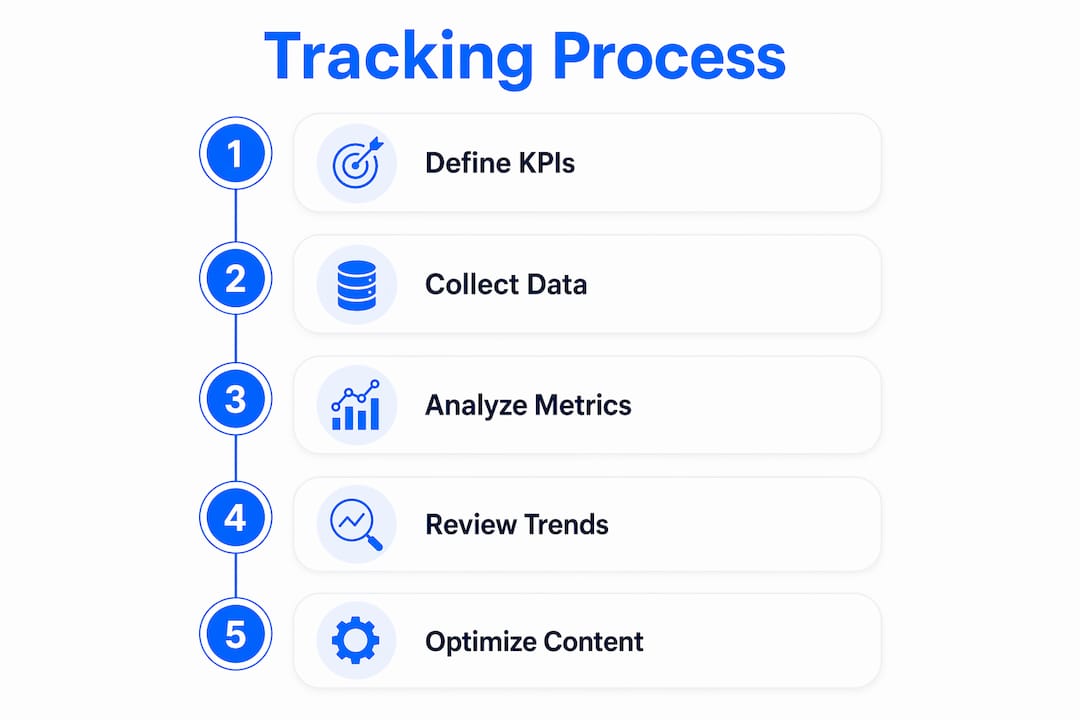
A repeatable tracking process prevents the common failure mode of collecting data but never acting on it. Follow these five steps to build one that holds up over time.
-
Collect baseline data. Before setting targets, pull at least 90 days of historical data across your key channels. This baseline tells you what normal looks like and makes future benchmarking meaningful.
-
Align KPIs with goals. Map each KPI to a specific business objective. If your goal is lead generation, your primary KPI is form completions, not page views. Mailchimp recommends aligning KPIs with goals before you start monitoring, not after.
-
Set a monitoring cadence. Weekly reviews catch short-term drops in traffic or engagement. Monthly reviews reveal trends. Quarterly reviews are the right time to assess whether your content strategy is working at a higher level.
-
Segment your data. Mailchimp and Hockeystack both recommend segmenting by content type, channel, and audience. Segmentation turns a wall of numbers into a clear picture of what is working where and for whom.
-
Benchmark against historical performance. Comparing this month’s organic traffic to last month is useful. Comparing it to the same month last year is more useful, because it accounts for seasonal patterns. Use your baseline data from step one as the starting reference point.
This process works for teams of any size. A solo content marketer can run it in a few hours per month. A larger team benefits from assigning ownership of each KPI to a specific person so accountability is clear.
What tools and dashboards best support centralized content performance tracking?
A centralized dashboard is the single most practical upgrade you can make to your tracking setup. Without one, you are switching between Google Search Console, your email platform, your CRM, and your social analytics tools to piece together a picture that should be visible in one place.
ContentSquare, HubSpot, and Hockeystack all highlight the value of dashboards that pool site analytics, social data, email performance, and CRM data into unified reports. That unified view is what separates reactive reporting from proactive decision-making.
When evaluating content tracking tools, look for these capabilities:
-
Multi-source data consolidation: The tool should pull from search, social, email, and CRM without manual exports.
-
Historical data depth: Standard Google Search Console limits you to 16 months of data. Platforms with extended storage give you a longer view for trend analysis.
-
Segmentation and filtering: You need to slice data by content type, device, geography, and audience segment.
-
Real-time updates: Waiting 48 hours for data to refresh means you are always making decisions on stale information.
Serpview addresses a specific gap in this stack. Google Search Console caps data at 1,000 rows per report, which means large sites miss most of their query-level data. Serpview removes that cap, giving you access to up to 50,000 rows and a shared dashboard that consolidates analytics across multiple properties.
Pro Tip: Use custom annotations to mark site changes, content updates, and campaign launches directly on your performance charts. This makes it far easier to connect traffic shifts to specific actions.
What are content performance tracking best practices to optimize ROI and engagement?
The most common mistake in measuring content effectiveness is tracking too much. Mightybytes emphasizes choosing metrics that matter over tracking all available data. More data without more focus produces more confusion, not more clarity.
These best practices keep your tracking program focused and useful:
-
Prioritize KPIs tied to business objectives. If a metric does not connect to a goal, remove it from your dashboard. Every KPI should have an owner and a target.
-
Avoid vanity metrics. Total page views, total social followers, and total impressions are easy to report but hard to act on. Replace them with engagement rate, return visitor rate, and conversion rate.
-
Use multi-touch attribution. Improvado notes that last-click attribution systematically undervalues top-of-funnel content. A blog post that introduces a prospect to your brand deserves credit even if the conversion happens weeks later on a different page. Multi-touch models distribute that credit accurately.
-
Map custom events in GA4. Digital Applied explains that default GA4 setups do not capture the full content-to-revenue path. Custom event architecture connects content touchpoints to funnel stages so you can report actual revenue influence.
-
Refresh content regularly. Content that ranked well 18 months ago may be losing ground today. Use a content decay detector to identify pages where traffic is declining so you can update them before rankings drop further.
Pro Tip: Track topic clusters as a unit, not just individual pages. A cluster of five related posts may collectively drive far more pipeline than any single article, and that story only appears when you measure the group.
Key takeaways
Content performance tracking works when you tie every KPI to a specific business goal, segment your data, and review it on a consistent schedule.
| Point | Details |
|---|---|
| Define KPIs before tracking | Map each KPI to a business objective before collecting data, not after. |
| Use three metric tiers | Organize KPIs across reach, engagement, and conversion for complete coverage. |
| Segment and benchmark | Break data down by content type, channel, and audience to find what actually works. |
| Apply multi-touch attribution | Credit top-of-funnel content fairly by using attribution models beyond last-click. |
| Centralize with a dashboard | Consolidate search, social, email, and CRM data in one place for faster decisions. |
Why most content programs measure the wrong things
I have worked with content teams that produced detailed monthly reports and still could not answer the question their CEO was asking: “Is the content making us money?” The reports were full of impressions, sessions, and bounce rates. None of those numbers connected to revenue.
The real problem is not a lack of data. It is a lack of discipline in deciding what data matters before you start collecting it. Most teams build their tracking setup around what is easy to measure, not what is worth measuring. That is backwards.
The shift that actually changes outcomes is treating your KPI list as a contract with your business goals. Every metric on your dashboard should have a direct line to a goal your leadership team cares about. If you cannot draw that line, the metric does not belong there.
I have also seen teams underestimate how much segmentation changes the picture. Aggregate traffic numbers hide the fact that one content category is growing while another is collapsing. You only see that when you break the data apart. The teams that improve fastest are the ones that look at performance by content type, by channel, and by audience segment every single month.
The future of content measurement is moving toward AI-assisted analysis that surfaces anomalies and patterns automatically. But the foundation is still the same: clear goals, the right KPIs, and a consistent review process. No algorithm fixes a tracking setup built on the wrong questions.
— Utsav
How Serpview supports your content tracking setup
Content performance tracking requires data you can trust, at a depth most standard tools do not provide. Serpview gives content strategists and digital marketers a unified dashboard that goes beyond the limits of Google Search Console, with up to 50,000 rows of query data, extended historical storage, and real-time updates across multiple properties.
Whether you need to audit keyword performance, monitor content decay, or compare mobile versus desktop engagement, Serpview’s free SEO tools give you a practical starting point without a paid commitment. The platform is built for teams that need more than a surface-level view of their content’s impact. Start with the tools, see what your data actually shows, and build your tracking process from there.
FAQ
What is content performance tracking in simple terms?
Content performance tracking is the process of measuring how well your digital content achieves specific business goals by monitoring metrics like traffic, engagement, and conversions. It tells you what is working, what is not, and where to focus your efforts.
What are the most important content performance metrics?
The most important metrics fall into three tiers: reach (organic traffic, search visibility), engagement (time on page, return visitors), and conversion (goal completions, assisted conversions). WordPress VIP recommends focusing on KPIs that reflect audience reach, content quality, and business impact.
How often should you review content performance data?
Weekly reviews catch short-term drops, monthly reviews reveal trends, and quarterly reviews assess overall strategy. Mailchimp recommends a consistent monitoring cadence aligned with your KPIs and business goals.
What is multi-touch attribution and why does it matter for content ROI?
Multi-touch attribution distributes conversion credit across all content touchpoints in the buyer journey, not just the last click. Improvado notes this model is necessary to accurately value top-of-funnel content that assists conversions without receiving last-click credit.
How does Serpview help with content performance tracking?
Serpview consolidates search analytics from multiple properties into one dashboard, removes the 1,000-row data cap from Google Search Console, and provides up to 50,000 rows of query-level data for deeper content performance analysis.
Recommended
Ready to unlock your full GSC potential?
SERPView helps you access all your Google Search Console data without limitations. Start your free trial today.
Get Started Free