
Uncover Hidden Keyword Opportunities in Search Data
SERPView Team
SEO Analytics

TL;DR:
- Hidden keyword opportunities are queries your site already ranks for or could rank for but are often overlooked in content strategies. Combining Google Search Console data, competitor keyword gap analysis, and internal site search logs enables a targeted approach to uncover high-value, validated demand. Regularly reanalyzing these sources helps sites stay ahead by focusing on high-impact optimization and content creation efforts.
Hidden keyword opportunities are queries your site already ranks for, or could rank for, that your current content strategy completely ignores. Systematically learning to uncover hidden keyword opportunities from search data requires three layered inputs: Google Search Console (GSC) exports, competitor keyword gap analysis, and internal site search logs. Each source reveals a different category of validated demand. The difference between sites that grow steadily and those that plateau is almost always this: the growing sites work from verified search data, not estimated volume guesses.
What tools and data sources uncover hidden keyword opportunities?
Three data sources form the foundation of any serious keyword opportunity analysis. Each one answers a different question about where your traffic gaps actually are.

| Data source | What it reveals | Key metric |
|---|---|---|
| Google Search Console | Queries your site already ranks for | Impressions, CTR, position |
| Competitor rank exports | Keywords competitors rank for that you don’t | Volume, keyword difficulty (KD) |
| Internal site search logs | Queries users type directly on your site | Search term frequency |
GSC gives you verified search demand with no estimation involved. Competitor exports show you validated demand your site has not yet captured. Internal search logs reveal intent your audience expresses directly, which external tools cannot see. Using all three together is what separates a surface-level audit from a true keyword opportunity analysis.
Pro Tip: Export all three data sources into a single spreadsheet before you start filtering. Keeping them separate creates blind spots.
How to use Google Search Console exports to find hidden keywords
GSC’s query report is the fastest source of hidden keyword insights on your own site. A 90-minute audit of a site with 50 or more pages typically surfaces 20–40 actionable opportunities. That number is not theoretical. It comes from working through four specific filters on real query exports.
Run these four filters in sequence:
-
High impressions, low CTR. Filter for queries with more than 500 impressions and a CTR below 2%. These queries already have audience reach. A weak title tag or meta description is usually the only barrier to more clicks.
-
Positions 11–30. Targeting positions 11–30 is the single highest-ROI filter in GSC. Google already recognizes your page as relevant. A content update, a stronger internal link, or a revised H1 can push it onto page one without any backlink building.
-
High impressions, zero clicks. These queries often reflect featured snippet dominance or informational intent. You can either restructure your content to win the snippet or accept the impression value and move on.
-
Queries with no dedicated page. Filter 4 surfaces confirmed content gaps. If your site ranks for a query but has no page built around it, creating that page almost always produces a ranking improvement.
The most common mistake SEO professionals make with GSC is focusing only on queries with the highest click counts. Ignoring page-2 queries and zero-click impressions means leaving the easiest wins on the table. Filters 2 and 4 consistently produce the fastest results because Google has already done the hard work of recognizing your relevance.
Pro Tip: Sort Filter 2 results by impressions descending, then cross-reference with keyword difficulty scores. Prioritize any query with KD under 30 and more than 1,000 monthly impressions.
What is keyword gap analysis and how does it find competitor-hidden keywords?
Keyword gap analysis is the process of identifying queries your competitors rank for that your site does not. Closing keyword gaps rather than chasing high-volume head terms produces higher SEO ROI because the demand is already validated by a competitor’s existing traffic.
The process works like this:
- Export competitor keyword rankings from a rank tracking tool or CSV report.
- Filter by volume, KD, and intent. For younger or mid-authority domains, KD under 30 is the right starting threshold.
- Remove branded queries and navigational intent. These rarely convert for a non-brand site.
- Score remaining gaps by multiplying volume by your estimated CTR delta by an intent weight (commercial = 1.5, informational = 1.0).
Choosing the right competitors matters as much as the analysis itself. Select content competitors, meaning sites that rank for the same topics you target, not just business competitors. A direct business rival may target entirely different search queries. The SEO competitor analysis process works best when you compare three to five sites with similar domain authority and content focus.
Clustering related gaps by semantic similarity is the step most SEO professionals skip. Grouping queries into topic clusters lets you design pillar pages and internal link structures that build topical authority at scale, rather than creating isolated pages that compete with each other.
Pro Tip: Run gap analysis quarterly. Search landscapes shift fast. A quarterly cadence captures emerging topics before competitors consolidate their rankings.
How to use internal site search data to discover unique keyword opportunities
Internal site search data captures intent that no external tool can replicate. When a visitor types a query into your site’s search bar, they are telling you exactly what they need and cannot find. Combining GSC data with internal search logs unlocks intent-driven phrases and long-tail keyword questions that standard keyword research misses entirely.
Configure Google Analytics 4 to track internal search terms by enabling the site search parameter in your data stream settings. Once active, export the search terms report monthly. You will typically find three types of queries:
- Content gap queries. Users search for topics your site does not cover. These are direct content briefs.
- Navigation failure queries. Users search for pages that exist but are hard to find. These signal internal linking problems.
- Product or service queries. Users search for specific offerings. These reveal commercial intent you can target with dedicated landing pages.
Cluster the exported terms by intent and frequency. Any query appearing more than 10 times per month from internal search deserves a dedicated content response. Merging these intent signals with your GSC filter outputs creates a keyword list grounded entirely in real, observed demand rather than modeled estimates.
Pro Tip: Cross-reference your top internal search terms against your GSC query report. If a term appears in both, it is a near-certain content gap with confirmed external and internal demand.
How to prioritize and execute a keyword opportunity action plan
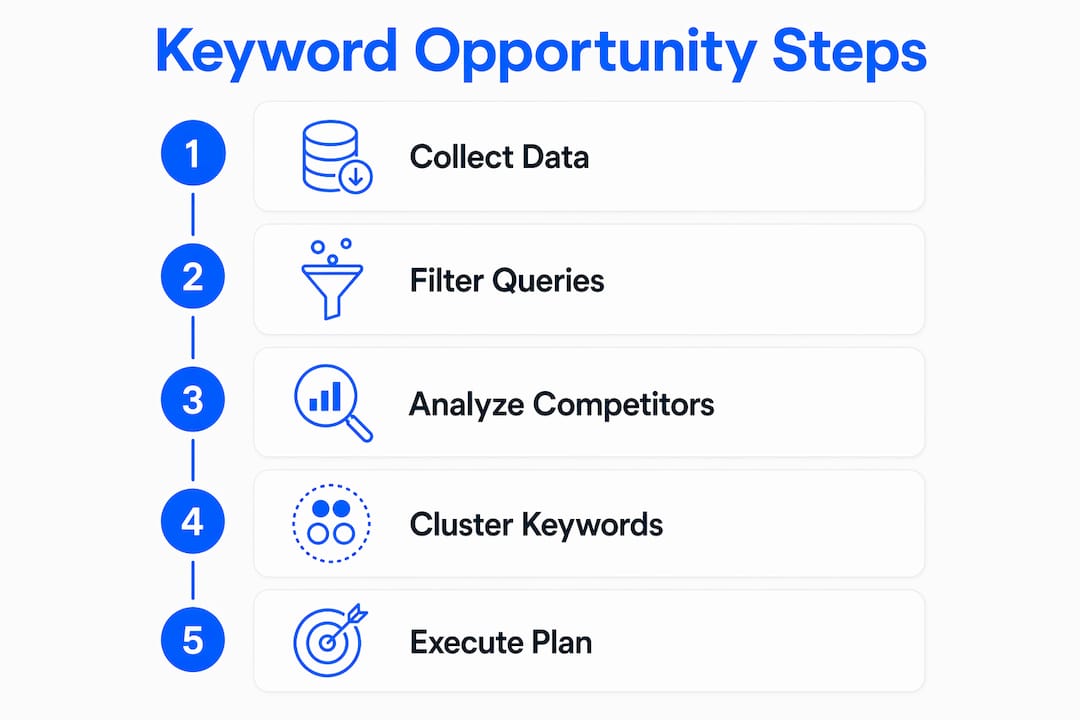
Collecting keyword data without a prioritization framework produces a long list and no results. The goal is a 90-day action plan that sequences work by expected impact.
-
Score every opportunity. Assign each keyword a score based on four criteria: monthly search volume, KD, search intent alignment with your business, and current ranking position. Weight position heavily. A query at position 12 with 2,000 monthly impressions outranks a new keyword with zero ranking history.
-
Segment by action type. Divide your list into three buckets: content updates for existing pages (Filter 1 and 2 wins), new page creation (Filter 4 and competitor gap wins), and internal linking fixes (navigation failure queries from internal search).
-
Set a 90-day sequence. Weeks 1–4: update title tags and H1s for all Filter 1 opportunities. Weeks 5–8: publish new pages for your top 10 content gap queries. Weeks 9–12: build internal links to all updated and new pages, then monitor position changes in GSC.
-
Track results by query tier. GSC combined with Search Console data lets you monitor position movement for each targeted query. Set a 30-day review checkpoint to catch pages that moved and pages that need additional work.
-
Avoid the two most common execution mistakes. First, do not target too many keywords per page. One primary query and two to three supporting queries per page is the right ratio. Second, do not skip the monitoring phase. Long-tail queries with KD under 15 can rank in as few as 4–8 weeks, but only if you track and iterate.
The content gap measurement process closes the loop between discovery and execution. Without it, you repeat the same audit every quarter without knowing which fixes actually worked.
Key takeaways
The most effective method to uncover hidden keyword opportunities from search data combines GSC query filters, competitor gap analysis, and internal site search mining into a single scored action plan.
| Point | Details |
|---|---|
| GSC filters reveal fast wins | Positions 11–30 and Filter 4 queries produce the fastest ranking improvements with minimal effort. |
| Competitor gaps offer validated demand | Keyword gap analysis targets queries with proven search volume, reducing the risk of creating content nobody searches for. |
| Internal search shows real intent | Queries typed into your site’s search bar reveal content gaps and navigation failures invisible to external tools. |
| Quarterly audits maintain momentum | Re-running gap analysis every quarter captures emerging topics before competitors lock in their rankings. |
| Scoring prevents wasted effort | Prioritizing by volume, KD, intent, and current position focuses work on the highest-return opportunities first. |
Why most SEO teams are sitting on a goldmine they never mine
I have reviewed keyword strategies for dozens of sites over the years, and the pattern is almost always the same. Teams spend hours debating which high-volume head terms to target while their GSC data quietly shows 30 queries sitting at position 14 with thousands of monthly impressions. Those queries need a title tag fix, not a six-month content campaign.
The uncomfortable truth about keyword research is that estimated volume from third-party tools is a starting point, not a decision. Real decisions come from verified data: what Google already shows your pages for, what your competitors have proven people search, and what your own visitors type when they cannot find what they need. Combining those three inputs is not a complicated process. Most teams just never do all three at once.
Periodic re-analysis matters more than most SEO professionals admit. Search intent shifts. Competitor content changes. A query that was too competitive six months ago may now have a clear path to page one. Running gap analysis quarterly is not optional maintenance. It is how you stay ahead of the curve rather than catching up to it.
The teams that consistently grow organic traffic are not the ones with the biggest keyword lists. They are the ones with the most disciplined prioritization process. A scored, sequenced 90-day plan built from layered search data will outperform any keyword list built from volume estimates alone.
— Utsav Chopra
How Serpview helps you act on search data faster
Serpview removes the biggest barrier to this entire process: data limitations. Google Search Console caps standard exports at 1,000 rows. Serpview expands that to up to 50,000 rows, giving you the full picture of your site’s query performance without truncation.

With Serpview’s unified dashboard, you can apply the four GSC filters described in this article across multiple properties simultaneously. The platform’s query counting by ranking tier feature segments your keywords by position range, making Filter 2 analysis (positions 11–30) a one-click operation instead of a manual export task. Serpview also supports combined analytics across properties, so you can monitor keyword movement and content gap closure in one place. Explore Serpview’s Google Search Console glossary and free tools to get started.
FAQ
What are hidden keyword opportunities in SEO?
Hidden keyword opportunities are queries your site already ranks for but fails to fully capitalize on, typically because of low CTR, weak content, or missing dedicated pages. They also include competitor-owned keywords with validated demand that your site has not yet targeted.
How do I find keyword gaps between my site and competitors?
Export competitor keyword rankings, filter by volume and keyword difficulty, then remove branded and navigational queries. Score the remaining gaps by volume, intent, and difficulty to prioritize which ones to target first.
How often should I run a keyword gap analysis?
Quarterly gap analysis is the recommended cadence. Running it more frequently than quarterly rarely surfaces enough new data to justify the time investment.
What is the fastest way to improve rankings using GSC data?
Target queries ranked at positions 11–30 with high impressions and low CTR. These pages already have Google’s recognition. Updating the title tag, H1, and adding internal links typically produces ranking movement within 4–8 weeks.
Why should I use internal site search data for keyword research?
Internal search logs capture intent-driven queries your audience expresses directly on your site, including long-tail questions that external keyword tools miss. These queries represent confirmed demand from your actual audience, making them high-priority content targets.
Recommended
Ready to unlock your full GSC potential?
SERPView helps you access all your Google Search Console data without limitations. Start your free trial today.
Get Started Free