
How Search Queries Map to Content Topics: SEO Workflow
SERPView Team
SEO Analytics
Every search query carries a signal: a topic, an intent, and a page type waiting to be assigned. Understanding how search queries map to content topics means translating raw query data into a structured plan where each query is normalized, clustered by intent, and matched to a specific page with a clear action (update, create, route to PPC, or exclude). Here is the three-step BLUF:
- Normalize and canonicalize your query exports by stripping stemming variations, collapsing duplicates, and surfacing the true underlying intent behind each phrase.
- Cluster by intent and topic using a hybrid of lexical matching and semantic grouping, then assign each cluster to a funnel stage (awareness, consideration, decision, retention).
- Assign a page type and action for every cluster: pillar, spoke, bridge, product/comparison, or support page, paired with a concrete next step.
Quick example: The query “best project management software for remote teams” normalizes to the theme project management software, carries commercial investigation intent, maps to a comparison/spoke page, and triggers the action create new page with a primary CTA of start free trial.
Table of Contents
- Why does mapping queries to content topics matter for SEO?
- How do you build a topical map from query exports?
- How do you map queries to user journeys and page types?
- What fields should your query mapping spreadsheet include?
- Which tools help you build and maintain a topic map?
- How do you measure the map’s impact and keep it current?
- Key Takeaways
- The map is never finished — and that is the point
- Serpview makes query mapping faster and more complete
- Useful sources
- FAQ
Why does mapping queries to content topics matter for SEO?
A topical map is a structured representation of every subject your site covers, organized by theme and intent rather than by individual keyword. The mapping relationship runs in one direction: raw query → normalized theme → page taxonomy → action. When you build that structure deliberately, you stop optimizing isolated pages and start building a content ecosystem.
Topical relevance is the degree to which a site covers the subtopics and related concepts users and search engines associate with a subject. A single well-written pillar page is not enough. Search engines evaluate depth and breadth: a pillar page supported by cluster pages and connected through internal links signals topical ownership in a way that a standalone article never can.
The practical contrast is stark. A site with twenty keyword-optimized pages targeting slight variations of the same phrase often cannibalizes itself, splitting authority and confusing crawlers about which URL to rank. A site with a mapped topic ecosystem, where each cluster has one authoritative page and supporting spokes, earns consistent SERP coverage across the full range of subtopics. Search intent is the connective tissue: when every page in a cluster serves a distinct intent, cannibalization drops and coverage expands.
One area most topical maps miss entirely is the retention layer. Post-conversion queries (“how do I set up X,” “troubleshoot Y error”) are under-indexed in most content plans, yet they attract long-tail traffic and strengthen domain authority by demonstrating that your site serves users at every stage of the relationship, not just before the sale.
How do you build a topical map from query exports?
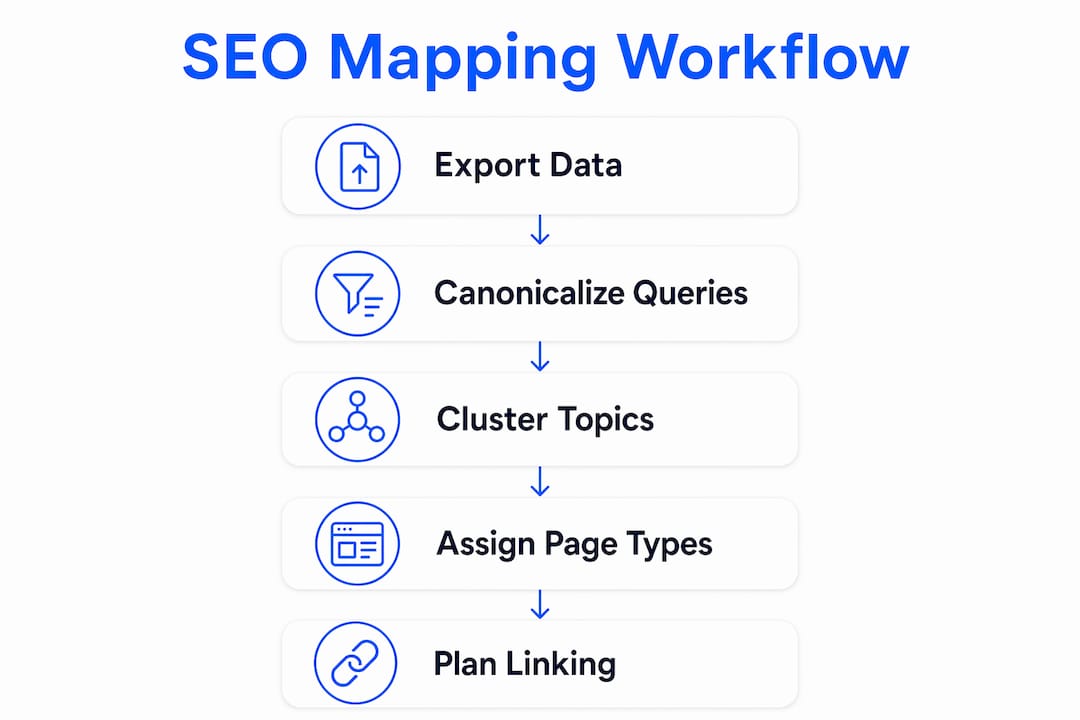
This workflow runs end-to-end: from raw data export to a prioritized content plan with page assignments and internal linking guidance.

Step 1: Export your query data
Pull from every available source to get a complete picture of what your audience actually searches for:
- Google Search Console — export up to 16 months of queries with impressions, clicks, CTR, and average position. Note that the standard interface caps at 1,000 rows; use the API or a dashboard tool to access the full dataset.
- Google Ads search terms report — captures paid search demand and reveals commercial queries your organic data may underrepresent. Google Keyword Planner is a practical companion for expanding coverage.
- Site search analytics — queries typed directly into your site’s search bar reveal what existing visitors cannot find, a high-signal gap list.
- CRM and support ticket data — customer questions map directly to retention-intent content opportunities.
Merge all exports into a single flat file before moving to canonicalization.
Step 2: Canonicalize your queries
Canonicalization is the process of collapsing query variants into a single representative form so the true underlying intent becomes visible. Strip stemming differences (“managing” vs. “management”), remove stop words that do not change meaning, and collapse word-order variants (“software for remote teams” and “remote team software” are the same canonical query). Map each canonical query to exactly one outcome later in the process. Skipping this step produces redundant pages that compete with each other.
Step 3: Cluster by topic and intent
Group canonical queries into topics and subtopics using a hybrid approach:
- Lexical clustering groups queries that share significant n-gram overlap. Fast and transparent, but it misses synonyms.
- Semantic (vector) clustering uses embedding models to measure conceptual proximity. Higher resolution, but treat the scores as directional signals rather than definitive answers. As Duane Forrester notes, embedding scores measure proximity in a model-specific semantic space that may not match your production retrieval system. Layer vector output with lexical checks and editorial review.
Start by defining topical silos (subject-matter subdivisions) before applying intent layers. Defining silos first prevents orphaned content and misplaced pillars. Once silos are set, assign an intent layer to each cluster: informational, navigational, commercial investigation, transactional, or retention/support.
Step 4: Assign page types and actions
Every cluster gets a page type and a concrete action:
| Page type | Best fit |
|---|---|
| Pillar | Broad, high-volume informational cluster anchoring a silo |
| Spoke | Specific subtopic within a silo, informational or commercial |
| Bridge | Cross-silo content connecting adjacent intent clusters |
| Product/comparison | Commercial investigation or transactional clusters |
| Support/retention | Post-conversion, how-to, and troubleshooting clusters |

Actions follow from the page type and current ranking: update existing page, create new page, route to PPC, or exclude as negative keyword.
Step 5: Plan internal linking
Pillars link to all spokes in their silo. Spokes link back to the pillar and to adjacent spokes where the topics genuinely overlap. Bridge articles link across silos and carry anchor text that reflects the destination page’s canonical theme, not a generic phrase. A simple silo matrix (rows = pillar topics, columns = spoke subtopics, cells = link status) gives you a bird’s-eye view of gaps.
Pro Tip: Before assigning actions, run a quick SERP check on each cluster’s head term. If a competitor’s pillar page ranks for your target cluster and your site has no existing coverage, “create new page” is almost always the right call, even when your keyword tool shows moderate volume.
How do you map queries to user journeys and page types?
Eli Schwartz advocates an intent-first approach where site architecture reflects domain expertise and user journeys rather than funnel-stage fragmentation. The practical implication: stop organizing content by “top of funnel / middle of funnel / bottom of funnel” labels and start organizing it by what the user is actually trying to accomplish at each stage.
The four journey stages that matter for mapping are:
- Awareness / informational — the user is learning; they want definitions, overviews, and explanations.
- Consideration / evaluation — the user is comparing options; they want comparisons, reviews, and use-case breakdowns.
- Decision / transactional — the user is ready to act; they want pricing, trials, and demos.
- Retention / support — the user already converted; they want setup guides, troubleshooting, and advanced tips.
Intent-to-page-type mapping table
| Intent stage | Recommended page type | Primary CTA or KPI |
|---|---|---|
| Informational | Pillar or spoke (educational) | Time on page, scroll depth, email capture |
| Commercial investigation | Comparison or spoke (evaluation) | Demo request, trial signup, content download |
| Transactional | Product or landing page | Purchase, signup, contact form |
| Retention / support | Support or hub page | Ticket deflection rate, return visit rate |
Three real-world examples:
- “what is topical authority” → informational intent → spoke page (educational) → CTA: subscribe to newsletter or link to pillar.
- “best SEO dashboard tools 2026” → commercial investigation → comparison page → CTA: start free trial.
- “how to export Search Console data” → retention/support intent → support spoke → KPI: ticket deflection.
A few best-practice notes on mixing intent within a single page: a pillar page can carry a soft transactional CTA (a trial link at the bottom) without compromising its informational purpose, as long as the primary content serves the informational query. Where two clusters share a head term but diverge in intent, a bridge article that addresses both and links to the dedicated pages is more effective than trying to serve both intents on one URL. Cross-silo bridge articles are critical for preventing cannibalization between adjacent silos.
What fields should your query mapping spreadsheet include?
The schema below is CSV-ready. Each row represents one canonical query. Copy these column headers directly into your spreadsheet or mapping tool.
Recommended field schema
| Field | Description |
|---|---|
| Query text | The raw query as exported |
| Canonical query | Normalized, deduplicated form |
| Normalized theme | The parent topic this query belongs to |
| Cluster ID | Numeric or alphanumeric cluster identifier |
| Intent | Informational / navigational / commercial / transactional / retention |
| Funnel stage | Awareness / consideration / decision / retention |
| Suggested page type | Pillar / spoke / bridge / product / support |
| Preferred URL | Target URL (existing or proposed) |
| Current ranking | Average position from Search Console |
| Impressions | Monthly impressions |
| Clicks | Monthly clicks |
| Conversion value | Estimated revenue or lead value (optional) |
| Action needed | Update / create / PPC / exclude |
| Notes | Canonicalization decisions, editorial flags |
These fields align with the standard query mapper structure used across SEO and PPC workflows, where each query is assigned to an existing landing page, a new page, a paid ad group, or an exclusion list.
Three-row CSV example
| Query text | Canonical query | Normalized theme | Intent | Funnel stage | Suggested page type | Action |
|---|---|---|---|---|---|---|
| best seo dashboard tools | best SEO dashboard | SEO tools | Commercial | Consideration | Comparison/spoke | Create new page |
| how to export search console data | export Search Console data | Search Console | Informational | Awareness | Support spoke | Update existing |
| seo dashboard pricing | SEO dashboard pricing | SEO tools | Transactional | Decision | Product/landing | Route to PPC |
Export and merge tips
Pull your Search Console data via the API to bypass the 1,000-row display cap. Export your Google Ads search terms report as a CSV and add a “source” column before merging. Use a VLOOKUP or a pivot table to deduplicate queries that appear in both exports. The canonical query column is your merge key.
Pro Tip: Run a simple find-and-replace pass on your query export before clustering. Replace common stemming variants (“optimizing” → “optimize,” “rankings” → “ranking”) so your clustering algorithm sees the same token for semantically identical queries. This one step can reduce your cluster count by 15–20% and prevent redundant page assignments.
Which tools help you build and maintain a topic map?
The right tool depends on your dataset size and team structure. Here is a practical breakdown.
Spreadsheets (Google Sheets, Excel)
The default starting point for most teams. Spreadsheets handle exports cleanly, support collaborative editing, and produce CSV outputs that feed into any downstream tool. Use conditional formatting to color-code intent layers and filter by action type. The limitation: manual clustering does not scale past a few hundred queries without becoming error-prone.
Semantic clustering tools
For datasets above 500 queries, embedding-based clustering tools (those that use vector representations of query text) surface thematic groups that lexical matching misses. Serpview’s AI Copilot can assist with mapping queries to topics and generating briefs from query clusters, reducing the manual review burden significantly. Treat the output as a first draft, then apply editorial judgment before finalizing cluster assignments.
You can also use Serpview’s free search intent classifier to validate intent tags programmatically before committing them to your schema.
Visualization: silo matrix and intent heatmap
Two lightweight visualizations give you the most insight per minute of effort:
- Silo matrix: A grid where rows are pillar topics and columns are spoke subtopics. Each cell shows whether a page exists, needs updating, or is a gap. Gaps are your creation backlog.
- Intent heatmap: Color-code your cluster list by intent stage. A map that is 80% informational and 5% transactional tells you immediately that your content plan is top-heavy and likely underserving decision-stage users.
Automation and integrations
Automating your weekly query export into the mapping sheet removes the biggest maintenance bottleneck. Connect Search Console via the API to a Google Sheet using a scheduled script, or use a dashboard tool that pulls data automatically. Serpview’s custom annotations feature lets you record mapping decisions directly against performance data, so you can track why a page was updated or canonicalized without maintaining a separate log.
For teams producing content at scale, the AI content brief generator converts cluster notes and schema fields into standardized briefs for writers, cutting brief production time considerably.
For teams that also produce video or multimedia assets alongside written content, AI video tools for SaaS can support content repurposing across formats once your cluster briefs are ready.
How do you measure the map’s impact and keep it current?
A topical map that is not measured and updated becomes stale within a quarter. Intent shifts, new competitors enter clusters, and pages that once ranked start to cannibalize each other as your site grows. Treat the map as an operational layer, not a one-time project.
KPIs to track by cluster
- Impressions by cluster — measures SERP coverage across the full topic group, not just the pillar.
- CTR by intent stage — informational clusters typically show lower CTR than transactional ones; a transactional cluster with sub-2% CTR signals a title or meta description problem.
- Ranking spread — how many queries in a cluster rank in positions 1–10, 11–20, and 20+? A cluster where only the pillar ranks and spokes sit at position 30+ needs internal linking work.
- Organic conversions per cluster — ties content investment to revenue; use query counting by ranking tier to assess how many queries in a cluster are driving clicks at each position band.
- Cannibalization signals — two URLs in the same cluster trading positions week over week is a clear flag.
Review schedule
| Cadence | What to check |
|---|---|
| Weekly | Ranking movements in priority clusters; new queries appearing in Search Console |
| Monthly | CTR changes by intent stage; new cannibalization signals; pages that dropped out of top 20 |
| Quarterly | Full gap analysis against competitor silo coverage; intent shift audit; bridge content opportunities |
Iteration triggers
- Merge clusters when two clusters consistently rank the same URL and share more than 70% of their query set.
- Split a page when a single URL ranks for both informational and transactional queries but converts poorly on both.
- Add bridge content when two adjacent silos have no connecting page and users logically move between them (e.g., from “SEO basics” to “keyword research tools”).
Real-time search data accelerates this review cycle by surfacing ranking changes as they happen rather than waiting for a monthly export.
Key Takeaways
Mapping search queries to content topics is most effective when you treat it as a continuous operational workflow, not a one-time audit: normalize queries, cluster by intent, assign page types, and review on a defined cadence.
| Point | Details |
|---|---|
| Canonicalize before clustering | Strip stemming variants and collapse duplicates so each canonical query maps to exactly one action. |
| Intent drives page type | Assign pillar, spoke, bridge, product, or support pages based on intent stage, not keyword volume alone. |
| Retention layer adds authority | Post-conversion queries are under-indexed in most maps; adding them expands long-tail coverage and domain authority. |
| Measure by cluster, not page | Track impressions, CTR, ranking spread, and conversions at the cluster level to catch cannibalization early. |
| Serpview centralizes the workflow | Serpview’s unified dashboard removes the 1,000-row export cap and connects query data, annotations, and cluster tracking in one place. |
The map is never finished — and that is the point
Most SEO teams build a topical map once, file it away, and wonder six months later why their content plan feels disconnected from what users are actually searching for. The map is not a deliverable. It is infrastructure.
The single most underrated practice in query mapping is treating canonicalization as an ongoing editorial decision rather than a one-time data-cleaning step. Intent shifts. A query that was purely informational two years ago may now carry strong commercial intent because the market has matured. If your canonical query assignments are frozen, your page types and CTAs are frozen too, and you are optimizing for a user who no longer exists.
There is also a real risk in over-relying on vector scores for clustering. Embedding models are powerful, but as Duane Forrester has pointed out, alignment scores are directional, not definitive. A cluster that looks tight in semantic space may contain queries that belong on completely different pages when you read them as a human. The fix is straightforward: use vector clustering to generate candidates, then apply a lexical check and a 30-second editorial review before committing. That combination catches the edge cases that pure automation misses.
Eli Schwartz’s intent-first framework gets this right. When site architecture reflects genuine domain expertise and user journeys, the map becomes a living document that the whole team can navigate, not just the SEO lead. That shared structure is what turns a content plan into a competitive moat.
Serpview makes query mapping faster and more complete
Google Search Console’s 1,000-row display cap is the single biggest bottleneck in most mapping workflows. You export what you can see, cluster what you exported, and end up with a map that covers your most visible queries but misses many long-tail clusters where real topical authority is built.

Serpview removes that ceiling, giving you access to up to 50,000 rows of query data from a unified dashboard that consolidates multiple Search Console properties. That means your canonical query list is complete before you start clustering, not after. Features like topic clusters, query counting by ranking tier, and custom annotations let you record mapping decisions directly against live performance data. Your shared dashboard keeps SEO, content, and PPC teams aligned on the same mapped structure, cutting redundant work across teams.
Whether you use the CSV schema from this guide or a dedicated mapping tool, start with complete data. Check the Google Search Console glossary page for a clear breakdown of how Search Console data feeds your exports, then explore Serpview’s features to see how a dashboard-based workflow compares to manual exports.
Useful sources
The following references cover the core concepts in this guide. Each is worth reading in full if you want to go deeper on a specific aspect of query mapping or intent-first SEO.
| Source | What it covers |
|---|---|
| Eli Schwartz — Map user journeys to search queries | The practitioner case for intent-first planning; explains why site architecture should reflect user journeys rather than funnel stages. |
| Duane Forrester — Content alignment and vector scores | A critical read on the limits of embedding-based alignment; explains why vector scores are directional, not definitive. |
| TopicalMap.ai — Mapping intent across content silos | Practical guide to silo-first sequencing, intent layers, and bridge content strategy. |
| ContentForce AI — What is topical relevance? | Defines topical relevance and explains how pillar-cluster-internal link structures signal topical ownership to search engines. |
| G2 — Types of search queries | A clear taxonomy of query types (navigational, informational, transactional, commercial) with examples useful for intent classification. |
| Google Ads — What people are searching for | Google’s own resource on using Keyword Planner and Ads data to understand search demand; practical for populating query exports. |
| ProductLedSEO — Map user journeys to queries | Explains how aligning SEO, PPC, content, and CRO teams around a shared map reduces redundant pages and wasted spend. |
| Serpview blog | Ongoing best practices for search analytics, query counting, and dashboard-based SEO workflows. |
FAQ
What is a topical map in SEO?
A topical map is a structured plan that organizes all the content on a site by subject, intent, and page type. It connects raw search queries to normalized themes, assigns each theme to a specific page, and defines the relationship between pillar pages, spoke pages, and bridge content.
How do you create a content map from search queries?
Export your query data from Search Console and Google Ads, canonicalize the queries by collapsing stemming variants and duplicates, cluster them by topic and intent, then assign each cluster a page type (pillar, spoke, bridge, or product page) and an action (update, create, PPC, or exclude).
What are the four stages of SEO most relevant to query mapping?
The four intent stages that map most directly to content planning are informational (awareness), commercial investigation (consideration), transactional (decision), and retention/support (post-conversion). Each stage calls for a different page type and a different primary CTA or KPI.
How do you find what keywords and queries people use?
Google Search Console shows queries your site already ranks for, while Google Keyword Planner surfaces broader demand data. Site search analytics and CRM data add high-signal queries that organic tools often miss, especially for retention-intent topics.
How does Serpview help with query mapping?
Serpview lifts the 1,000-row cap on Search Console exports, giving you up to 50,000 rows of query data across multiple properties. Its query counting feature lets you assess cluster coverage by ranking tier, and custom annotations let you log mapping decisions directly against live performance data.
Recommended
Ready to unlock your full GSC potential?
SERPView helps you access all your Google Search Console data without limitations. Start your free trial today.
Get Started Free