
Why Search Analytics Needs Historical Context
SERPView Team
SEO Analytics
TL;DR:
- Search analytics require historical data to distinguish patterns, seasonality, and true ranking shifts from short-term fluctuations.
- Using external archives like BigQuery ensures unlimited data retention and reduces query anonymization issues, strengthening long-term analysis.
Search analytics requires historical context to produce meaningful insights beyond short-term fluctuations. Without a temporal baseline, you cannot distinguish a seasonal traffic dip from a genuine ranking loss, or confirm whether a content update actually moved the needle. The industry term for this practice is longitudinal search analysis, and it sits at the core of every mature SEO program. Google Search Console’s 16-month data retention window makes the problem concrete: once that window closes, the data is gone permanently. Understanding why search analytics needs historical context starts with recognizing that point-in-time data answers “what happened today” but never “why” or “what comes next.”

Why search analytics needs historical context: the core argument
Historical context in search analytics is the practice of comparing current performance against archived data spanning multiple years, not just the most recent reporting period. This temporal perspective separates reactive SEO from strategic SEO.
A site that sees a 20% drop in clicks during february might panic. An analyst with three years of archived data recognizes that the same drop occurred every february for the past two years. That recognition saves hours of misguided investigation and prevents unnecessary content changes. Multi-year archives let analysts compare current periods to exact calendar windows from prior years, which is the only reliable way to identify true anomalies versus expected patterns.
Historical data also functions as institutional memory. Performance trends stored with contextual metadata enable future analysis and learning that goes far beyond raw metrics. When a new team member joins or a client asks why rankings shifted 18 months ago, your archive answers the question. Without it, that knowledge is permanently lost.
What limitations exist in native search analytics platforms
Google Search Console is the most widely used free search analytics tool, but it carries structural constraints that make long-term analysis impossible without external archiving.
The most critical constraint is the 16-month sliding retention window. Once a day passes that threshold, the data is deleted with no option to recover it. GSC’s BigQuery export does not backfill older data. It captures data only from the day you activate it forward. If you start exporting in march 2026, you have no access to data from january 2025 or earlier.
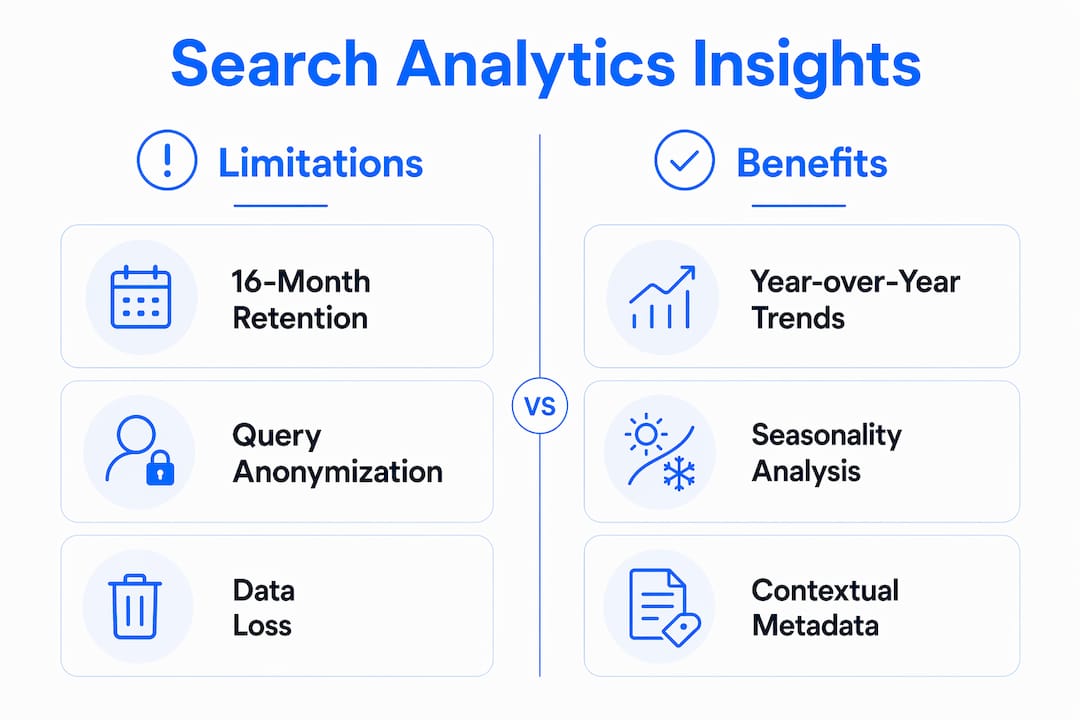
Query anonymization compounds the problem. Average query data anonymization sits at 46.77% for many sites, with high-volume properties seeing up to 80% of queries hidden. That means nearly half of your query-level data is invisible by default. You cannot build a reliable historical picture from a dataset that is structurally incomplete.
| Capability | Native GSC | External archive (e.g., BigQuery) |
|---|---|---|
| Data retention | 16 months maximum | Unlimited from setup date |
| Query visibility | 46–80% anonymized | Full row-level export |
| Row limit per report | 1,000 rows | Up to 50,000+ rows |
| Historical backfill | Not available | Not available |
| Year-over-year comparison | Limited to 16 months | Multi-year once archive matures |
The row limit is a separate issue. GSC’s standard interface caps reports at 1,000 rows. For any site with broad keyword coverage, that cap hides the long tail entirely.
- Start archiving immediately. Every day you delay creates a permanent gap.
- Use automated API scripts to pull GSC performance data daily into a warehouse like BigQuery.
- Normalize your data using rolling averages rather than raw daily numbers to reduce noise from GSC’s freshness lag.
- Document every extraction with date stamps and metadata so future analysts understand what the data represents.
Pro Tip: Set up your BigQuery export and a daily API script on the same day. Running both in parallel gives you a redundant archive and catches any export gaps caused by API rate limits or credential issues.
How does historical data enable trend detection and seasonality analysis?
Long-term archived data gives you the ability to separate signal from noise in search performance. This is the most direct answer to why historical data matters for working SEO professionals.
Year-over-year comparison is the clearest application. When you compare october 2026 to october 2025 and october 2024, you build a pattern. Deviations from that pattern are worth investigating. Deviations that match the pattern are expected behavior. Without the archive, every fluctuation looks like a potential crisis.
Seasonality analysis works the same way. Incorrectly interpreting seasonal patterns without historical reference leads to unnecessary SEO panic or false confidence. A travel site that loses 30% of its traffic every january is not in trouble. A travel site that loses 30% in july probably is. Only multi-year data tells you which situation you are in.
Google core update impacts are another area where historical context is indispensable. A single update cycle tells you very little. Tracking site performance across three or four update cycles reveals whether your site consistently recovers, consistently loses ground, or holds steady. That pattern informs content and technical decisions far more reliably than any single data point.
Predictive analytics also depends on historical depth. Effective AI and machine learning models rely on historical context as foundational training data. Static recent snapshots produce unstable predictions. The more historical depth you feed into a forecasting model, the more reliable its output becomes.
- Identify recurring seasonal peaks and troughs by month across at least two prior years.
- Flag Google core update dates in your archive to isolate algorithm-driven changes from content-driven ones.
- Use rolling 28-day averages instead of daily snapshots to smooth GSC freshness lag.
- Build year-over-year dashboards that surface percentage change rather than absolute numbers.
Pro Tip: When you see a sudden spike or drop, check your archive for the same two-week window in prior years before drawing any conclusions. Most “anomalies” are patterns you had not yet documented.
How does query context enrich historical search analytics?
Query context is the set of signals surrounding a search query: the user’s prior searches, their location, their device, and the content they engaged with before and after clicking. Session context is the behavioral data from a single browsing session, including pages visited, time on page, and exit behavior. Both become far more useful when analyzed against historical baselines.
Pairing historical GSC data with engagement metrics from Google Analytics 4 reveals patterns that neither platform surfaces alone. Combining query and session context reveals intent cannibalization and content engagement patterns that directly affect SEO outcomes. For example, two pages ranking for overlapping queries might both show decent CTR in GSC, but session data reveals that one page drives 80% of conversions while the other drives bounces. Historical session data shows when that split began, which points to the content change or ranking shift that caused it.
Combining macro topic-level and micro query-level context allows search engines to refine relevance and improve personalized rankings. For SEO professionals, mirroring that approach in your own analysis means tracking how user intent for a given query cluster has shifted over time, not just what the current rankings look like.
Practical methods for integrating these data streams include:
- Link GSC query data to GA4 landing page reports using the page URL as the join key.
- Track engagement rate and session duration by landing page over time to detect content decay.
- Use historical session data to identify when a page’s audience intent shifted, which often precedes a ranking change.
- Monitor audience search behavior patterns across quarters to catch gradual intent drift before it affects rankings.
What are the best practices for building a historical search analytics archive?
The single most important rule in historical data management is to start today. A late start creates irrevocable gaps, because no retroactive backfill exists for GSC data older than 16 months before your archive setup date.
Extraction and storage
Automated daily API extraction scripts pull GSC performance data into independent warehouses, enabling year-over-year comparisons that are not possible natively. BigQuery is the most common destination because it integrates directly with GSC’s native export and scales without row limits. Structured data warehouses with defined schemas work equally well if your team already manages one.
Data normalization
GSC’s newest numbers are provisional and subject to adjustment over several days. Analysts who compare yesterday’s data to last week’s data are comparing a draft to a final. Use multi-week rolling averages to filter out this noise. Normalization also means accounting for query anonymization: treat your query-level data as a sample, not a census, and focus on directional trends rather than absolute counts.
Metadata and documentation
Every data pull should carry a date stamp, the GSC property it came from, the filter settings used, and any known anomalies for that period. This metadata is what transforms a raw archive into a living knowledge base that future analysts can actually use. Without it, you have numbers with no story.
Pro Tip: Log every significant site event, including content updates, technical changes, and Google core update dates, directly in your archive as a metadata field. This context is what separates a useful historical record from a spreadsheet of unexplained numbers. Serpview’s custom annotations feature does this automatically within your search analytics dashboard.
For teams evaluating storage and extraction options, the key criteria are row capacity, query-level granularity, and the ability to join external data sources. Platforms that cap rows or aggregate data before storage limit the depth of analysis you can perform later. Serpview’s extended storage capability addresses this by retaining multi-year data without the row restrictions native to GSC.
Key Takeaways
Historical context transforms search analytics from a reporting function into a strategic decision-making tool, and the time to build that archive is before you need it.
| Point | Details |
|---|---|
| GSC retention is finite | The 16-month window deletes data permanently; external archiving must start immediately. |
| Query data is incomplete by default | Average anonymization of 46.77% means query-level analysis requires normalization, not raw counts. |
| Seasonality requires multi-year baselines | Year-over-year comparison is the only reliable way to separate expected patterns from true anomalies. |
| Session context enriches query data | Pairing GSC with GA4 reveals intent cannibalization and content decay that neither platform shows alone. |
| Metadata preserves meaning | Date stamps, event logs, and filter records turn raw numbers into an institutional knowledge base. |
The competitive edge most SEO teams are leaving on the table
I have worked with SEO teams that had years of ranking data but could not answer a basic question: “Did we recover from the last core update?” The data existed, but it lived in disconnected exports with no event annotations, no normalization, and no consistent schema. The archive was technically there. It was practically useless.
The teams that get the most from historical search data are not necessarily the ones with the most sophisticated tools. They are the ones who treat their archive as a living record rather than a backup. They log site changes. They annotate algorithm updates. They build dashboards that surface year-over-year comparisons by default, not as a special request.
The search landscape is also shifting in ways that make historical context more valuable, not less. AI-driven ranking systems increasingly factor in long-term engagement signals and historical context in AI training data to produce stable outputs. If the algorithms themselves rely on temporal depth, your analytics should too.
My honest advice: do not wait until you need a multi-year trend analysis to realize you never built the archive. The cost of starting today is a few hours of setup. The cost of starting two years from now is two years of missing data you can never recover.
— Utsav Chopra
How Serpview extends your search analytics beyond GSC limits
Serpview is built for SEO professionals who have hit the ceiling of what native GSC reporting can deliver. Its extended data storage retains multi-year search performance data without the 16-month cutoff, giving you the longitudinal view that strategic analysis requires.

The custom annotations feature lets you log site changes, algorithm updates, and campaign launches directly on your performance timeline. That context is what makes historical data interpretable rather than just archived. Serpview also surfaces up to 50,000 rows per report, removing the 1,000-row cap that hides long-tail keyword performance in standard GSC exports. For teams ready to move from reactive reporting to long-term search strategy, Serpview provides the data depth to make that shift.
FAQ
What is historical context in search analytics?
Historical context in search analytics is the practice of comparing current search performance data against archived data from prior months or years. It enables trend detection, seasonality analysis, and algorithm impact measurement that point-in-time data cannot support.
Why does Google Search Console limit data to 16 months?
GSC applies a 16-month sliding retention window as a platform constraint, and data beyond that threshold is permanently deleted with no backfill option. SEO professionals must use external archiving tools like BigQuery or platforms like Serpview to retain data beyond this limit.
How does historical data help with seasonality analysis?
Multi-year archives let analysts compare current traffic to the same calendar period in prior years, which is the only reliable method for distinguishing expected seasonal patterns from genuine ranking losses or gains.
What is the difference between query context and session context?
Query context refers to the signals surrounding a specific search query, including prior searches and device type. Session context is the behavioral data from a single browsing session, such as pages visited and time on page. Combining both with historical GSC data reveals intent shifts and content decay patterns over time.
How do I start building a historical search analytics archive?
Activate GSC’s BigQuery export immediately and set up a daily API extraction script to pull performance data into a structured warehouse. Document every pull with date stamps, property details, and event annotations to preserve the context that makes the data useful for future analysis.
Recommended
Ready to unlock your full GSC potential?
SERPView helps you access all your Google Search Console data without limitations. Start your free trial today.
Get Started Free