
50,000 Row Export Reveals Your Branded vs Non Branded Split for SEOs
SERPView Team
SEO Analytics
Branded keywords contain your business name and convert at low cost because searchers already know you. Non-branded keywords describe problems or products without naming a brand, and they drive discovery among people who don’t know you exist yet. You need both. Defend and measure your branded terms closely, then invest in non-branded search to grow the pool of people who eventually search for you by name.
TL;DR:
- Branded keyword performance is typically 2 to 5 times higher in conversion rates than non-branded, due to lower competition and higher intent.
- Google Search Console’s new AI-based branded query filter improves classification accuracy over regex lists, especially for typos and voice searches.
- Startups should prioritize non-branded search with at least two-thirds of spend, while mature brands focus more on branded keywords but must maintain non-branded channels.
- Separating campaigns and landing pages by intent helps prevent budget leaks and optimizes for user expectations accordingly.
- Using cross-property exports of up to 50,000 rows reveals a fuller picture of long-tail non-branded queries and scattered brand mentions overlooked by standard reports.
Table of Contents
- Branded vs Non-Branded Keywords: Definitions and Examples
- Why the Difference in Keyword Types Matters for Revenue
- How to Measure Branded vs Non-Branded Traffic
- Balancing Budget Between Branded and Non-Branded Keywords
- Tactical Steps for Structuring Branded and Non-Branded Keywords
- A Serpview Workflow for Branded vs Non-Branded Analysis
- Why Discovery Deserves More Patience Than It Gets
- See Your Full Branded vs Non-Branded Split with Serpview
- Sources
- FAQ
Branded vs Non-Branded Keywords: Definitions and Examples
A branded keyword contains your brand, business, or product name, or a close variation of it, according to DreamHost’s glossary definition. Branded queries almost always signal prior awareness. The searcher already knows you and wants to navigate to you, check pricing, get support, or buy.
Branded terms break into three practical buckets:
- Pure brand: just the name, like “Serpview” or “Nike.”
- Brand plus modifier: “Serpview login,” “Nike returns,” “Serpview pricing.”
- Brand plus product: “Serpview keyword tracking,” “Nike Air Max 90.”
Non-branded keywords describe a need without naming a company. They split into head terms (“SEO analytics tool”) and long-tail variations (“how to track branded vs non-branded traffic in GA4”). Head terms carry volume and competition; long-tail terms carry sharper intent and less competition.
Two edge cases trip people up. Generic brand names that double as common words (think “Delta” or “Apple”) pollute branded reports unless you filter carefully. And competitor-brand queries, someone searching a rival’s name, are technically “branded” but belong in a separate competitive intelligence bucket, not your own brand tracking.
Why the Difference in Keyword Types Matters for Revenue
Branded searches are navigational or transactional. The person already decided you’re a candidate, and they’re either finding you or ready to buy. Non-branded searches are discovery-stage. The person is comparing options or just learning the vocabulary of their problem, which puts them earlier in the funnel and more expensive to convert.
That intent gap shows up directly in performance numbers.
Branded keyword performance in one line: Industry summaries commonly cite 2 to 5 times higher conversion rates for branded terms compared with non-branded queries, alongside materially lower cost-per-click, though the exact multiple varies by industry and competitive set.
The reasons are structural, not magic:
- Branded clicks skip most of the consideration phase, so conversion rate climbs.
- Lower competition on your own name keeps CPC down and Quality Score high in paid search.
- Non-branded terms fight for attention against every competitor bidding the same category words, which pushes CPC up and conversion down.
- Organic branded rankings are close to guaranteed for an established business, while organic non-branded rankings require sustained content and authority work.
Treat the two differently in reporting. A branded keyword underperforming its historical conversion rate is a red flag (site issue, reputation problem, new competitor bidding your name). A non-branded keyword converting below the branded rate is expected, not a failure.
How to Measure Branded vs Non-Branded Traffic
Manual regex lists have been the default way to split branded from non-branded data for years, and they miss a lot: typos, partial brand mentions, and product names unique to your domain that a generic pattern won’t catch. Google addressed that gap directly.
- Use Search Console’s branded queries filter. Google’s newer branded queries filter in Search Console applies AI-assisted classification to separate branded from non-branded queries automatically, including misspellings and product mentions a regex list would never catch.
- Layer GA4 segments on top. Build a segment for sessions landing from branded organic queries and a separate one for non-branded, so conversion rate and revenue per session are visible side by side rather than blended into one average.
- Split paid campaigns at the account level. Run branded and non-branded in separate campaigns with separate budgets. Blending them hides the CPC gap and makes optimization guesswork.
- Track five metrics consistently: impressions, clicks, CTR, conversion rate, and CPC (paid) or organic position (SEO), for each bucket, every reporting cycle.
- Export across properties before drawing conclusions. A single-domain view in Search Console misses brand mentions that show up on subdomains, regional sites, or app store listings, which creates blind spots in your cross-domain keyword analysis.
Pro Tip: Run the new Search Console filter alongside your old regex list for one full month before retiring the regex. You’ll likely find brand variations, especially typos and voice-search phrasing, that the manual list never caught.
Balancing Budget Between Branded and Non-Branded Keywords
There’s no single correct split, but there are reasonable starting points by company stage. A useful benchmark range puts non-branded discovery spend at roughly one-third to two-thirds of the keyword program, with branded making up the remainder depending on how mature the brand already is, per industry guidance on branded vs non-branded splits. A business with the vast majority of its traffic and spend concentrated in branded terms is usually underinvesting in discovery, not winning at branding.
- Startups and new brands: lean heavily non-branded, often the majority of spend, because there isn’t enough branded search volume yet to matter.
- Growth-stage companies: aim closer to an even split as branded search volume climbs alongside paid and content investment.
- Established brands: branded search often carries a larger share of total volume naturally, but non-branded spend should stay active to keep feeding the pipeline, since non-branded search fuels future branded demand.
Defend branded terms in paid search whenever a competitor bids on your name or your branded organic position is unstable. Pause or reduce brand bids only when you rank first organically with a strong click share and no competitor bidding activity. Reallocate budget when conversion rate on non-branded terms climbs close to branded levels, when branded traffic share drops unexpectedly, or when customer acquisition cost on one bucket drifts significantly from the other.
Tactical Steps for Structuring Branded and Non-Branded Keywords
Getting the split right on paper doesn’t help if the account structure and content don’t reflect it.
- Separate campaigns and ad groups by intent, never by convenience. One branded campaign, one or more non-branded campaigns grouped by topic cluster.
- Add competitor and generic-term negatives to branded campaigns so budget doesn’t leak into ambiguous matches.
- Match landing pages to intent. Branded queries should land on homepage, pricing, or product pages built for people ready to act. Non-branded queries should land on educational or comparison content that answers the specific question asked.
- Audit keyword lists quarterly for keyword stuffing risk and cannibalization between branded and non-branded pages targeting the same terms.
- Build a standing dashboard that alerts you when branded click share drops, CPC spikes on either bucket, or a non-branded page starts ranking for its own brand-adjacent terms.
A Serpview Workflow for Branded vs Non-Branded Analysis
Standard Search Console exports cap out at 1,000 rows, which hides long-tail non-branded queries and scattered brand mentions across subdomains, exactly the kind of common search data blind spot that skews a branded vs non-branded split.
- Pull up to 50,000 rows across every property in one export to catch brand mentions and long-tail discovery terms a capped view would miss.
- Use device and country segmentation to see whether branded search behaves differently on mobile versus desktop.
- Layer content decay heatmaps over non-branded pages to catch discovery content losing ground before it drags down your overall split.
Pro Tip: Start any branded vs non-branded audit by exporting a full year of query data across all connected properties first, then layer in Search Console’s branded filter. Establishing the baseline before filtering keeps you from misjudging what “normal” branded share looks like for your site.
Why Discovery Deserves More Patience Than It Gets
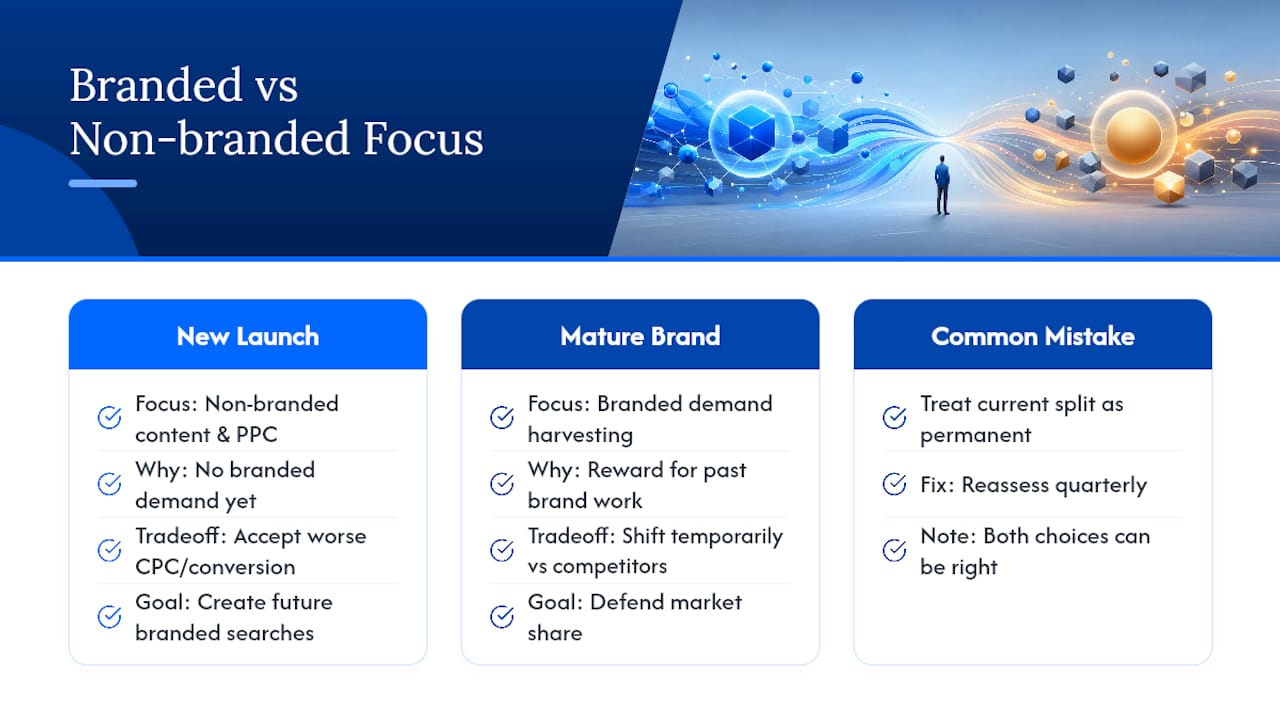
Most teams overweight branded performance because the numbers look better on a monthly report. That’s a short-term read. Branded conversion rates reward work you already did, brand building, product quality, word of mouth, not work you’re doing right now. Non-branded search is where the next quarter’s branded searches get created.
A company launching a new product category should lean hard into non-branded content and PPC, even at a worse CPC and conversion rate, because there’s no branded demand yet to harvest. A mature brand defending market share against aggressive competitor bidding should shift the opposite direction temporarily. The mistake isn’t picking one; it’s treating the current split as permanent instead of a signal to reread quarterly.
— Utsav Chopra
See Your Full Branded vs Non-Branded Split with Serpview
Most SEO teams discover their branded vs non-branded split is wrong only after Search Console’s 1,000 row cap has already hidden half the picture. Serpview is built around that exact gap: it consolidates Google Search Console data across every property you manage into one export of up to 50,000 rows, so long-tail non-branded queries and scattered brand mentions stop disappearing from your reports.

You get branded query tracking, device and country segmentation, and pre-built dashboards that separate branded and non-branded performance without manual regex work. Agencies managing multiple client accounts can pull a shared dashboard with white-label reporting instead of rebuilding the same split by hand for every client. Start a Serpview workspace and run your first cross-property branded vs non-branded export today.
Sources
Google’s own branded queries filter announcement is the primary source for how the classification works. DreamHost’s branded keyword glossary entry covers definitions in more depth. For SaaS-specific keyword strategy, Baby Love Growth’s guide to SaaS SEO is worth a read.
- Introducing the branded queries filter in Search Console | Google Search Central Blog
- What Is a Branded Keyword? - DreamHost Glossary
- Branded Keywords: Definition, Examples & 2026 SEO Playbook | theStacc Glossary
- Understanding Brand vs Nonbrand Keywords
FAQ
What is the difference between a branded keyword and a non-branded keyword?
A branded keyword contains your brand, business, or product name, signaling that the searcher already knows you. A non-branded keyword describes a need or category without naming any brand, signaling discovery-stage intent.
What is the difference between branded and non-branded search overall?
Branded search tends to be navigational or transactional, with searchers ready to visit, buy, or get support. Non-branded search is exploratory, with searchers still comparing options or learning what solutions exist.
What are branded keywords, exactly?
Branded keywords include your exact brand name, common misspellings, or your name paired with a product or modifier, such as “Serpview pricing” or “Serpview login.”
How do I tell branded and non-branded traffic apart in my reports?
Use Google Search Console’s branded queries filter for AI-assisted classification, then layer GA4 segments and separate paid campaigns so each bucket’s conversion rate and CPC stay visible on their own.
Should I spend more on branded or non-branded keywords?
It depends on your stage. Newer brands should lean toward non-branded discovery spend, often 70 percent or more, while established brands can shift more toward branded defense while keeping non-branded investment active to feed future demand.
Recommended
Ready to unlock your full GSC potential?
SERPView helps you access all your Google Search Console data without limitations. Start your free trial today.
Get Started Free